Animate this exact backstage view in one continuous shot. The elderly shadow-puppet artisan slowly raises the bamboo control rods, lifting the one leather bird puppet upward behind the translucent screen. As its hinged wings open, the shadow on the screen rises and spreads into the matching full bird silhouette. Preserve the artisan face and hands, bamboo rod connections, puppet design and warm lamp position. Slow deliberate movement with physically corresponding puppet and shadow, very gentle lateral camera drift, no cuts or additional characters.
Hailuo 02 Pro Image to Video API
minimax/hailuo-02/pro/image-to-videoHailuo 02 Pro Image to Video 将静态首帧图像与提示词转化为具备电影级动态张力的 512P 与 768P 视频成片,支持大幅度肢体动作演绎、全分辨率尾帧定向过渡与光影追踪。它能够深度保留输入图片的角色五官、服饰材质与空间透视,同时赋予画面极富视觉冲击力的物理交互与运镜调度。
485
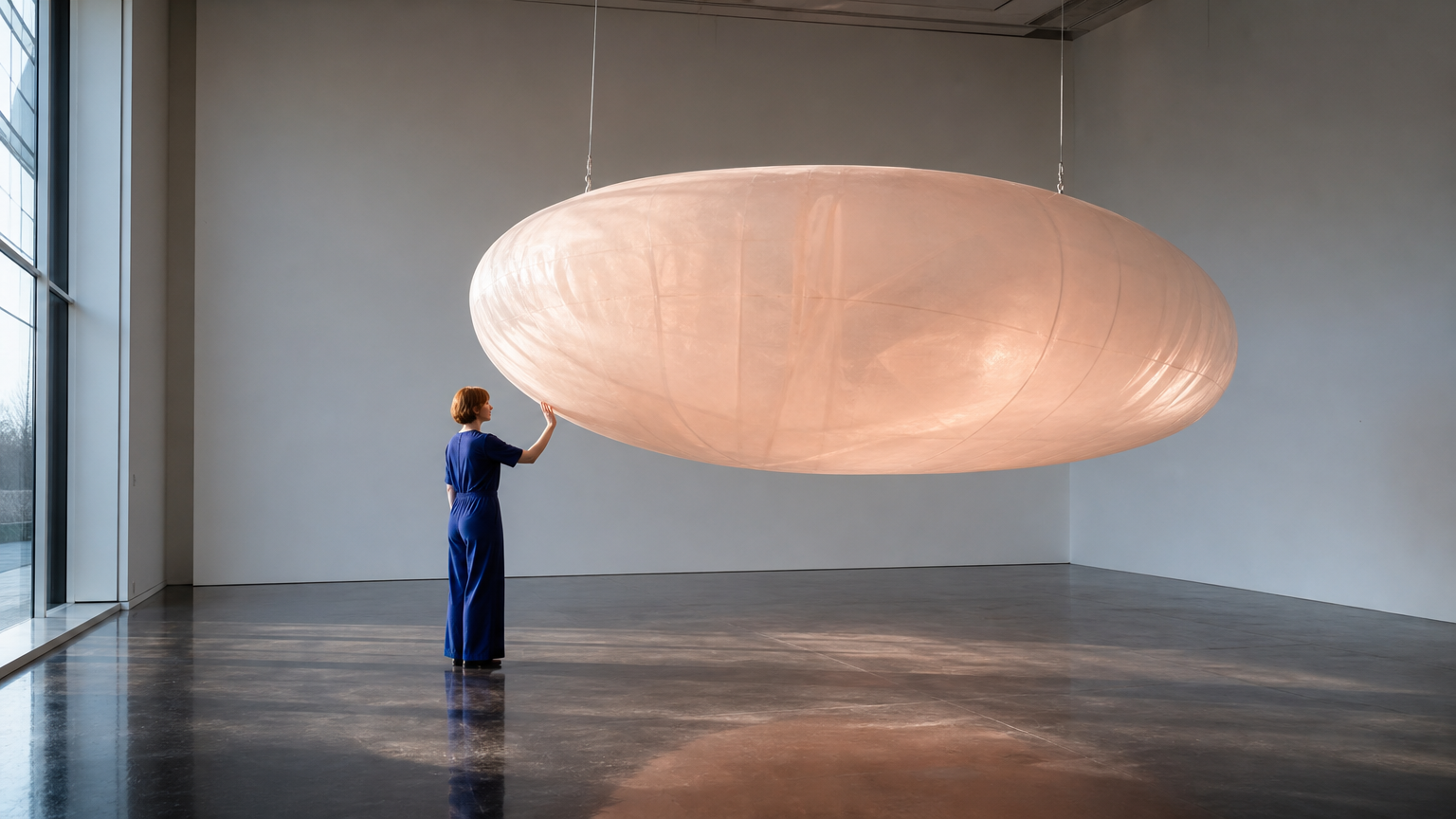
必填,一张 JPG、PNG 或 WebP 图片,上传不超过 10 MiB。
可选,上传格式及大小限制同首帧。
输出已就绪
示例
REST API 规格
快速开始
提交端点请求并查询任务状态。请将示例素材 URL 替换为可访问的真实文件。
01
第一步:配置 API 鉴权
在控制台申请 API Key,并在每个 HTTP 请求头中携带 Authorization: Bearer <API_KEY> 进行身份验证。
- 任务提交端点
- POST
https://api.vidgo.ai/api/generate/submit - 鉴权请求头
- Authorization: Bearer VIDGO_API_KEY
02
第 2 步:提交生成任务
POST /api/generate/submit。model 和可选 callback_url 位于根级,生成参数位于 input 内。
提交请求载荷
REQUEST_BODY=$(cat <<'JSON'
{
  "model": "minimax/hailuo-02/pro/image-to-video",
  "input": {
    "prompt": "Continue the same wide shot. The adult visitor gently presses the translucent inflated sculpture once with an open palm, creating a shallow indentation. They release their hand and take one small step back. The suspended form slowly swings away and returns once while its soft surface relaxes. Keep the person, suspension cables, gallery architecture and artwork unchanged. Convincing elastic deformation, soft inertia, subtle moving transmitted light, locked camera, no cuts, no text.",
    "prompt_optimizer": false,
    "image_urls": [
      "https://cdn.vidgo.ai/apis/models/minimax/hailuo-02/pro/image-to-video/v1/02/start.png"
    ]
  }
}
JSON
)

RESPONSE=$(curl --silent --show-error --fail-with-body \
  --request POST \
  --url "https://api.vidgo.ai/api/generate/submit" \
  --header "Authorization: Bearer $VIDGO_API_KEY" \
  --header "Content-Type: application/json" \
  --data "$REQUEST_BODY")

CODE=$(printf '%s' "$RESPONSE" | jq -r '.code // empty')
if [ "$CODE" != "0" ] && [ "$CODE" != "200" ]; then
  printf 'API error: %s
' "$RESPONSE" >&2
  exit 1
fi
printf '%s
' "$RESPONSE"
03
第三步:轮询任务执行结果
使用 task_id 查询进度;not_started 或 running 时继续轮询,finished 或 failed 时停止。成功后读取 data.files[].file_url,失败时读取 data.error_message。
状态查询端点
GET https://api.vidgo.ai/api/generate/status/{task_id}使用 task_id 查询进度;not_started 或 running 时继续轮询,finished 或 failed 时停止。成功后读取 data.files[].file_url,失败时读取 data.error_message。
not_startedrunningfinishedfailed提交响应结果
{
  "code": 200,
  "data": {
    "task_id": "ZD6N3KPN7QHVOFCQ",
    "status": "running",
    "created_time": "2026-09-22T16:05:39"
  }
}
完成响应数据
{
  "code": 200,
  "data": {
    "task_id": "task-unified-...",
    "status": "finished",
    "files": [
      {
        "file_url": "https://storage.vidgo.ai/generated/video.mp4",
        "file_type": "video"
      }
    ],
    "created_time": "2026-08-22T10:00:00Z",
    "progress": 100,
    "error_message": null
  }
}
端到端完整脚本示例
展开查看在生产环境中具备轮询重试、异常保护和超时处理的完整自动化脚本。
端到端完整脚本示例
set -euo pipefail
: "${VIDGO_API_KEY:?Set VIDGO_API_KEY in your environment}"

REQUEST_BODY=$(cat <<'JSON'
{
  "model": "minimax/hailuo-02/pro/image-to-video",
  "input": {
    "prompt": "Continue the same wide shot. The adult visitor gently presses the translucent inflated sculpture once with an open palm, creating a shallow indentation. They release their hand and take one small step back. The suspended form slowly swings away and returns once while its soft surface relaxes. Keep the person, suspension cables, gallery architecture and artwork unchanged. Convincing elastic deformation, soft inertia, subtle moving transmitted light, locked camera, no cuts, no text.",
    "prompt_optimizer": false,
    "image_urls": [
      "https://cdn.vidgo.ai/apis/models/minimax/hailuo-02/pro/image-to-video/v1/02/start.png"
    ]
  }
}
JSON
)

SUBMIT_RESPONSE=$(curl --silent --show-error --fail-with-body \
  --request POST \
  --url "https://api.vidgo.ai/api/generate/submit" \
  --header "Authorization: Bearer $VIDGO_API_KEY" \
  --header "Content-Type: application/json" \
  --data "$REQUEST_BODY")

TASK_ID=$(printf '%s' "$SUBMIT_RESPONSE" | jq -r '.data.task_id // .task_id // empty')
BUSINESS_CODE=$(printf '%s' "$SUBMIT_RESPONSE" | jq -r '.code // empty')
if [ "$BUSINESS_CODE" != "0" ] && [ "$BUSINESS_CODE" != "200" ]; then
  printf 'Submit failed:
%s
' "$SUBMIT_RESPONSE" >&2
  exit 1
fi
if [ -z "$TASK_ID" ]; then
  printf 'Submit response did not include task_id:
%s
' "$SUBMIT_RESPONSE" >&2
  exit 1
fi

START_TIME=$(date +%s)
POLL_DELAY=2
while true; do
  if [ $(( $(date +%s) - START_TIME )) -ge 600 ]; then
    printf 'Timed out after 600 seconds
' >&2
    exit 1
  fi
  STATUS_RESPONSE=$(curl --silent --show-error --fail-with-body \
    --url "https://api.vidgo.ai/api/generate/status/$TASK_ID" \
    --header "Authorization: Bearer $VIDGO_API_KEY")
  STATUS=$(printf '%s' "$STATUS_RESPONSE" | jq -r '.data.status // .status // empty')
  BUSINESS_CODE=$(printf '%s' "$STATUS_RESPONSE" | jq -r '.code // empty')
  if [ "$BUSINESS_CODE" != "0" ] && [ "$BUSINESS_CODE" != "200" ]; then
    printf 'Status request failed:
%s
' "$STATUS_RESPONSE" >&2
    exit 1
  fi

  case "$STATUS" in
    finished)
      printf '%s' "$STATUS_RESPONSE" | jq -r '(.data.files // .files // [])[]?.file_url'
      break
      ;;
    failed)
      printf '%s' "$STATUS_RESPONSE" | jq -r '.data.error_message // .error_message // "Generation failed"' >&2
      exit 1
      ;;
    not_started|running)
      sleep "$POLL_DELAY"
      if [ "$POLL_DELAY" -lt 10 ]; then POLL_DELAY=$((POLL_DELAY + 1)); fi
      ;;
    *)
      printf 'Unexpected task status: %s
' "$STATUS" >&2
      exit 1
      ;;
  esac
done
请求参数(input 对象)
向 /api/generate/submit 提交 POST 请求时,input 内部所支持的生成参数配置:
| 字段 | 类型 | 必填 | 默认值 | 描述 |
|---|---|---|---|---|
| prompt | string | 是 | — | 必填字符串,去除首尾空白后不能为空。当前上游实现未设置显式长度上限。 |
| resolution | string | 否 | 768P | 512P 或 768P,默认 768P。 |
| image_urls | array | 是 | — | 必须包含且仅包含一个首帧图片 HTTP(S) URL。 |
| end_image_url | string | 否 | — | 可选尾帧图片 HTTP(S) URL,必须同时提供首帧。当前上游实现支持两种分辨率。 |
| prompt_optimizer | boolean | 否 | — | 可选布尔值;省略时由上游处理,体验区默认关闭。 |
响应字段(查询结果)
通过 GET /api/generate/status/{task_id} 轮询获取的任务详情:
| 字段 | 类型 | 描述 |
|---|---|---|
| code | integer | 业务响应状态码,200 表示成功。 |
| data.task_id | string | 异步任务全局唯一流水号。 |
| data.status | string | 任务执行阶段:not_started(排队中)、running(生成中)、finished(已完成)、failed(失败)。 |
| data.files | array | 生成成功时包含的成片文件列表,每项含 file_url 与 file_type。 |
| data.error_message | string | null | 任务执行异常时的具体错误描述。 |
任务生命周期
客户端应根据 status 字段判断任务进度,达到 finished 或 failed 终态时立即终止轮询:
not_started任务已接收,等待执行。
running正在生成。
finished生成完成,从 data.files 获取视频 URL。
failed生成失败,请查看 data.error_message,已扣积分按现有流程返还。
轮询与异常处理
- 轮询频次推荐建议初始轮询间隔设为 2–3 秒,随着任务持续可递增至 5 秒一次,避免过密请求。
- 网络波动与重试若查询网络出现 5xx 或连接超时,不代表任务失败,可稍作休眠后继续重试查询。
- 异步 Webhook 回调支持在提交请求体根层级传递 callback_url,在任务终态时系统将通过 POST 自动推送完整任务结果。
接口规格
| 规格项 | 取值 | 说明 |
|---|---|---|
| Model ID | minimax/hailuo-02/pro/image-to-video | 请求根级 model 字段。 |
| 分辨率 | 512P / 768P | 512P 或 768P,默认 768P。 |
| 时长 | — | 不接受 duration 参数。 |
Hailuo 02 Pro Image to Video
Hailuo 02 Pro Image to Video 是 MiniMax 推出的旗舰级静态图像动画生成模型,专为高端商业视效与复杂影视分镜设计。用户仅需上传一张主体明确的起始图片并输入动态指令,即可生成光影细腻、动作张力充沛的高清动态成片;模型在 512P 与 768P 下均全面支持可选尾帧控制,能够自如实现首尾静止画面的平滑插值与平稳运镜过渡。采用固定单次按次计费(65 积分),是专业创作者打造高质量动态视觉资产的理想工具。
为什么选择此模式?
电影级高动态运动表现极大拓展了角色动作与物理变形的极限,在大幅度回眸、疾跑、跳跃等复杂运动中依然保持结构稳定。
全分辨率尾帧自由过渡无论是 512P 还是 768P 规格,均原生支持指定结束画面,实现首尾两张画面的无缝动态衔接。
严谨的角色与光影一致性深度锁存首帧人物五官神态、发丝质感与光影走向,在复杂运镜下角色特征不漂移、不畸变。
容纳详尽专业分镜提示词接口无显式字数硬上限,可详尽描写光影随时间的演进、空气中的微粒动态及摄影机运动路线。
统一明确的按次计费模式每次成功交付固定扣除 65 积分($0.325),计费与分辨率及动作复杂度脱钩,成本清晰透明。
参数说明
| 参数 | 要求 | 说明 |
|---|---|---|
| prompt | 必填 | 必填字符串,去除首尾空白后不能为空。当前上游实现未设置显式长度上限。 |
| resolution | 可选 | 512P 或 768P,默认 768P。 默认值 768P |
| image_urls | 必填 | 必须包含且仅包含一个首帧图片 HTTP(S) URL。 |
| end_image_url | 可选 | 可选尾帧图片 HTTP(S) URL,必须同时提供首帧。当前上游实现支持两种分辨率。 |
| prompt_optimizer | 可选 | 可选布尔值;省略时由上游处理,体验区默认关闭。 |
使用方法
上传高画质首帧图片提供一张主体轮廓清晰的 JPG、PNG 或 WebP 图片作为起点(体验区单张限制在 10 MiB 内)。
按需指定目标尾帧若需要镜头精确过渡至特定终点,可在 end_image_url 中指定尾帧图片(512P 与 768P 均支持)。
编写细腻动态提示词详尽描述人物动作的时序发生过程、肢体幅度变化以及摄影机的具体推拉平移轨迹。
确认不传 duration 参数Pro 模式为固定单次交付机制,请求体内无需且严禁包含 duration 参数。
提交任务并查收成片发起异步生成请求并获得 task_id,通过状态查询或 Webhook 回调下载最终的高清 MP4 视频。
计费说明
1 credit = $0.005。Pro 按次计费,不接受 duration 参数。
| 计费项 | 费率 | 说明 |
|---|---|---|
| 512P | 65 credits ($0.325) | 每次生成 |
| 768P | 65 credits ($0.325) | 每次生成 |
适用场景
电影与动画高燃分镜预演将关键帧概念图转化为极具张力与运动冲击力的高清动态样片,加速视觉导演决策。
游戏 CG 与角色立绘高级动态化让静态精细立绘生动演绎攻击、拔刀、施法等大幅度招式动作,保持面容稳定。
品牌商业广告关键帧转场利用首尾两张品牌静帧素材制作流畅平滑的推拉运镜转场广告短片。
艺术摄影与视觉艺术深度创作为先锋摄影作品注入光影变幻与粒子烟雾动态,创作震撼的动态视觉艺术品。
创作技巧
- 首尾帧构图透视协同:当配置尾帧时,两张图片的景深透视与画幅比例越一致,中间生成的运镜过程越自然平稳。
- 优先选择 768P 高清输出:由于 512P 与 768P 单次扣除积分完全一致(均为 65 积分),推荐直接使用 768P 享受最佳成片质感。
- 提示词重点交代动作动词:首帧已确定的静态背景无需反复描述,把提示词篇幅留给运动幅度、肢体变化与镜头机位调度。
- 描述环境辅助物理反应:在提示词中加入对发丝飘动、水滴飞溅或烟雾缭绕的描写,能最大限度激发 Pro 模式的物理模拟能力。
- 体验区与 API 保持无 duration 规范:在编写代码或配置工作流时,切勿向 Pro 端点传递 duration 参数,避免请求被拦截。
注意事项
- 首帧必填与上传规格:必须包含且仅包含 1 个公开首帧图片 URL(image_urls),前端体验区支持单张图片大小上限 10 MiB。
- 尾帧全分辨率支持:可选尾帧 end_image_url 在 512P 与 768P 两种分辨率下均受支持,必须在提供首帧的前提下使用。
- 单次固定计费与时长:Pro 模式为固定单次任务交付,不接受 duration 参数;单次生成固定扣除 65 积分,失败自动全额退款。
相关模型














Hailuo 02 Pro Image to Video API 常见问题
Hailuo 02 Pro Image to Video API 是什么?
Hailuo 02 Pro Image to Video 是 MiniMax 研发的专业级图像生成视频模型。它根据单张起始图片与文本提示词生成具备电影级高动态张力的 512P 或 768P 视频成片,支持大幅度物理运动模拟、全分辨率尾帧定向过渡与长篇提示词描述。基于 MiniMax 旗舰级视频生成架构,它在深度保持输入图片主体面貌与场景构图的同时,赋予画面极富冲击力的镜头运镜与真实物理碰撞。你可以通过 API 进行程序化调用,也可以在上方体验区直接在线试用。
Hailuo 02 Pro Image to Video 在 512P 下支持尾帧吗?
支持。与 Standard 模式不同,Pro 模式在 512P 与 768P 两种分辨率下均全面支持传入 end_image_url 尾帧图片,为创作者提供更大的构图与输出灵活性。
Hailuo 02 Pro Image to Video 如何处理大幅度动态动作?
Pro 模式针对大幅度肢体运动、快速视角转换以及复杂物理交互进行了算法强化。在处理回眸、跳跃、挥手等剧烈运动时,能够连贯解算人体骨骼形变与衣物布料动态,避免画面断裂或主体失真。
Hailuo 02 Pro Image to Video 单次生成需要多少积分?
单次成功生成固定扣除 65 积分($0.325)。无论选择 512P 还是 768P 分辨率,无论是否使用尾帧,均享受统一的按次价格,若任务异常失败会自动全额退回积分。
Hailuo 02 Pro Image to Video 需要设置 duration 时长吗?
不需要,且请求中严禁包含 duration 参数。Pro 模式采用固定单次交付机制,在提交数据中传递 duration 字段会被接口校验拒绝。
Hailuo 02 Pro Image to Video 如何在剧烈运动中保持角色特征?
模型通过深度特征编码锁存起始图片的五官比例、发型质感与衣着风格,并在时序去噪中持续对齐参考特征。建议提示词集中指导动作轨迹与镜头调度,避免对主体特征给出冲突描写。
创作者什么时候应该选择 Pro 图生视频而非 Standard 模式?
当任务需要大幅度动作张力、影视级复杂布光演变、或在 512P 下也必须使用尾帧定向转场时,推荐选用 Pro 模式;若需要精确的 6/10 秒时长控制或在大规模生成中按秒控制预算,建议选用 Standard 模式。