Animate the exact handmade paper theater. The little green paper dragon slowly unfolds both accordion-paper wings, holds them open and tilts its rounded head with curiosity. Keep all four feet planted, the silhouette intact and every surface visibly matte cut paper. Tiny natural paper-flex movement, subtle paper rustling, fixed front camera, playful stop-motion timing. Preserve the layered ochre and teal arches. No flying, new characters, text, music or cuts.
Wan 2.6 Image to Video API
alibaba/wan-2.6/image-to-videoWan 2.6 Image to Video animates single still images into 5–15 second 1080p high-definition videos, featuring first-frame animation, multi-shot camera progression, and precise trajectory control. It faithfully preserves the source image's facial identity, apparel textures, and lighting ambiance while adding expressive motion dynamics guided by your prompt.
480/5000
1/1
Required: 1 image. Playground supports JPG, PNG, WebP up to 10 MiB.
OutputReady
Examples
REST API Spec
Quick Start
Submit an endpoint request and poll for status. Replace example URLs with your accessible files.
01
Step 1: Configure API authentication
Obtain an API key from the dashboard and include Authorization: Bearer <API_KEY> in every request header.
- Submission Endpoint
- POST
https://api.vidgo.ai/api/generate/submit - Auth Header
- Authorization: Bearer VIDGO_API_KEY
02
Step 2: Submit a generation task
POST /api/generate/submit. Pass model and optional callback_url at the root level, with generation parameters inside input.
Request Payload
REQUEST_BODY=$(cat <<'JSON'
{
  "model": "alibaba/wan-2.6/image-to-video",
  "input": {
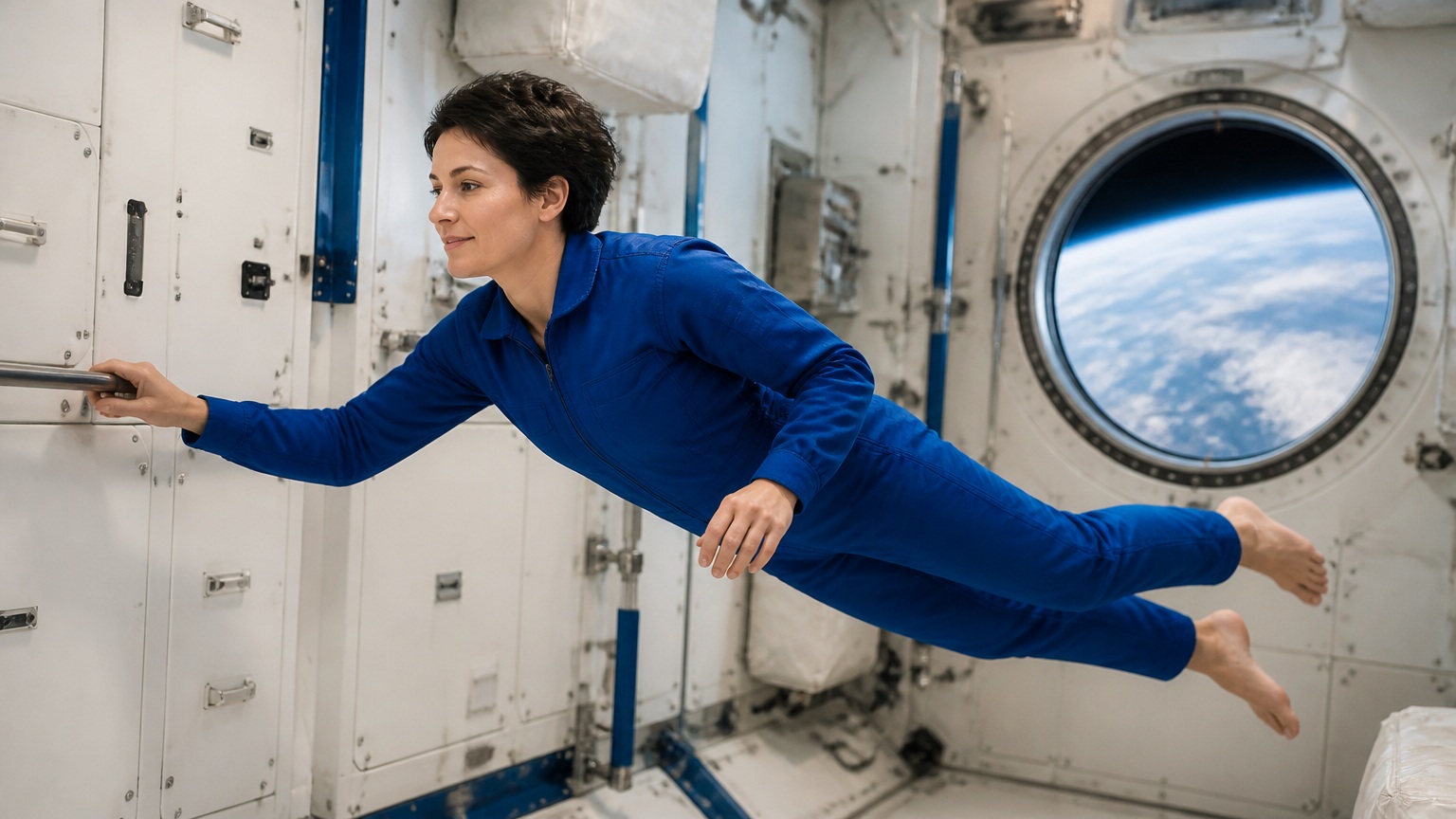
    "prompt": "Continue naturally from this exact first frame. The astronaut gently pushes away from the fixed handrail with her right hand, then drifts slowly sideways in zero gravity, her body and clothing retaining their original shape. A subtle camera track follows her at the same distance; equipment remains fixed. Keep her face, blue flight suit, handrail and window consistent. A quiet ventilation hum and soft fabric movement. One uninterrupted shot, no speech, cuts, logos or captions.",
    "duration": 5,
    "resolution": "720p",
    "multi_shots": false,
    "image_urls": [
      "https://cdn.vidgo.ai/apis/models/alibaba/wan-2.6/image-to-video/v1/01/input.jpg"
    ]
  }
}
JSON
)

RESPONSE=$(curl --silent --show-error --fail-with-body \
  --request POST \
  --url "https://api.vidgo.ai/api/generate/submit" \
  --header "Authorization: Bearer $VIDGO_API_KEY" \
  --header "Content-Type: application/json" \
  --data "$REQUEST_BODY")

CODE=$(printf '%s' "$RESPONSE" | jq -r '.code // empty')
if [ "$CODE" != "0" ] && [ "$CODE" != "200" ]; then
  printf 'API error: %s
' "$RESPONSE" >&2
  exit 1
fi
printf '%s
' "$RESPONSE"
03
Step 3: Poll for task completion
Poll status with task_id; continue while not_started or running, and stop on finished or failed. Read video URLs from data.files[].file_url on success, or data.error_message on failure.
Status Endpoint
GET https://api.vidgo.ai/api/generate/status/{task_id}Poll status using task_id; continue while not_started or running, stop when finished or failed. On success, read data.files[].file_url; on failure, read data.error_message.
not_startedrunningfinishedfailedSubmission Response
{
  "code": 200,
  "data": {
    "task_id": "1QG7XQN3IDI7XD43",
    "status": "running",
    "created_time": "2026-09-21T17:29:36"
  }
}
Completed Response Data
{
  "code": 200,
  "data": {
    "task_id": "task-unified-...",
    "status": "finished",
    "files": [
      {
        "file_url": "https://storage.vidgo.ai/generated/video.mp4",
        "file_type": "video"
      }
    ],
    "created_time": "2026-08-22T10:00:00Z",
    "progress": 100,
    "error_message": null
  }
}
Complete end-to-end script example
Expand to view a production-ready script with retry logic, error handling, and timeout safeguards.
Complete end-to-end script example
set -euo pipefail
: "${VIDGO_API_KEY:?Set VIDGO_API_KEY in your environment}"

REQUEST_BODY=$(cat <<'JSON'
{
  "model": "alibaba/wan-2.6/image-to-video",
  "input": {
    "prompt": "Continue naturally from this exact first frame. The astronaut gently pushes away from the fixed handrail with her right hand, then drifts slowly sideways in zero gravity, her body and clothing retaining their original shape. A subtle camera track follows her at the same distance; equipment remains fixed. Keep her face, blue flight suit, handrail and window consistent. A quiet ventilation hum and soft fabric movement. One uninterrupted shot, no speech, cuts, logos or captions.",
    "duration": 5,
    "resolution": "720p",
    "multi_shots": false,
    "image_urls": [
      "https://cdn.vidgo.ai/apis/models/alibaba/wan-2.6/image-to-video/v1/01/input.jpg"
    ]
  }
}
JSON
)

SUBMIT_RESPONSE=$(curl --silent --show-error --fail-with-body \
  --request POST \
  --url "https://api.vidgo.ai/api/generate/submit" \
  --header "Authorization: Bearer $VIDGO_API_KEY" \
  --header "Content-Type: application/json" \
  --data "$REQUEST_BODY")

TASK_ID=$(printf '%s' "$SUBMIT_RESPONSE" | jq -r '.data.task_id // .task_id // empty')
BUSINESS_CODE=$(printf '%s' "$SUBMIT_RESPONSE" | jq -r '.code // empty')
if [ "$BUSINESS_CODE" != "0" ] && [ "$BUSINESS_CODE" != "200" ]; then
  printf 'Submit failed:
%s
' "$SUBMIT_RESPONSE" >&2
  exit 1
fi
if [ -z "$TASK_ID" ]; then
  printf 'Submit response did not include task_id:
%s
' "$SUBMIT_RESPONSE" >&2
  exit 1
fi

START_TIME=$(date +%s)
POLL_DELAY=2
while true; do
  if [ $(( $(date +%s) - START_TIME )) -ge 600 ]; then
    printf 'Timed out after 600 seconds
' >&2
    exit 1
  fi
  STATUS_RESPONSE=$(curl --silent --show-error --fail-with-body \
    --url "https://api.vidgo.ai/api/generate/status/$TASK_ID" \
    --header "Authorization: Bearer $VIDGO_API_KEY")
  STATUS=$(printf '%s' "$STATUS_RESPONSE" | jq -r '.data.status // .status // empty')
  BUSINESS_CODE=$(printf '%s' "$STATUS_RESPONSE" | jq -r '.code // empty')
  if [ "$BUSINESS_CODE" != "0" ] && [ "$BUSINESS_CODE" != "200" ]; then
    printf 'Status request failed:
%s
' "$STATUS_RESPONSE" >&2
    exit 1
  fi

  case "$STATUS" in
    finished)
      printf '%s' "$STATUS_RESPONSE" | jq -r '(.data.files // .files // [])[]?.file_url'
      break
      ;;
    failed)
      printf '%s' "$STATUS_RESPONSE" | jq -r '.data.error_message // .error_message // "Generation failed"' >&2
      exit 1
      ;;
    not_started|running)
      sleep "$POLL_DELAY"
      if [ "$POLL_DELAY" -lt 10 ]; then POLL_DELAY=$((POLL_DELAY + 1)); fi
      ;;
    *)
      printf 'Unexpected task status: %s
' "$STATUS" >&2
      exit 1
      ;;
  esac
done
Request Parameters (input object)
Supported image-to-video parameters inside the input object when submitting a POST request to /api/generate/submit:
| Field | Type | Required | Default | Description |
|---|---|---|---|---|
| prompt | string | Yes | — | String. Trimmed before validation; 1–5,000 Unicode characters. |
| image_urls | array<string> | Yes | — | Array containing exactly one HTTP(S) image URL. For local uploads in the playground: JPG, PNG, or WebP, up to 10 MiB. |
| duration | integer | No | 5 | Integer. Output duration: 5, 10, 15 seconds. |
| resolution | string | No | 720p | Output resolution: 720p or 1080p. |
| multi_shots | boolean | No | — | Optional boolean. Omit to leave the upstream setting unspecified. The playground starts with false. No additional charge. |
Response Fields (query result)
Task details returned when polling GET /api/generate/status/{task_id}:
| Field | Type | Description |
|---|---|---|
| code | integer | Business response code, 200 on success. |
| data.task_id | string | Globally unique asynchronous task identifier. |
| data.status | string | Execution status: not_started, running, finished, or failed. |
| data.files | array | Generated video files upon completion, each with file_url and file_type. |
| data.error_message | string | null | Error description if task fails. |
Task Lifecycle
Clients should inspect the status field and stop polling when reaching finished or failed:
not_startedTask received and queued for execution.
runningGeneration is in progress.
finishedGeneration complete; retrieve video URL from data.files.
failedGeneration failed; inspect data.error_message; deducted credits are refunded per standard policy.
Polling & Error Handling
- Recommended Polling IntervalStart polling every 2–3 seconds, increasing to 5 seconds as the task continues, to avoid excessive requests.
- Network Fluctuations & RetriesIf status polling encounters 5xx or timeouts, the task is still running; retry querying after a brief pause.
- Asynchronous Webhook CallbackProvide callback_url at the root of the request payload to receive the completed task result automatically via POST.
Specifications
| Specification | Value | Description |
|---|---|---|
| Model ID | alibaba/wan-2.6/image-to-video | Send this value in the root-level model field. |
| Duration | 5, 10, 15s | Default is 5 seconds. |
| Resolution | 720p / 1080p | Default is 720p. |
Wan 2.6 Image to Video
Wan 2.6 Image to Video is developed by Alibaba Tongyi Lab to animate still photos into coherent cinematic videos. By providing a single reference image as the starting visual frame along with a prompt describing desired movements, creators can generate 5, 10, or 15-second takes in up to 1080p resolution, with optional multi_shots camera transitions.
Why Choose This?
High-fidelity first-frame identity preservationAnchors directly onto the source image to preserve exact facial features, hairstyle, and intricate clothing patterns throughout the sequence.
Multi-shot scene evolutionEnable multi_shots to develop a single still image into dynamic multi-angle cinematography without losing character consistency.
Up to 1080p native full HD outputSupports 720p and 1080p resolution tiers to capture delicate skin tones, material reflections, and environmental depth.
Versatile 5–15 second durationsChoose 5, 10, or 15-second outputs to suit everything from quick looping micro-motions to sustained narrative sequences.
Clean API contract and playground testingRequires just one image URL and prompt; easily integrated into creative pipelines via standard asynchronous REST endpoints.
Parameters
| Parameter | Requirement | Description |
|---|---|---|
| prompt | Required | String. Trimmed before validation; 1–5,000 Unicode characters. |
| image_urls | Required | Array containing exactly one HTTP(S) image URL. For local uploads in the playground: JPG, PNG, or WebP, up to 10 MiB. |
| duration | Optional | Integer. Output duration: 5, 10, 15 seconds. Default 51015 |
| resolution | Optional | Output resolution: 720p or 1080p. Default 720p1080p |
| multi_shots | Optional | Optional boolean. Omit to leave the upstream setting unspecified. The playground starts with false. No additional charge. truefalse |
How to Use
Upload reference imageProvide 1 clear image asset; playground supports JPG, PNG, or WebP up to 10 MiB, while API accepts the image_urls array.
Describe desired motionIn the prompt, detail how subjects move, how lighting evolves, and how the camera should track across the scene.
Select output durationChoose 5, 10, or 15 seconds based on narrative requirements, with 5 seconds as default.
Choose resolutionSelect 720p for rapid iteration or 1080p for full-definition delivery, with 720p as default.
Configure multi-shot modeSet multi_shots to true if you want the single image to evolve into multi-angle cinematic sequences.
Review credits and submitCheck estimated credit cost and click Run, or send an authenticated POST request to /api/generate/submit.
Poll status and save videoMonitor progress with task_id and download the final MP4 file once status reaches finished.
Pricing
Billed per generated video by output resolution and duration. Multiple shots do not add a surcharge. 1 credit = $0.005.
| Usage | Rate | Details |
|---|---|---|
| 720p · 5 seconds | 80 credits / $0.40 | Per video |
| 720p · 10 seconds | 160 credits / $0.80 | Per video |
| 720p · 15 seconds | 240 credits / $1.20 | Per video |
| 1080p · 5 seconds | 120 credits / $0.60 | Per video |
| 1080p · 10 seconds | 240 credits / $1.20 | Per video |
| 1080p · 15 seconds | 360 credits / $1.80 | Per video |
Best Use Cases
E-commerce product and model showcasesTransform studio catalog shots into dynamic fashion walks and product demonstration videos.
Digital avatars and character concept riggingBreathe life into illustrations, concept art, and game characters with natural breathing, blinks, and gestures.
Portrait and archival photo animationAnimate historical portraits and personal keepsakes with expressive facial subtleties and realistic lighting.
Photography motion cinemagraphsConvert architectural and landscape stills into vibrant timelapses with drifting clouds and flowing water.
Brand social campaign reelsTurn hero visual assets into high-resolution 1080p social teasers and promotional video ads.
Pro Tips
- Use high-clarity source imagery: Clear subject separation, balanced contrast, and well-lit compositions yield the smoothest motion without distortion.
- Reference initial image state in prompt: Starting your prompt with reference context (e.g. 'The woman in red turns smoothly...') helps align initial trajectory.
- Match duration to motion magnitude: Use 5 seconds for subtle expressions or gentle panning; reserve 10 or 15 seconds for complex bodily actions.
- Pair multi_shots with full-body stills: When providing medium or full shots, setting multi_shots=true produces cinematic shot-reverse-shot sequences.
- Focus on active positive verbs: Guide movement using definitive action verbs like 'gracefully strides forward' or 'gentle breeze flutters jacket hem'.
Notes
- Image input requirements: This endpoint strictly accepts exactly 1 image; image_urls array must contain one accessible HTTP(S) URL.
- Playground upload limits: Web playground supports JPG, PNG, and WebP uploads up to 10 MiB per file.
- Duration and pricing tiers: Supports 5, 10, and 15 seconds at 720p or 1080p; multi_shots mode adds no extra charge.
- Asynchronous execution: POST submission returns task_id immediately; poll the status endpoint or supply callback_url for webhooks.
Wan 2.6 Image to Video API Frequently Asked Questions
What is the Wan 2.6 Image to Video API?
Wan 2.6 Image to Video is an Alibaba model for image-to-video generation. It animates a single static reference image and text prompt into 5–15 second, up to 1080p high-definition dynamic video with support for camera control and multi-shot transitions. Built on a Diffusion Transformer spatio-temporal architecture, it faithfully preserves the input image's subject identity, composition, and lighting while adding coherent physical motion. You can call it programmatically or try it from the playground above.
How many reference images does Wan 2.6 Image to Video accept?
This endpoint strictly accepts exactly 1 static image as the starting frame. When calling the API, provide 1 accessible HTTP(S) image URL in the image_urls array; the playground accepts JPG, PNG, or WebP files up to 10 MiB.
How does Wan 2.6 Image to Video maintain facial consistency?
The model leverages the initial image as a structural latent anchor to preserve facial proportions and expressions. Reinforcing clothing details in your prompt and directing gradual movement helps maintain strict character fidelity throughout the video.
Can Wan 2.6 Image to Video create multi-shot scenes from one photo?
Yes. Enabling the multi_shots parameter allows the model to transition between multiple camera perspectives while keeping the primary subject consistent, with no extra billing surcharge.
What durations does Wan 2.6 Image to Video support?
It supports durations of 5, 10, and 15 seconds, with 5 seconds as default. Use 5 seconds for subtle loops and character micro-gestures, and 10 or 15 seconds for continuous spatial moves.
Does generating 1080p in Wan 2.6 Image to Video alter the image aspect ratio?
No, it maintains your composition. Selecting 1080p enhances fine texture and edge definition while respecting the original framing, delivering production-grade clarity.
Should I use Wan 2.6 Image to Video to transfer motion from an existing clip?
If you want to transfer motion dynamics or aesthetic style from existing video footage, use the Wan 2.6 Reference to Video endpoint instead. Wan 2.6 Image to Video is tailored specifically for animating still images.