Animate this exact backstage view in one continuous shot. The elderly shadow-puppet artisan slowly raises the bamboo control rods, lifting the one leather bird puppet upward behind the translucent screen. As its hinged wings open, the shadow on the screen rises and spreads into the matching full bird silhouette. Preserve the artisan face and hands, bamboo rod connections, puppet design and warm lamp position. Slow deliberate movement with physically corresponding puppet and shadow, very gentle lateral camera drift, no cuts or additional characters.
Hailuo 02 Pro Image to Video API
minimax/hailuo-02/pro/image-to-videoHailuo 02 Pro Image to Video animates static images into cinematic 512P and 768P video scenes, featuring expansive dynamic range, versatile ending-frame guidance at all resolutions, and nuanced lighting. It faithfully anchors facial identity, textural detail, and spatial geometry while unleashing expressive physical choreography and fluid camera work.
485
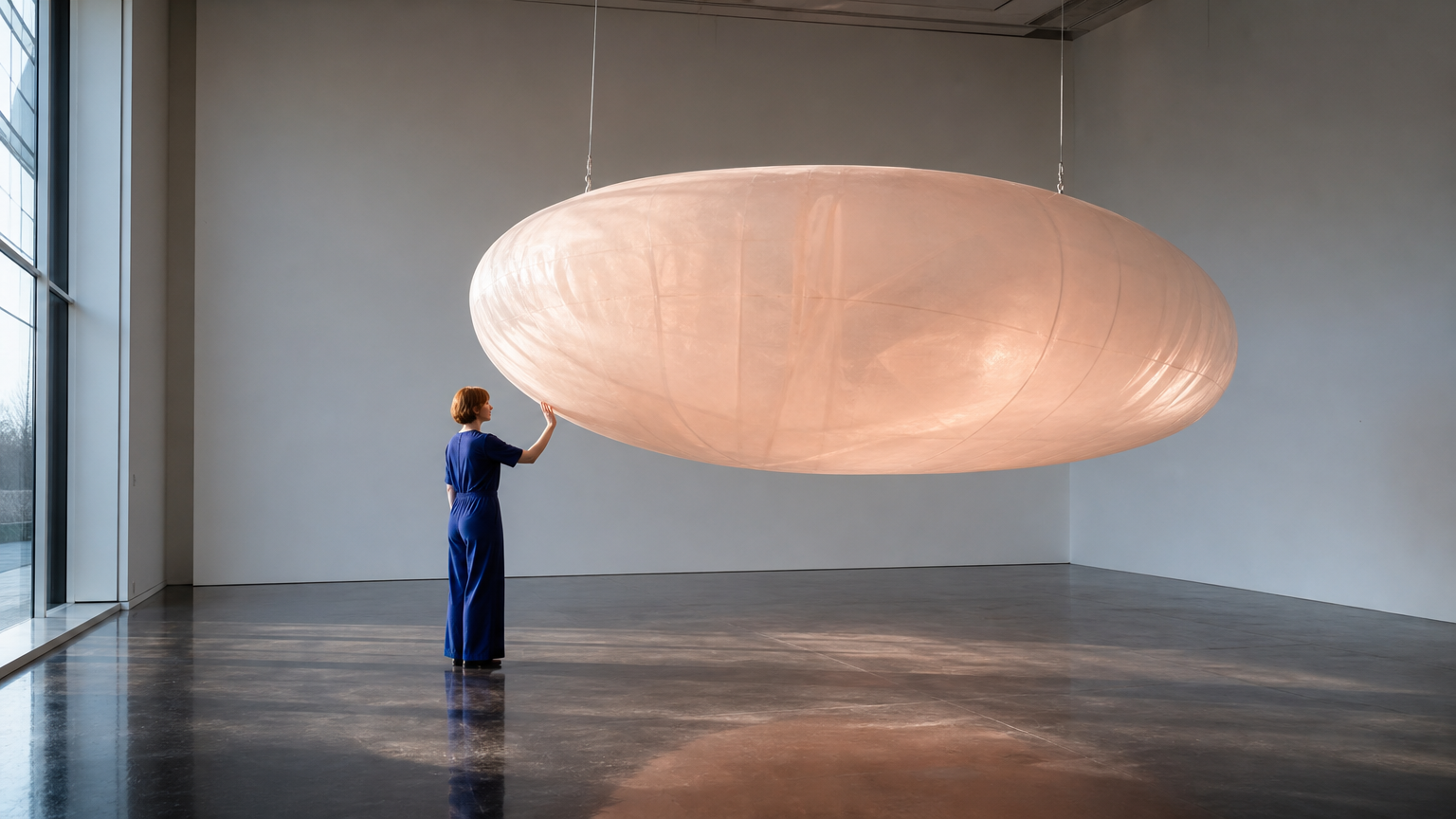
Required. One JPG, PNG, or WebP image, up to 10 MiB per upload.
Optional, with the same upload limits as the starting image.
OutputReady
Examples
REST API Spec
Quick Start
Submit an endpoint request and poll for status. Replace example URLs with your accessible files.
01
Step 1: Configure API authentication
Obtain an API key from the dashboard and include Authorization: Bearer <API_KEY> in every request header.
- Submission Endpoint
- POST
https://api.vidgo.ai/api/generate/submit - Auth Header
- Authorization: Bearer VIDGO_API_KEY
02
Step 2: Submit a generation task
POST /api/generate/submit. Pass model and optional callback_url at the root level, with generation parameters inside input.
Request Payload
REQUEST_BODY=$(cat <<'JSON'
{
  "model": "minimax/hailuo-02/pro/image-to-video",
  "input": {
    "prompt": "Continue the same wide shot. The adult visitor gently presses the translucent inflated sculpture once with an open palm, creating a shallow indentation. They release their hand and take one small step back. The suspended form slowly swings away and returns once while its soft surface relaxes. Keep the person, suspension cables, gallery architecture and artwork unchanged. Convincing elastic deformation, soft inertia, subtle moving transmitted light, locked camera, no cuts, no text.",
    "prompt_optimizer": false,
    "image_urls": [
      "https://cdn.vidgo.ai/apis/models/minimax/hailuo-02/pro/image-to-video/v1/02/start.png"
    ]
  }
}
JSON
)

RESPONSE=$(curl --silent --show-error --fail-with-body \
  --request POST \
  --url "https://api.vidgo.ai/api/generate/submit" \
  --header "Authorization: Bearer $VIDGO_API_KEY" \
  --header "Content-Type: application/json" \
  --data "$REQUEST_BODY")

CODE=$(printf '%s' "$RESPONSE" | jq -r '.code // empty')
if [ "$CODE" != "0" ] && [ "$CODE" != "200" ]; then
  printf 'API error: %s
' "$RESPONSE" >&2
  exit 1
fi
printf '%s
' "$RESPONSE"
03
Step 3: Poll for task completion
Poll status with task_id; continue while not_started or running, and stop on finished or failed. Read video URLs from data.files[].file_url on success, or data.error_message on failure.
Status Endpoint
GET https://api.vidgo.ai/api/generate/status/{task_id}Poll status using task_id; continue while not_started or running, stop when finished or failed. On success, read data.files[].file_url; on failure, read data.error_message.
not_startedrunningfinishedfailedSubmission Response
{
  "code": 200,
  "data": {
    "task_id": "ZD6N3KPN7QHVOFCQ",
    "status": "running",
    "created_time": "2026-09-22T16:05:39"
  }
}
Completed Response Data
{
  "code": 200,
  "data": {
    "task_id": "task-unified-...",
    "status": "finished",
    "files": [
      {
        "file_url": "https://storage.vidgo.ai/generated/video.mp4",
        "file_type": "video"
      }
    ],
    "created_time": "2026-08-22T10:00:00Z",
    "progress": 100,
    "error_message": null
  }
}
Complete end-to-end script example
Expand to view a production-ready script with retry logic, error handling, and timeout safeguards.
Complete end-to-end script example
set -euo pipefail
: "${VIDGO_API_KEY:?Set VIDGO_API_KEY in your environment}"

REQUEST_BODY=$(cat <<'JSON'
{
  "model": "minimax/hailuo-02/pro/image-to-video",
  "input": {
    "prompt": "Continue the same wide shot. The adult visitor gently presses the translucent inflated sculpture once with an open palm, creating a shallow indentation. They release their hand and take one small step back. The suspended form slowly swings away and returns once while its soft surface relaxes. Keep the person, suspension cables, gallery architecture and artwork unchanged. Convincing elastic deformation, soft inertia, subtle moving transmitted light, locked camera, no cuts, no text.",
    "prompt_optimizer": false,
    "image_urls": [
      "https://cdn.vidgo.ai/apis/models/minimax/hailuo-02/pro/image-to-video/v1/02/start.png"
    ]
  }
}
JSON
)

SUBMIT_RESPONSE=$(curl --silent --show-error --fail-with-body \
  --request POST \
  --url "https://api.vidgo.ai/api/generate/submit" \
  --header "Authorization: Bearer $VIDGO_API_KEY" \
  --header "Content-Type: application/json" \
  --data "$REQUEST_BODY")

TASK_ID=$(printf '%s' "$SUBMIT_RESPONSE" | jq -r '.data.task_id // .task_id // empty')
BUSINESS_CODE=$(printf '%s' "$SUBMIT_RESPONSE" | jq -r '.code // empty')
if [ "$BUSINESS_CODE" != "0" ] && [ "$BUSINESS_CODE" != "200" ]; then
  printf 'Submit failed:
%s
' "$SUBMIT_RESPONSE" >&2
  exit 1
fi
if [ -z "$TASK_ID" ]; then
  printf 'Submit response did not include task_id:
%s
' "$SUBMIT_RESPONSE" >&2
  exit 1
fi

START_TIME=$(date +%s)
POLL_DELAY=2
while true; do
  if [ $(( $(date +%s) - START_TIME )) -ge 600 ]; then
    printf 'Timed out after 600 seconds
' >&2
    exit 1
  fi
  STATUS_RESPONSE=$(curl --silent --show-error --fail-with-body \
    --url "https://api.vidgo.ai/api/generate/status/$TASK_ID" \
    --header "Authorization: Bearer $VIDGO_API_KEY")
  STATUS=$(printf '%s' "$STATUS_RESPONSE" | jq -r '.data.status // .status // empty')
  BUSINESS_CODE=$(printf '%s' "$STATUS_RESPONSE" | jq -r '.code // empty')
  if [ "$BUSINESS_CODE" != "0" ] && [ "$BUSINESS_CODE" != "200" ]; then
    printf 'Status request failed:
%s
' "$STATUS_RESPONSE" >&2
    exit 1
  fi

  case "$STATUS" in
    finished)
      printf '%s' "$STATUS_RESPONSE" | jq -r '(.data.files // .files // [])[]?.file_url'
      break
      ;;
    failed)
      printf '%s' "$STATUS_RESPONSE" | jq -r '.data.error_message // .error_message // "Generation failed"' >&2
      exit 1
      ;;
    not_started|running)
      sleep "$POLL_DELAY"
      if [ "$POLL_DELAY" -lt 10 ]; then POLL_DELAY=$((POLL_DELAY + 1)); fi
      ;;
    *)
      printf 'Unexpected task status: %s
' "$STATUS" >&2
      exit 1
      ;;
  esac
done
Request Parameters (input object)
Supported generation parameters inside the input object when submitting a POST request to /api/generate/submit:
| Field | Type | Required | Default | Description |
|---|---|---|---|---|
| prompt | string | Yes | — | Required nonblank string, trimmed before validation. No explicit length limit in the current upstream handler. |
| resolution | string | No | 768P | 512P or 768P; defaults to 768P. |
| image_urls | array | Yes | — | Exactly one HTTP(S) URL for the starting image. |
| end_image_url | string | No | — | Optional ending-image HTTP(S) URL; requires a starting image. Accepted with either resolution by the current handler. |
| prompt_optimizer | boolean | No | — | Optional boolean; omit to leave unspecified upstream. The playground starts with false. |
Response Fields (query result)
Task details returned when polling GET /api/generate/status/{task_id}:
| Field | Type | Description |
|---|---|---|
| code | integer | Business response code, 200 on success. |
| data.task_id | string | Globally unique asynchronous task identifier. |
| data.status | string | Execution status: not_started, running, finished, or failed. |
| data.files | array | Generated video files upon completion, each with file_url and file_type. |
| data.error_message | string | null | Error description if task fails. |
Task Lifecycle
Clients should inspect the status field and stop polling when reaching finished or failed:
not_startedTask received and queued for execution.
runningGeneration is in progress.
finishedGeneration complete; retrieve video URL from data.files.
failedGeneration failed; inspect data.error_message; deducted credits are refunded per standard policy.
Polling & Error Handling
- Recommended Polling IntervalStart polling every 2–3 seconds, increasing to 5 seconds as the task continues, to avoid excessive requests.
- Network Fluctuations & RetriesIf status polling encounters 5xx or timeouts, the task is still running; retry querying after a brief pause.
- Asynchronous Webhook CallbackProvide callback_url at the root of the request payload to receive the completed task result automatically via POST.
Specifications
| Specification | Value | Description |
|---|---|---|
| Model ID | minimax/hailuo-02/pro/image-to-video | Root-level model field. |
| Resolution | 512P / 768P | 512P or 768P; defaults to 768P. |
| Duration | — | Do not send duration. |
Hailuo 02 Pro Image to Video
Hailuo 02 Pro Image to Video is MiniMax's flagship model for transforming still images into high-tension cinematic animations. By supplying a single starting image and motion directions, creators can generate visually stunning scenes with organic physics and realistic lighting. The model fully supports ending-frame transitions across both 512P and 768P resolutions. Billed at a predictable 65 credits per generation, it empowers creators to deliver elite dynamic visual assets.
Why Choose This?
Elite Cinematic Motion AmplitudeExpands physical motion boundaries to render sweeping head turns, agile sprints, and dynamic leaps without body distortion.
Universal End-Frame TransitionFull native support for an ending frame at both 512P and 768P resolutions for seamless visual interpolation between two still assets.
Uncompromising Identity & Lighting ConsistencyAccurately preserves facial bone structure, delicate hair strands, and lighting highlights throughout intense motion.
Uncapped Prompt ArticulationOperates without explicit character limits, allowing comprehensive descriptions of light decay, atmospheric particles, and camera vectors.
Predictable Fixed-Per-Task BillingBilled at a flat rate of 65 credits ($0.325) per successful task regardless of resolution or visual complexity.
Parameters
| Parameter | Requirement | Description |
|---|---|---|
| prompt | Required | Required nonblank string, trimmed before validation. No explicit length limit in the current upstream handler. |
| resolution | Optional | 512P or 768P; defaults to 768P. Default 768P |
| image_urls | Required | Exactly one HTTP(S) URL for the starting image. |
| end_image_url | Optional | Optional ending-image HTTP(S) URL; requires a starting image. Accepted with either resolution by the current handler. |
| prompt_optimizer | Optional | Optional boolean; omit to leave unspecified upstream. The playground starts with false. |
How to Use
Upload a High-Quality Starting ImageProvide a clear JPG, PNG, or WebP image under 10 MiB that anchors the initial composition and subject.
Optionally Supply an Ending FrameIf guiding camera motion to a precise closing frame, provide the second image in end_image_url (supported at all resolutions).
Detail Dynamic Choreography in PromptDescribe character motion evolution, physical interactions, and camera vectors with rich cinematic descriptors.
Omit the Duration ParameterPro mode is delivered on a fixed single-task basis; do not include a duration parameter in your request.
Submit and Download ResultDispatch the asynchronous generation call, poll with task_id, and retrieve the finalized cinematic MP4 video.
Pricing
1 credit = $0.005. Pro is billed per generation and does not accept duration.
| Usage | Rate | Details |
|---|---|---|
| 512P | 65 credits ($0.325) | Per generation |
| 768P | 65 credits ($0.325) | Per generation |
Best Use Cases
Action Cinematic Storyboard PitchingConvert keyframe concepts into high-tension visual sequences to guide animation and film crews.
Game CG & Character Illustration AnimationBring static game art to life with powerful combat movements, spell-casting, and weapon draws.
Premium Commercial Keyframe TransitionsUtilize starting and ending frames to produce smooth camera transitions between featured product scenes.
Fine Art & Conceptual Motion ExhibitsInfuse photography with evolving volumetric light, fog drift, and particle physics for immersive galleries.
Pro Tips
- Align Perspective Between Starting and Ending Frames: When providing an ending frame, ensure matching field-of-view and lighting angles for silky-smooth motion.
- Select 768P for Supreme Fidelity: Because 512P and 768P cost the exact same flat 65 credits, default to 768P for superior detail and clarity.
- Focus Prompts on Motion Dynamics Over Appearance: Since source images already define character look, dedicate prompt words to action verbs and camera trajectories.
- Direct Environmental Reaction Cues: Describe flowing hair, cascading water, or drifting mist to trigger Pro's advanced physical simulation engines.
- Maintain Zero-Duration API Payloads: Ensure your code integration strictly omits the duration parameter to prevent request schema rejection.
Notes
- Starting Image Contract: Exactly one public starting image URL must be provided in image_urls, with playground uploads capped at 10 MiB.
- Universal Ending Frame Support: The optional end_image_url parameter is supported at both 512P and 768P resolutions when a starting image is provided.
- Flat Single-Task Pricing: Pro generation operates on fixed single-task delivery without a duration parameter; each task costs 65 credits with automatic refunds upon failure.
Related Models














Hailuo 02 Pro Image to Video API frequently asked questions
What is the Hailuo 02 Pro Image to Video API?
Hailuo 02 Pro Image to Video is a MiniMax model for professional video generation from images. It generates continuous 512P or 768P cinematic videos from a starting image and text prompt, featuring heightened motion amplitude, universal ending frame support across all resolutions, and rich script comprehension. Built on MiniMax's premier video generation architecture, it faithfully preserves subject likeness and composition while introducing dynamic camera work and authentic physics. You can call it programmatically or try it from the playground above.
Does Hailuo 02 Pro Image to Video support ending frames at 512P?
Yes. Unlike the Standard tier, the Pro mode fully supports an optional ending frame in end_image_url across both 512P and 768P resolutions, offering creators complete flexibility.
How does Hailuo 02 Pro Image to Video handle high-motion dynamic scenes?
The Pro mode is engineered specifically for extensive physical movements, rapid perspective shifts, and complex collisions. When rendering dramatic actions like leaping or turning, it calculates skeletal articulation and fabric draping to prevent distortion.
How much does a generation cost on Hailuo 02 Pro Image to Video?
Each successful generation costs a flat 65 credits ($0.325). Both 512P and 768P resolutions share this uniform rate regardless of ending frame usage, with automatic credit refunds if a task encounters an error.
Does Hailuo 02 Pro Image to Video require a duration setting?
No, and the duration parameter is strictly disallowed. Pro mode operates on fixed single-task delivery; including a duration field in your request payload will trigger a validation error.
How does Hailuo 02 Pro Image to Video preserve character identity across motion?
The model deeply encodes facial proportions, hairstyle textures, and garment styling from the starting image, enforcing reference alignment across frames. Direct your prompt on motion choreography to ensure identity consistency.
When should creators choose Hailuo 02 Pro Image to Video over the Standard mode?
Choose Pro mode when your creative task requires explosive physical motion, dramatic lighting evolutions, or ending-frame control at 512P. Choose Standard mode when you require exact 6s or 10s duration control or per-second budget flexibility.