One continuous locked-camera shot. The astronaut stays near the handrail and watches the single floating wrench directly in front of her open hand. She reaches that open hand forward, wraps her fingers firmly around the middle of the wrench handle, and holds the captured wrench still. This one precise gentle catch is the entire action. The wrench remains one solid metal object and stops moving when gripped. Keep the other hand on the rail, the same face, orange suit, body proportions and cabin geometry throughout. Very subtle zero-gravity drift only. No cuts, no extra tools, no throwing, no text.
Hailuo 02 Standard Image to Video API
minimax/hailuo-02/standard/image-to-videoHailuo 02 Standard Image to Video animates static starting images into fluid 512P and 768P video clips, supporting 6-second or 10-second outputs, optional end-frame transition, and prompt refinement. It preserves character facial features, source composition, and textural lighting while introducing realistic physical motion and cinematic camera angles.
489/1500

Required. One JPG, PNG, or WebP image, up to 10 MiB per upload.
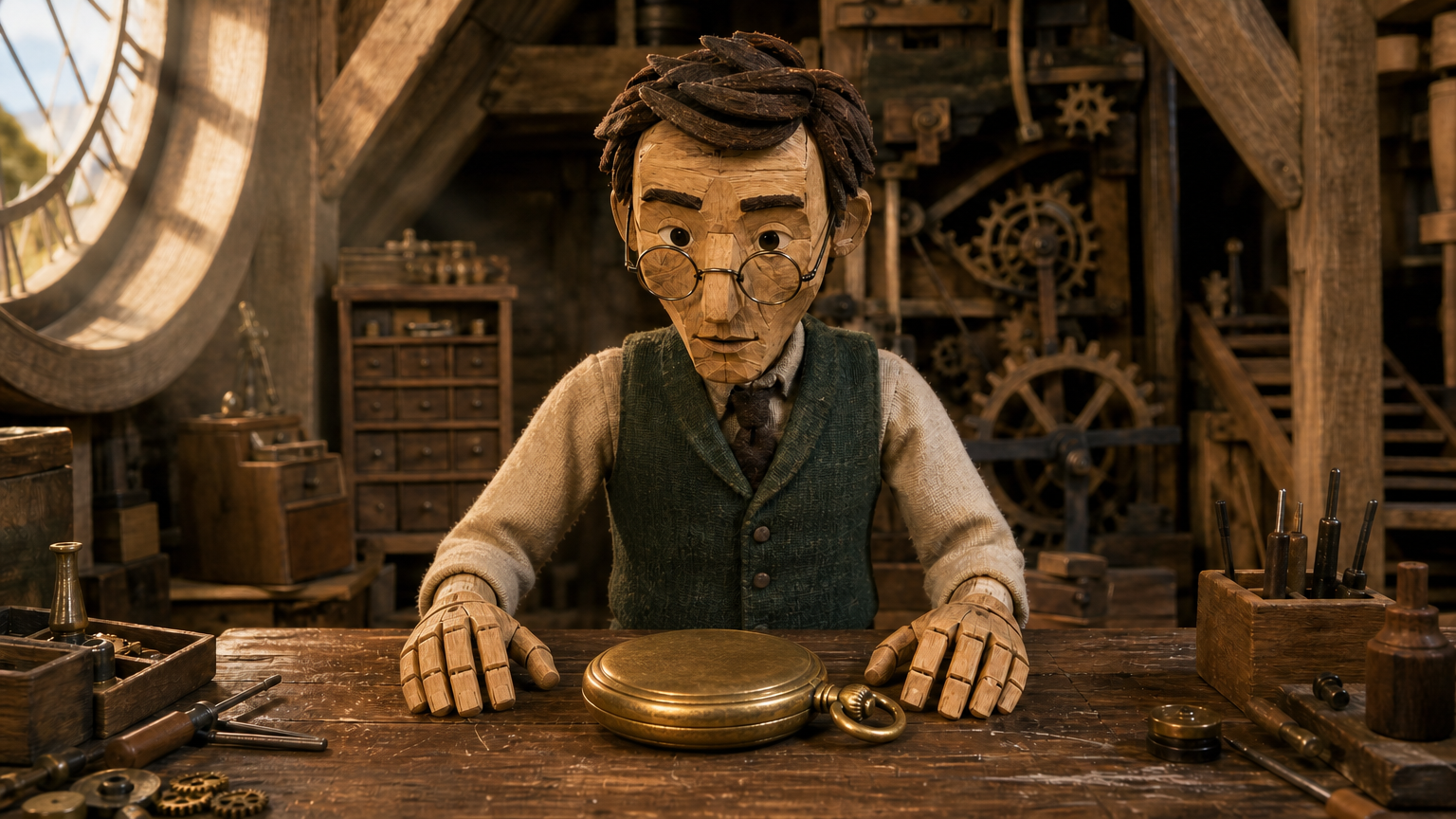
Optional, with the same upload limits as the starting image. Choose 768P when using an ending image.
An ending frame requires 768P. Remove it to enable 512P.
OutputReady
Examples
REST API Spec
Quick Start
Submit an endpoint request and poll for status. Replace example URLs with your accessible files.
01
Step 1: Configure API authentication
Obtain an API key from the dashboard and include Authorization: Bearer <API_KEY> in every request header.
- Submission Endpoint
- POST
https://api.vidgo.ai/api/generate/submit - Auth Header
- Authorization: Bearer VIDGO_API_KEY
02
Step 2: Submit a generation task
POST /api/generate/submit. Pass model and optional callback_url at the root level, with generation parameters inside input.
Request Payload
REQUEST_BODY=$(cat <<'JSON'
{
  "model": "minimax/hailuo-02/standard/image-to-video",
  "input": {
    "prompt": "Single locked-off stop-motion miniature shot. The same wooden clockmaker puppet slowly lowers the hinged lid of the open brass pocket watch with one wooden hand. The other hand keeps the watch centered on the workbench. The lid closes neatly and both hands come to rest beside the closed watch, matching the supplied ending frame. Preserve the puppet face, clothing, miniature attic and camera composition. Deliberate small movements, tactile handcrafted materials, no cuts or new objects.",
    "prompt_optimizer": false,
    "duration": 6,
    "image_urls": [
      "https://cdn.vidgo.ai/apis/models/minimax/hailuo-02/standard/image-to-video/v1/03/start.png"
    ],
    "resolution": "768P",
    "end_image_url": "https://cdn.vidgo.ai/apis/models/minimax/hailuo-02/standard/image-to-video/v1/03/end.png"
  }
}
JSON
)

RESPONSE=$(curl --silent --show-error --fail-with-body \
  --request POST \
  --url "https://api.vidgo.ai/api/generate/submit" \
  --header "Authorization: Bearer $VIDGO_API_KEY" \
  --header "Content-Type: application/json" \
  --data "$REQUEST_BODY")

CODE=$(printf '%s' "$RESPONSE" | jq -r '.code // empty')
if [ "$CODE" != "0" ] && [ "$CODE" != "200" ]; then
  printf 'API error: %s
' "$RESPONSE" >&2
  exit 1
fi
printf '%s
' "$RESPONSE"
03
Step 3: Poll for task completion
Poll status with task_id; continue while not_started or running, and stop on finished or failed. Read video URLs from data.files[].file_url on success, or data.error_message on failure.
Status Endpoint
GET https://api.vidgo.ai/api/generate/status/{task_id}Poll status using task_id; continue while not_started or running, stop when finished or failed. On success, read data.files[].file_url; on failure, read data.error_message.
not_startedrunningfinishedfailedSubmission Response
{
  "code": 200,
  "data": {
    "task_id": "X69IXES85K62G9Z5",
    "status": "running",
    "created_time": "2026-09-22T13:05:02"
  }
}
Completed Response Data
{
  "code": 200,
  "data": {
    "task_id": "task-unified-...",
    "status": "finished",
    "files": [
      {
        "file_url": "https://storage.vidgo.ai/generated/video.mp4",
        "file_type": "video"
      }
    ],
    "created_time": "2026-08-22T10:00:00Z",
    "progress": 100,
    "error_message": null
  }
}
Complete end-to-end script example
Expand to view a production-ready script with retry logic, error handling, and timeout safeguards.
Complete end-to-end script example
set -euo pipefail
: "${VIDGO_API_KEY:?Set VIDGO_API_KEY in your environment}"

REQUEST_BODY=$(cat <<'JSON'
{
  "model": "minimax/hailuo-02/standard/image-to-video",
  "input": {
    "prompt": "Single locked-off stop-motion miniature shot. The same wooden clockmaker puppet slowly lowers the hinged lid of the open brass pocket watch with one wooden hand. The other hand keeps the watch centered on the workbench. The lid closes neatly and both hands come to rest beside the closed watch, matching the supplied ending frame. Preserve the puppet face, clothing, miniature attic and camera composition. Deliberate small movements, tactile handcrafted materials, no cuts or new objects.",
    "prompt_optimizer": false,
    "duration": 6,
    "image_urls": [
      "https://cdn.vidgo.ai/apis/models/minimax/hailuo-02/standard/image-to-video/v1/03/start.png"
    ],
    "resolution": "768P",
    "end_image_url": "https://cdn.vidgo.ai/apis/models/minimax/hailuo-02/standard/image-to-video/v1/03/end.png"
  }
}
JSON
)

SUBMIT_RESPONSE=$(curl --silent --show-error --fail-with-body \
  --request POST \
  --url "https://api.vidgo.ai/api/generate/submit" \
  --header "Authorization: Bearer $VIDGO_API_KEY" \
  --header "Content-Type: application/json" \
  --data "$REQUEST_BODY")

TASK_ID=$(printf '%s' "$SUBMIT_RESPONSE" | jq -r '.data.task_id // .task_id // empty')
BUSINESS_CODE=$(printf '%s' "$SUBMIT_RESPONSE" | jq -r '.code // empty')
if [ "$BUSINESS_CODE" != "0" ] && [ "$BUSINESS_CODE" != "200" ]; then
  printf 'Submit failed:
%s
' "$SUBMIT_RESPONSE" >&2
  exit 1
fi
if [ -z "$TASK_ID" ]; then
  printf 'Submit response did not include task_id:
%s
' "$SUBMIT_RESPONSE" >&2
  exit 1
fi

START_TIME=$(date +%s)
POLL_DELAY=2
while true; do
  if [ $(( $(date +%s) - START_TIME )) -ge 600 ]; then
    printf 'Timed out after 600 seconds
' >&2
    exit 1
  fi
  STATUS_RESPONSE=$(curl --silent --show-error --fail-with-body \
    --url "https://api.vidgo.ai/api/generate/status/$TASK_ID" \
    --header "Authorization: Bearer $VIDGO_API_KEY")
  STATUS=$(printf '%s' "$STATUS_RESPONSE" | jq -r '.data.status // .status // empty')
  BUSINESS_CODE=$(printf '%s' "$STATUS_RESPONSE" | jq -r '.code // empty')
  if [ "$BUSINESS_CODE" != "0" ] && [ "$BUSINESS_CODE" != "200" ]; then
    printf 'Status request failed:
%s
' "$STATUS_RESPONSE" >&2
    exit 1
  fi

  case "$STATUS" in
    finished)
      printf '%s' "$STATUS_RESPONSE" | jq -r '(.data.files // .files // [])[]?.file_url'
      break
      ;;
    failed)
      printf '%s' "$STATUS_RESPONSE" | jq -r '.data.error_message // .error_message // "Generation failed"' >&2
      exit 1
      ;;
    not_started|running)
      sleep "$POLL_DELAY"
      if [ "$POLL_DELAY" -lt 10 ]; then POLL_DELAY=$((POLL_DELAY + 1)); fi
      ;;
    *)
      printf 'Unexpected task status: %s
' "$STATUS" >&2
      exit 1
      ;;
  esac
done
Request Parameters (input object)
Supported generation parameters inside the input object when submitting a POST request to /api/generate/submit:
| Field | Type | Required | Default | Description |
|---|---|---|---|---|
| prompt | string | Yes | — | Required nonblank string, trimmed before validation. Maximum 1500 Unicode characters. |
| resolution | string | No | 768P | 512P or 768P; defaults to 768P. |
| duration | integer | No | 6 | 6 or 10 seconds; defaults to 6. |
| image_urls | array | Yes | — | Exactly one HTTP(S) URL for the starting image. |
| end_image_url | string | No | — | Optional ending-image HTTP(S) URL; requires a starting image. Requires 768P. |
| prompt_optimizer | boolean | No | — | Optional boolean; omit to leave unspecified upstream. The playground starts with false. |
Response Fields (query result)
Task details returned when polling GET /api/generate/status/{task_id}:
| Field | Type | Description |
|---|---|---|
| code | integer | Business response code, 200 on success. |
| data.task_id | string | Globally unique asynchronous task identifier. |
| data.status | string | Execution status: not_started, running, finished, or failed. |
| data.files | array | Generated video files upon completion, each with file_url and file_type. |
| data.error_message | string | null | Error description if task fails. |
Task Lifecycle
Clients should inspect the status field and stop polling when reaching finished or failed:
not_startedTask received and queued for execution.
runningGeneration is in progress.
finishedGeneration complete; retrieve video URL from data.files.
failedGeneration failed; inspect data.error_message; deducted credits are refunded per standard policy.
Polling & Error Handling
- Recommended Polling IntervalStart polling every 2–3 seconds, increasing to 5 seconds as the task continues, to avoid excessive requests.
- Network Fluctuations & RetriesIf status polling encounters 5xx or timeouts, the task is still running; retry querying after a brief pause.
- Asynchronous Webhook CallbackProvide callback_url at the root of the request payload to receive the completed task result automatically via POST.
Specifications
| Specification | Value | Description |
|---|---|---|
| Model ID | minimax/hailuo-02/standard/image-to-video | Root-level model field. |
| Resolution | 512P / 768P | 512P or 768P; defaults to 768P. |
| Duration | 6 / 10s | Defaults to 6 seconds. |
Hailuo 02 Standard Image to Video
Hailuo 02 Standard Image to Video is developed by MiniMax to transform still images into fluid video scenes. Creators supply a single high-quality starting image alongside action prompts to generate 6-second or 10-second animations; selecting 768P resolution enables an optional ending frame to steer camera trajectory and closing composition. The model maintains subject likeness and environmental texture across movements with transparent per-second billing.
Why Choose This?
Faithful Subject & Composition PreservationAnchors generation to the starting image to maintain facial fidelity, clothing textures, and lighting without drift.
Guided End-Frame TransitionSupports an optional closing frame at 768P resolution, enabling smooth interpolation between two distinct still shots.
Flexible 6-Second and 10-Second DurationsOffers tailored output lengths for swift social loops or extended sequential storytelling.
Physically Coherent Lighting and DynamicsReplicates real-world motion for fabric draping, hair dynamics, and reflection changes throughout camera movement.
Cost-Effective Per-Second BillingTransparent rates at 3 credits/sec for 512P or 7 credits/sec for 768P, with automated refunds for failed tasks.
Parameters
| Parameter | Requirement | Description |
|---|---|---|
| prompt | Required | Required nonblank string, trimmed before validation. Maximum 1500 Unicode characters. |
| resolution | Optional | 512P or 768P; defaults to 768P. Default 768P |
| duration | Optional | 6 or 10 seconds; defaults to 6. Default 6 |
| image_urls | Required | Exactly one HTTP(S) URL for the starting image. |
| end_image_url | Optional | Optional ending-image HTTP(S) URL; requires a starting image. Requires 768P. |
| prompt_optimizer | Optional | Optional boolean; omit to leave unspecified upstream. The playground starts with false. |
How to Use
Upload a Clear Starting ImageSupply a single JPG, PNG, or WebP image under 10 MiB that cleanly establishes the visual subject and scene.
Describe Motion and Camera FlowFocus your text prompt on physical transformations and camera movement (e.g., 'subject smiles gently as the camera tracks right').
Add an Optional Ending FrameWhen steering toward an exact ending scene, select 768P resolution and provide the closing frame in end_image_url.
Configure Resolution and DurationPick 6s or 10s duration and choose between 512P for rapid drafts or 768P for high-definition output.
Submit and Download ResultDispatch the generation request to receive a task_id, then retrieve your finished MP4 via polling or webhook callback.
Pricing
1 credit = $0.005. Billed by resolution and output duration.
| Usage | Rate | Details |
|---|---|---|
| 512P / 6s | 18 credits ($0.090) | 3 credits/second |
| 512P / 10s | 30 credits ($0.150) | 3 credits/second |
| 768P / 6s | 42 credits ($0.210) | 7 credits/second |
| 768P / 10s | 70 credits ($0.350) | 7 credits/second |
Best Use Cases
Portrait and Photography AnimationInfuse still portraits and scenic landscapes with subtle expressions, eye contact, and atmospheric motion.
E-Commerce Product ShowcaseTransform static product photos and 3D renders into dynamic rotational showcases for digital storefronts.
Keyframe Transition InterpolationUse starting and ending frames to produce smooth scene transitions for film and animation storyboards.
Social Media Creative LoopsConvert standalone concept art or branding graphics into engaging 6-to-10-second video posts.
Pro Tips
- Match Starting and Ending Frame Aesthetics: Ensure consistent aspect ratio, subject appearance, and lighting across both frames for seamless interpolation.
- Focus Prompts on Motion Rather Than Static Details: Since the starting image already defines appearance, direct text prompts toward motion verbs and camera vectors.
- Always Pair Ending Frames with 768P: Remember to set resolution to 768P when supplying an end_image_url to satisfy endpoint contract constraints.
- Detail Micro-Expressions in Close-Ups: Direct subtle shifts like eye blinks or slight head tilts alongside a gentle push-in shot for maximum cinematic impact.
- Use Prompt Optimization on Concise Prompts: Turn prompt_optimizer on to automatically enrich environmental physics when your motion prompt is brief.
Notes
- Starting Image Requirement: Exactly one starting image URL must be provided in image_urls, with playground uploads capped at 10 MiB.
- Ending Frame Constraint: The optional end_image_url parameter requires 768P resolution; 512P does not support ending frames.
- Billing and Refund Safeguards: Billed by duration (6 or 10 seconds) and resolution; failed tasks are automatically refunded in full.
Related Models














Hailuo 02 Standard Image to Video API frequently asked questions
What is the Hailuo 02 Standard Image to Video API?
Hailuo 02 Standard Image to Video is a MiniMax model for video generation from images. It generates continuous dynamic videos at 512P or 768P resolution from a starting image and text prompt, supporting 6-second or 10-second durations, optional ending frame control, and prompt refinement. Built on MiniMax's advanced video generation architecture, it faithfully preserves subject likeness and composition while adding realistic physical movement and camera motion. You can call it programmatically or try it from the playground above.
Does Hailuo 02 Standard Image to Video support an ending frame?
Yes. You can supply a publicly accessible image URL in end_image_url. The model will synthesize a coherent motion transition that originates from the starting frame and concludes on the ending frame.
Which resolution is required when using an ending frame in Hailuo 02 Standard Image to Video?
Supplying an ending frame with end_image_url requires selecting 768P resolution. The 512P tier in Standard mode does not accept an ending frame; set resolution to 768P whenever a closing frame is included.
How many starting images can be uploaded to Hailuo 02 Standard Image to Video?
The image_urls array must contain exactly 1 starting image URL. Multi-image blending is not supported on this endpoint; to guide the closing composition, use the dedicated end_image_url field.
How does Hailuo 02 Standard Image to Video maintain subject consistency from the initial image?
The model anchors facial structure, apparel textures, and lighting from the starting image across temporal frames. To ensure maximum consistency, focus your prompt on action trajectories rather than conflicting physical re-descriptions.
Can Hailuo 02 Standard Image to Video generate 10-second animations?
Yes. The model provides 6-second and 10-second duration settings, with 6 seconds as default. Choosing 10 seconds allows for extended character movement and gradual camera development while maintaining visual fidelity.
How are generations billed for Hailuo 02 Standard Image to Video?
Billing is calculated per output second based on resolution (1 credit = $0.005). 512P is 3 credits/second (18 credits for 6s, 30 credits for 10s), while 768P is 7 credits/second (42 credits for 6s, 70 credits for 10s). Adding an ending frame incurs no additional surcharge.