Grok Imagine Image 2.0 Edit API

xai/grok-imagine-image-v2.0/edit
1–3 张输入图 · Low/Medium · 1K/2K

Grok Imagine Image 2.0 Edit 结合参考图片与自然语言指令完成精准图像编辑,支持多达 3 张参考图智能融合、特定区域像素级重绘,以及智能画幅自适应扩展。它能够在执行复杂的换装、背景替换或元素增删时,高度保留源图像的核心主体特征、面部结构与光影材质,实现天衣无缝的自然合成。

获取 API Key
输入
987/8000
1/3
Reference image 1: Reference 1
输出已就绪
1 × 12 + 1 × 2 = 14 积分 · $0.070

继续使用

示例

output.jpg

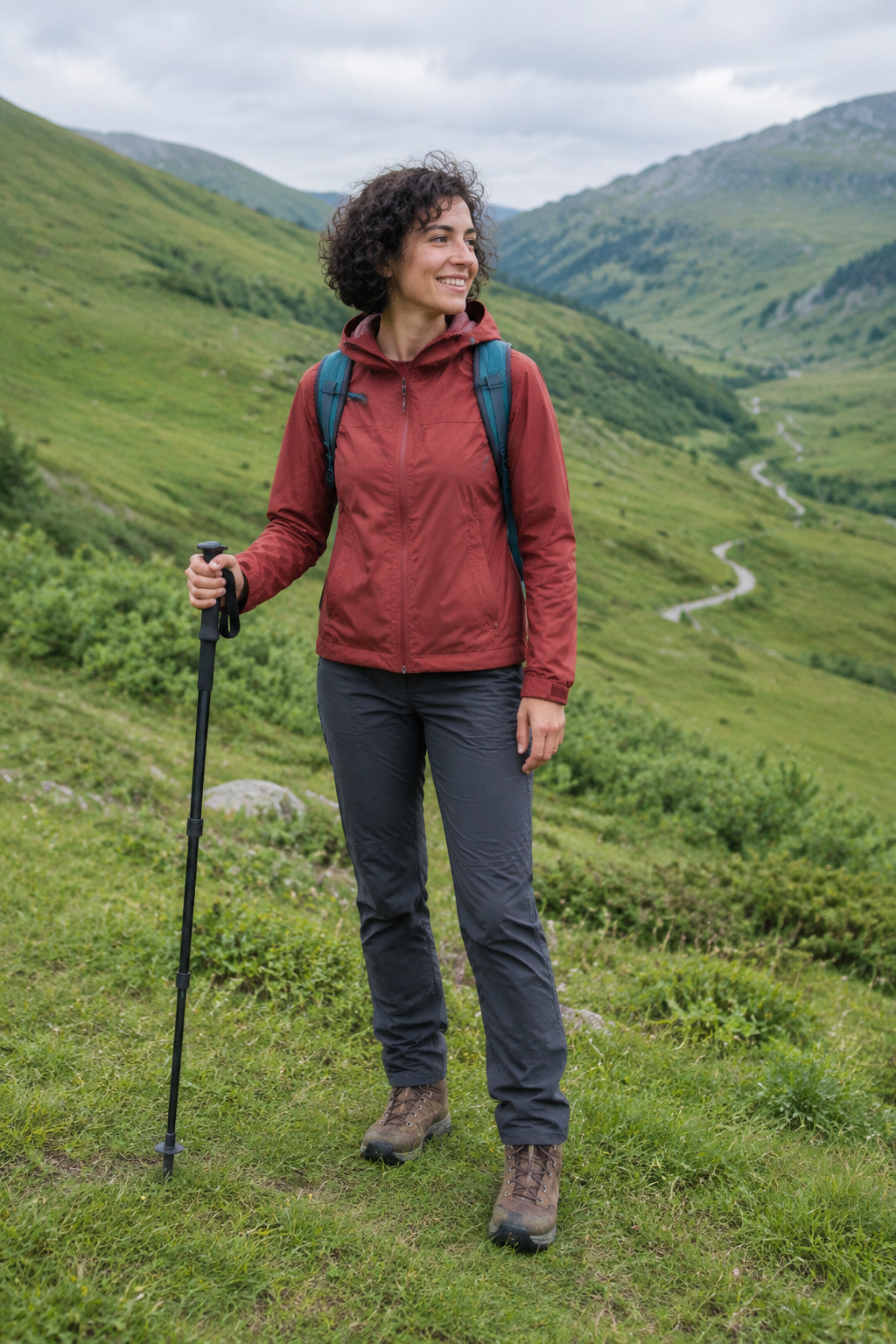
Edit this photograph by moving the same hiker from the green valley to a snow-covered alpine ridge at sunrise. Preserve her identity and recognizable facial features, short curly hair, expression, exact body pose and framing, rust-red jacket, charcoal trousers, brown boots, teal backpack, strap layout and single walking pole. Replace the grass and distant green hills with softly wind-sculpted snow and dramatic jagged snowy peaks under a pale peach dawn sky. Keep the full person and both boots visible at the same scale and position. Adapt the illumination naturally: warm sunrise rim light on the right side of her jacket and hair, soft cool blue fill from the snow, a believable contact shadow and slight boot impressions beneath her feet. Keep all clothing materials and equipment intact, no extra gear or extra people. The result must read as one convincing documentary outdoor photograph, not a cutout pasted onto a background. No advertising, text, logos, borders or watermark.

output.jpg

Transform the entire supplied home photograph into a lovingly handmade embroidery artwork on natural ivory linen, viewed straight on. Preserve the same cat's exact curled pose, gaze, silhouette, orange-black-white facial markings, white paws and wrapped tail. Preserve the relative placement of the blue cushion, wooden window and small fern so the original composition remains recognizable. Render the cat's fur using directional long-and-short stitches with subtle thread-color changes, its whiskers as fine individual strands, the cushion in soft satin stitches, the plant in delicate stem stitches, and the background in restrained running stitches with some exposed linen weave. Visible tactile thread relief and tiny handmade irregularities, softly lit physical textile, not a flat digital filter. Fill the square frame with the artwork without an embroidery hoop, decorative border, packaging, lettering, product presentation, advertising or watermark.

output.jpg

Combine these two reference photographs into one realistic wide landscape photograph. Image 1 supplies only the distinctive empty ochre-yellow canoe, its dark wooden gunwale, two bench seats, surface wear and single wooden paddle; preserve those features and its bow-pointing-right orientation. Image 2 supplies the sandstone canyon, river, camera viewpoint and late-afternoon lighting; retain its recognizable rock formations and river bend. Place exactly one canoe floating naturally on the calm water in the lower middle of image 2, occupying about one third of the frame width so the canyon remains vast. Match the boat's perspective, scale, color temperature and shadow to the canyon scene. Add a physically credible soft reflection beneath the hull and small contact ripples without changing the river's overall calmness. No shoreline from image 1, no duplicate boat, no people, no additional objects, no collage seams. Natural wilderness photograph, no text, advertising, logos, borders or watermark.

Grok Imagine Image 2.0 Edit 概览

Grok Imagine Image 2.0 Edit 是 xAI 针对专业图像修改与多素材合成打造的旗舰级编辑模型。它在权威 Image Edit Arena 榜单中名列全球第二,将编辑提升为一等公民能力,支持通过文本指令精准操控 1–3 张输入图片,具备局部魔棒级精修、多参考融图、无损背景移除与 Smart Resize 智能外延重绘等前沿功能。

为什么选择 Grok Imagine Image 2.0 Edit?

  • 多达 3 张参考图智能融合支持同时上传 1 至 3 张参考素材,模型能够智能提取并融合不同图像中的人物形象、服饰纹理与道具细节,摆脱繁琐的手动切图拼接。

  • 魔棒级局部精准编辑通过自然语言明确指定修改区域与目标变化,仅对目标物体进行重绘,完整保留其余画面的像素细节与背景结构。

  • Smart Resize 智能画幅自适应在调整宽高比(如从 1:1 扩展至 16:9 或 9:16)时,智能推断并补全周边环境与透视构图,绝无拉伸变形。

  • 主体特征与风格无缝保持在进行跨场景迁移、换装或光影微调时,深度锚定人物容貌、体态与艺术风格,确保系列物料的一致性。

  • 按需阶梯计费与全额退款保障基础输出画质计费结合每张输入图附加费(2 积分/张),计费清晰透明,生成异常自动全额返还点数。

参数

参数要求说明
prompt必填

提示词必须为 1–8,000 个字符的非空字符串。

image_urls必填

1–3 个公开 HTTP(S) 图片 URL,不允许内嵌账号密码。

n可选

整数 1–4,默认 1。

默认1234
aspect_ratio可选

支持 1:1、2:3、3:2、9:16、16:9,默认 1:1。

默认1:12:33:29:1616:9
resolution可选

选择 1K 或 2K,默认 1K。

默认1K2K
quality可选

Low 或 Medium,默认 Medium。

默认mediumlow

使用教程

  1. 准备参考素材与基础图上传 1 至 3 张清晰的公开图片 URL 作为基底或特征参考图(支持单张人像、商品图或风格样片)。

  2. 编写精准修改指令用清晰文本指明需修改、替换或添加的区域与属性(例如“将图 1 中的衬衫替换为图 2 中的皮夹克”)。

  3. 设定输出规格与画幅选择目标分辨率(1K 或 2K)、画质档位(Low 或 Medium)及目标宽高比(1:1、2:3、3:2、9:16、16:9)。

  4. 提交异步编辑任务发起 API 请求提交参数并获取唯一任务 ID,由后台图像编辑引擎执行多图特征提取与扩散重绘。

  5. 检验并获取成品轮询任务状态接口至就绪阶段,获取生成的高保真修改后图像进行下载与集成。

价格

总积分 = 输出数量 × 输出档位单价 + 输入图片数 × 2。输入附加费不随输出数量重复计收。1 积分 = $0.005。

用量费率详情
Low / 1K8 积分 / 输出图片$0.040 / 张
Medium / 1K12 积分 / 输出图片$0.060 / 张
Low / 2K12 积分 / 输出图片$0.060 / 张
Medium / 2K16 积分 / 输出图片$0.080 / 张
输入图片附加费2 积分 / 输入图片$0.010 / 张,单次请求计收一次

最佳应用场景

  • 电商商品换景换色与多图融合上传产品图与场景图,直接将产品无缝嵌入全新拍摄环境并微调材质光影,省去昂贵的实景商业摄影。

  • 虚拟模特换装与配饰搭配保留模特性貌与身形,结合服装参考图快速生成系列穿搭展示物料,保证人脸高度一致。

  • 海报画面重构与比例适配将方形或横版海报智能重构为 9:16 竖版物料,自动延伸背景景深并保持核心主体无损居中。

  • 图像瑕疵修复与背景透明化精准剔除多余杂物、替换杂乱背景为干净演播室布景或纯色透底,产出开箱即用的商用资产。

专家技巧

  • 传入多张参考图时,建议在提示词中通过序号或明确特征指代不同图片,例如“保留第一张图的人物发型与面容,穿着第二张图展示的蓝色工装外套”。
  • 进行局部修改时,明确指出“保持不变”与“改变”的边界,例如“仅将人物手中的雨伞替换为手提电脑,保持人物手势、面部及雨天街道背景完全不变”。
  • 利用 Smart Resize 进行比例扩展时,在提示词中补充周边环境的延展细节描述,如“向两侧延伸街道两侧的咖啡馆橱窗与夜市街景”。
  • 准备参考图时优先使用高对比度、主体清晰无遮挡的图像,有助于特征提取模块准确解耦主体与原背景。

注意事项

  • image_urls 为必填数组,必须包含 1 至 3 个有效的公开 HTTP(S) 图像 URL。
  • 提示词为必填参数,去除前后空格后字符长度须在 1 至 8,000 字符之间。
  • 单次输出图片张数 n 范围为 1 至 4,生成费用按最终输出数量与输入图数量叠加核算。
  • 任务执行采用异步处理机制,可根据 task_id 轮询状态或设置 callback_url 回调通知。

相关模型推荐

Grok Imagine Image 2.0 Edit API 常见问题

Grok Imagine Image 2.0 Edit API 是什么?

Grok Imagine Image 2.0 Edit 是 xAI 研发的高保真图像精准编辑模型。它结合 1 至 3 张参考图片与自然语言指令,支持局部魔棒级精修、多素材特征融合与智能画幅外延重构。基于前沿的多模态对齐扩散架构,它能够在完成换装、换景或元素修改的同时,深度保留主体的五官结构、固有材质与环境光照一致性。你可以通过 API 进行程序化调用,也可以在上方体验区直接在线试用。

Grok Imagine Image 2.0 Edit 一次最多支持传入几张参考图片?

支持传入 1 至 3 张公开 HTTP(S) 图像 URL。模型能够智能解析多张图像中的不同视觉特征,并在单次编辑任务中将它们有机融合成一张全新作品。

Grok Imagine Image 2.0 Edit 进行局部修改时如何保留原图主体?

模型具备精准的区域分割与指令对齐能力,会在内部建立目标区域遮罩。在提示词中明确指明修改对象与保持范围,即可仅重绘目标元素,原图的主体身份与周围环境细节均会获得完整保留。

Grok Imagine Image 2.0 Edit 支持智能画幅比例重构吗?

支持。借助 Smart Resize 特性,你可以将任意输入图像指定为 1:1、2:3、3:2、9:16 或 16:9 画幅,模型将依据原始透视自然延伸周边背景,避免画面拉伸或突兀裁切。

Grok Imagine Image 2.0 Edit 的计费规则是什么?

总费用由输出张数的基础画质费用加上每张输入图片 2 积分($0.010)的附加费构成。例如使用 1 张输入图生成 1 张 1K Low 图片总计 10 积分($0.050),使用 3 张输入图生成 1 张 2K Medium 图片为 22 积分($0.110)。若任务异常失败,积分全额自动退还。

Grok Imagine Image 2.0 Edit 支持背景替换与主体提取吗?

支持。通过在提示词中发出“将背景替换为现代极简工作室”或“移除背景并保留纯净透明图层”等指令,模型能够精确识别前景边缘,实现发丝级精细抠图与场景无缝重构。

如何编写 Grok Imagine Image 2.0 Edit 的编辑提示词以获得最佳效果?

建议使用“定位目标 + 执行动作 + 关联素材 + 保留限定”的语法结构,例如“选定第一张图的模特,换上第二张图的白色连衣裙,保持原有站姿、发型与室内暖光不变”,为编辑算法提供严密的控制依据。