Edit only the walking woman's coat to match the teal wool coat in the reference image. Preserve her face, hair, body, stride, coat cut, trousers, shoes, camera motion, street, lighting and timing exactly. The coat stays consistently teal in every frame. Do not alter any other object. No text, lettering, captions, logos, watermarks, brands, advertising or product packaging.
Wan 2.7 Video Edit API
alibaba/wan-2.7/video-editWan 2.7 Video Edit transforms source footage into re-imagined 720p or 1080p videos guided by natural language prompts, supporting reference image conditioning and auto duration matching. It preserves original camera motion, subject kinematics, and temporal pacing while seamlessly restyling visual aesthetics, textures, and lighting environments.
Input
375/5,000
Video Url
Reference Image Url (optional)
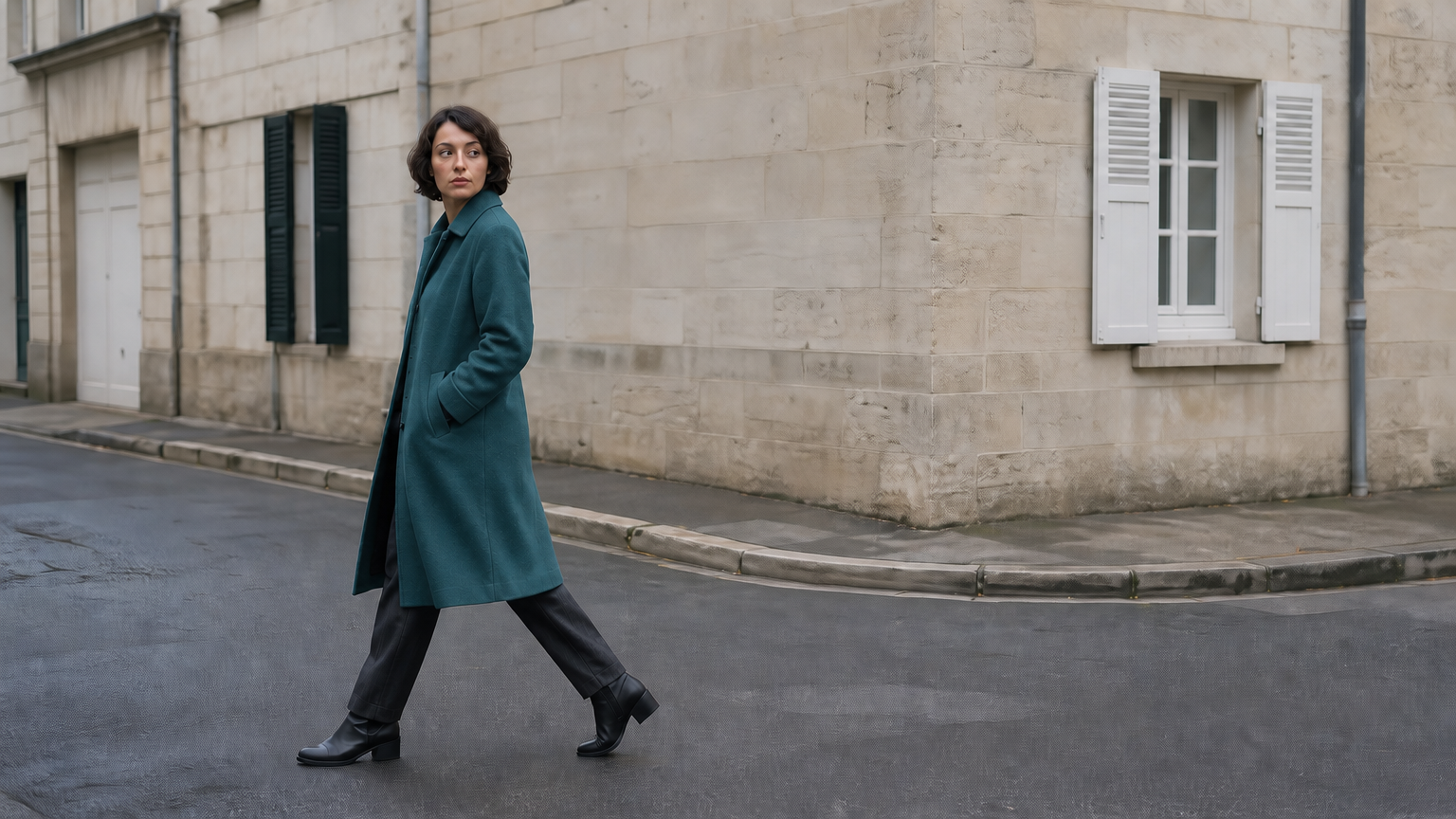
Output
ReadyContinue using
Examples
REST API Reference
Quick Start
Submit a task and query its status.
01
Step 1: Set up authentication
Create an API key in the dashboard and attach Authorization: Bearer <API_KEY> when submitting a task.
- Submit Endpoint
- POST
https://api.vidgo.ai/api/generate/submit - Authorization Header
- Authorization: Bearer VIDGO_API_KEY
02
Step 2: Submit a task
POST /api/generate/submit · alibaba/wan-2.7/video-edit
Submit Request
REQUEST_BODY=$(cat <<'JSON'
{
  "model": "alibaba/wan-2.7/video-edit",
  "input": {
    "resolution": "720p",
    "duration": 0,
    "prompt": "Describe the scene or edit",
    "aspect_ratio": "16:9",
    "video_url": "https://example.com/source.mp4"
  }
}
JSON
)

RESPONSE=$(curl --silent --show-error --fail-with-body \
  --request POST \
  --url "https://api.vidgo.ai/api/generate/submit" \
  --header "Authorization: Bearer $VIDGO_API_KEY" \
  --header "Content-Type: application/json" \
  --data "$REQUEST_BODY")

CODE=$(printf '%s' "$RESPONSE" | jq -r '.code // empty')
if [ "$CODE" != "0" ] && [ "$CODE" != "200" ]; then
  printf 'API error: %s
' "$RESPONSE" >&2
  exit 1
fi
printf '%s
' "$RESPONSE"
03
Step 3: Poll for completion
Poll with task_id while status is not_started or running, and stop at finished or failed. On success, read data.files[].file_url; on failure, read data.error_message.
Status Endpoint
GET https://api.vidgo.ai/api/generate/status/{task_id}Poll with task_id while status is not_started or running, and stop at finished or failed. On success, read data.files[].file_url; on failure, read data.error_message.
not_startedrunningfinishedfailedSubmit Response
{
  "code": 200,
  "data": {
    "task_id": "task-example",
    "status": "running",
    "created_time": "2026-09-21T08:00:00Z"
  }
}
Completed Response
{
  "code": 200,
  "data": {
    "task_id": "task-unified-...",
    "status": "finished",
    "files": [
      {
        "file_url": "https://storage.vidgo.ai/generated/video.mp4",
        "file_type": "video"
      }
    ],
    "created_time": "2026-08-22T10:00:00Z",
    "progress": 100,
    "error_message": null
  }
}
Complete executable script
Expand to review an end-to-end script with automatic polling, error handling, and timeout safeguards.
Complete executable script
set -euo pipefail
: "${VIDGO_API_KEY:?Set VIDGO_API_KEY in your environment}"

REQUEST_BODY=$(cat <<'JSON'
{
  "model": "alibaba/wan-2.7/video-edit",
  "input": {
    "resolution": "720p",
    "duration": 0,
    "prompt": "Describe the scene or edit",
    "aspect_ratio": "16:9",
    "video_url": "https://example.com/source.mp4"
  }
}
JSON
)

SUBMIT_RESPONSE=$(curl --silent --show-error --fail-with-body \
  --request POST \
  --url "https://api.vidgo.ai/api/generate/submit" \
  --header "Authorization: Bearer $VIDGO_API_KEY" \
  --header "Content-Type: application/json" \
  --data "$REQUEST_BODY")

TASK_ID=$(printf '%s' "$SUBMIT_RESPONSE" | jq -r '.data.task_id // .task_id // empty')
BUSINESS_CODE=$(printf '%s' "$SUBMIT_RESPONSE" | jq -r '.code // empty')
if [ "$BUSINESS_CODE" != "0" ] && [ "$BUSINESS_CODE" != "200" ]; then
  printf 'Submit failed:
%s
' "$SUBMIT_RESPONSE" >&2
  exit 1
fi
if [ -z "$TASK_ID" ]; then
  printf 'Submit response did not include task_id:
%s
' "$SUBMIT_RESPONSE" >&2
  exit 1
fi

START_TIME=$(date +%s)
POLL_DELAY=2
while true; do
  if [ $(( $(date +%s) - START_TIME )) -ge 600 ]; then
    printf 'Timed out after 600 seconds
' >&2
    exit 1
  fi
  STATUS_RESPONSE=$(curl --silent --show-error --fail-with-body \
    --url "https://api.vidgo.ai/api/generate/status/$TASK_ID" \
    --header "Authorization: Bearer $VIDGO_API_KEY")
  STATUS=$(printf '%s' "$STATUS_RESPONSE" | jq -r '.data.status // .status // empty')
  BUSINESS_CODE=$(printf '%s' "$STATUS_RESPONSE" | jq -r '.code // empty')
  if [ "$BUSINESS_CODE" != "0" ] && [ "$BUSINESS_CODE" != "200" ]; then
    printf 'Status request failed:
%s
' "$STATUS_RESPONSE" >&2
    exit 1
  fi

  case "$STATUS" in
    finished)
      printf '%s' "$STATUS_RESPONSE" | jq -r '(.data.files // .files // [])[]?.file_url'
      break
      ;;
    failed)
      printf '%s' "$STATUS_RESPONSE" | jq -r '.data.error_message // .error_message // "Generation failed"' >&2
      exit 1
      ;;
    not_started|running)
      sleep "$POLL_DELAY"
      if [ "$POLL_DELAY" -lt 10 ]; then POLL_DELAY=$((POLL_DELAY + 1)); fi
      ;;
    *)
      printf 'Unexpected task status: %s
' "$STATUS" >&2
      exit 1
      ;;
  esac
done
Request Parameters (input object)
Supported generation parameters inside the input object when submitting to /api/generate/submit:
| Field | Type | Required | Default | Description |
|---|---|---|---|---|
| prompt | string | Yes | — | Prompt, trimmed; maximum 5,000 Unicode characters. Optional for image-to-video. |
| reference_image_url | string | No | — | One optional reference image: HTTP(S), Data URI or Base64. |
| video_url | string | Yes | — | Public HTTP(S) video URL. Required for video editing; optional for image-to-video. |
| aspect_ratio | string | No | 16:9 | 16:9, 9:16, 1:1, 4:3 or 3:4. Default: 16:9. |
| resolution | string | No | 720p | 720p or 1080p. Default: 720p. |
| duration | integer | No | 0 | 0 (default, detect source duration and round down) or 2–10 whole seconds. Auto source: 2–10 seconds, at most 100 MiB. |
| multi_shots | boolean | No | — | Optional multi-shot control. Omitted by default. |
| audio_setting | string | No | — | Optional audio setting string forwarded to the provider; omitted by default. |
| seed | integer | No | — | Optional integer from 0 to 2147483647. |
| enable_safety_checker | boolean | No | — | Optional safety checker setting; omitted by default. |
Response Fields (Status Query)
Details returned by GET /api/generate/status/{task_id}:
| Field | Type | Description |
|---|---|---|
| code | integer | HTTP/business response status code (200 indicates success). |
| data.task_id | string | Globally unique task identifier. |
| data.status | string | Task lifecycle state: not_started, running, finished, or failed. |
| data.files | array | Array of output assets containing file_url and file_type upon completion. |
| data.error_message | string | null | Error diagnostic details if the task status is failed. |
Task Lifecycle
Clients should poll status until reaching either the finished or failed terminal state:
not_startedQueued
runningGenerating
finishedReady
failedFailed
Polling & Error Handling
- Polling frequencyStart polling with a 2 to 3-second interval, gradually increasing to 5 seconds for extended takes.
- Network resiliencyTransient 5xx responses or timeouts do not signify task failure; retry status requests after a short backoff.
- Webhook callbacksProvide a top-level callback_url in your submission payload to receive completion notifications automatically.
Specifications
| Specification | Value | Description |
|---|---|---|
| Model | alibaba/wan-2.7/video-edit | |
| Resolution | 720p / 1080p | Default: 720p |
| Duration | 0 (default, detect source duration and round down) or 2–10 whole seconds. Auto source: 2–10 seconds, at most 100 MiB. |
Wan 2.7 Video Edit Overview
Wan 2.7 Video Edit enables instruction-based video recreation and restyling powered by Alibaba Tongyi Lab's Diffusion Transformer architecture. By providing an existing video along with descriptive text commands and an optional style reference image, users can alter artistic styles, swap lighting atmospheres, or retexture characters while preserving original camera trajectories and physical motion beats without manual rotoscoping.
Why Choose Wan 2.7 Video Edit?
Instruction-based video recreationApply natural language commands to retexture environments, modify clothing, or re-render scenes into anime, cinematic realism, or vintage film aesthetics.
Preserve motion and camera trajectoriesKeep the source video's camera choreography, subject choreography, and physical acceleration completely intact across edits.
Optional reference image conditioningSupply a single image via reference_image_url to transfer specific character faces, product materials, or color palettes directly onto the footage.
Automatic source duration matchingSet duration to 0 to automatically detect source clip length between 2 and 10 seconds and render matching whole-second output.
Customizable aspect ratios and multi-shot flowOutput in 16:9, 9:16, 1:1, 4:3, or 3:4 aspect ratios and activate multi_shots for dynamic multi-angle visual restructuring.
Parameters
| Parameter | Requirement | Description |
|---|---|---|
| prompt | Yes | Prompt, trimmed; maximum 5,000 Unicode characters. Optional for image-to-video. Default — |
| reference_image_url | No | One optional reference image: HTTP(S), Data URI or Base64. Default — |
| video_url | Yes | Public HTTP(S) video URL. Required for video editing; optional for image-to-video. Default — |
| aspect_ratio | No | 16:9, 9:16, 1:1, 4:3 or 3:4. Default: 16:9. Default 16:9 |
| resolution | No | 720p or 1080p. Default: 720p. Default 720p |
| duration | No | 0 (default, detect source duration and round down) or 2–10 whole seconds. Auto source: 2–10 seconds, at most 100 MiB. Default 0 |
| multi_shots | No | Optional multi-shot control. Omitted by default. Default — |
| audio_setting | No | Optional audio setting string forwarded to the provider; omitted by default. Default — |
| seed | No | Optional integer from 0 to 2147483647. Default — |
| enable_safety_checker | No | Optional safety checker setting; omitted by default. Default — |
How to Use Wan 2.7 Video Edit
Provide source video and reference imageInput a public URL to your original video clip (2–10s) and optionally attach a reference image for style or character transfer.
Specify editing instructionsWrite a precise prompt describing desired style transfers, environmental changes, or lighting adjustments, and configure duration.
Submit task and retrieve edited videoExecute via API or Playground, poll task status until completion, and download the finished MP4 video.
Pricing
Credits = output seconds × resolution rate. Auto duration rounds source duration down to whole seconds. Failed tasks are refunded automatically.
| Usage | Rate | Details |
|---|---|---|
| 720p | 12 credits/s ($0.06/s) | All four workflows use the same rate. |
| 1080p | 18 credits/s ($0.09/s) | All four workflows use the same rate. |
Best Use Cases
Live-action to animation stylizationConvert smartphone or camera recordings into anime, oil painting, or cyberpunk stylized animations while keeping authentic movement.
Atmospheric and lighting transitionsShift daytime footage to golden hour sunset, rainy nighttime, or surreal neon environments with consistent shadow movement.
Character and wardrobe restylingRedress actors in costume, swap character hair and clothing textures, and incorporate reference image identities seamlessly.
Commercial video adaptationRapidly restyle promotional product clips for diverse thematic campaigns or localized branding aesthetics without re-shooting.
Pro Tips for Wan 2.7 Video Edit
- Frame instructions as modifications rather than descriptions:Focus on changes like 'convert scene to retro anime aesthetic' or 'replace background with glowing cyberpunk city' rather than recounting the entire clip.
- Use reference images for precise color grading and character features:Provide a clean reference image via reference_image_url to transfer exact color swatches or facial likenesses into the recreated video.
- Set duration to 0 for automatic synchronization:Allow the model to analyze source footage length directly to produce an edit that matches your original video timing.
- Keep camera motion stable in source footage:Clean, steady camera pans or stable tracking shots yield cleaner edge adherence and fewer temporal artifacts during intense style swaps.
Notes
- Source video duration limits:Source videos should be between 2 and 10 seconds for automatic duration matching. Clips outside this range may fail detection.
- Prompt and video requirements:Both prompt and video_url are mandatory parameters for the Video Edit endpoint.
- Automatic credit refund:If a task fails validation or processing due to network or encoding issues, all deducted credits are immediately refunded.
Wan 2.7 Video Edit API frequently asked questions
What is the Wan 2.7 Video Edit API?
Wan 2.7 Video Edit is an Alibaba Tongyi Lab model for instruction-based video recreation and restyling. It transforms source footage into re-imagined 720p or 1080p videos guided by natural language prompts, supporting reference image conditioning, auto duration matching, and multi-shot flow. Built on a Diffusion Transformer architecture with Wan-VAE 3D temporal compression, it preserves original camera motion, subject kinematics, and temporal pacing while restyling visual textures and lighting. You can call it programmatically or try it from the playground above.
Which source video formats does Wan 2.7 Video Edit support?
Wan 2.7 Video Edit accepts standard MP4 and MOV videos accessible via public HTTP or HTTPS URLs. The source footage should feature clear visual elements and a duration between 2 and 10 seconds for optimal restyling.
How does auto duration work in Wan 2.7 Video Edit?
When duration is set to 0 or omitted, the system measures the length of your input source video between 2 and 10 seconds and rounds down to the nearest whole second. Generation and credit billing both proceed using that exact rounded duration.
How can you use a reference image in Wan 2.7 Video Edit?
You can provide a single image URL or Data URI in the reference_image_url field. The model extracts visual style, color palettes, or subject features from the reference image and applies them across the source video sequence.
How does Wan 2.7 Video Edit preserve camera movement from the source video?
The model uses temporal cross-attention layers to analyze the optical flow and camera trajectories of the source video. It anchors spatial translations and panning angles so that the newly generated aesthetics follow the original camera path faithfully.
How does Wan 2.7 Video Edit handle audio from the original video?
You can configure the audio_setting parameter to direct audio behavior for the output video. The platform coordinates video timing with the audio stream to deliver a cohesive audiovisual delivery.
How is billing calculated for Wan 2.7 Video Edit tasks?
Billing is calculated by multiplying the output video duration in whole seconds by the resolution rate of 12 credits per second for 720p or 18 credits per second for 1080p. If a generation task fails or is rejected, all deducted credits are fully and immediately refunded.