GPT Image 2.6 Flare Text to Image API

openai/gpt-image-2.6-flare/text-to-image
1K · 2K · 4K

GPT Image 2.6 Flare Text to Image turns text prompts into 1K–4K images with fast low-quality drafts, legible poster typography and transparent backgrounds. It places headlines, subjects and props where the prompt puts them, so one prompt carries a concept from quick draft to final quality.

Get API Key
Input
Required832/32000
Optional
Optional
Optional
Optional
Optional
Optional
Optional
OutputReady

Maximum upfront charge: 5.50 credits · $0.02750

Billed by actual tokens. Any difference is refunded after completion.

Continue using

Examples

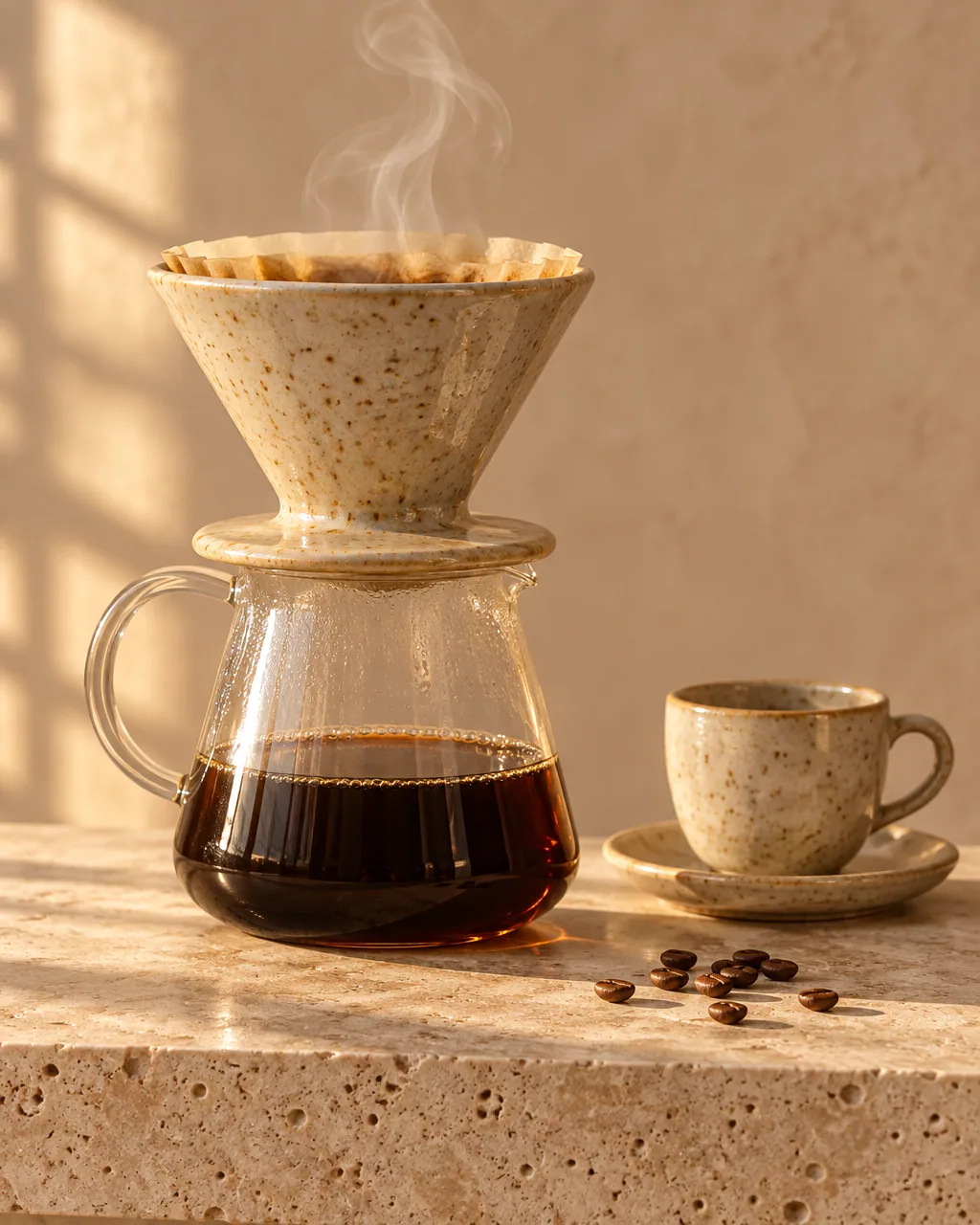
output-1e47045815f2.png

Premium commercial product photograph of an unbranded handmade stoneware pour-over coffee dripper in speckled oatmeal glaze, seated on a clear borosilicate glass carafe half filled with dark coffee. A thin wisp of steam rises from the dripper. Beside it on the right: a small matching speckled cup on a saucer and a few whole coffee beans scattered naturally. Everything rests on a honed cream travertine slab with visible pores. Soft early-morning window light from the left casts long gentle shadows and a warm rim highlight on the glaze; background is a softly blurred warm plaster wall. Eye-level 50mm lens, shallow depth of field, crisp focus on the dripper rim, realistic glass refraction and liquid. Calm minimal styling, no text, no logos, no brand marks, no watermark.
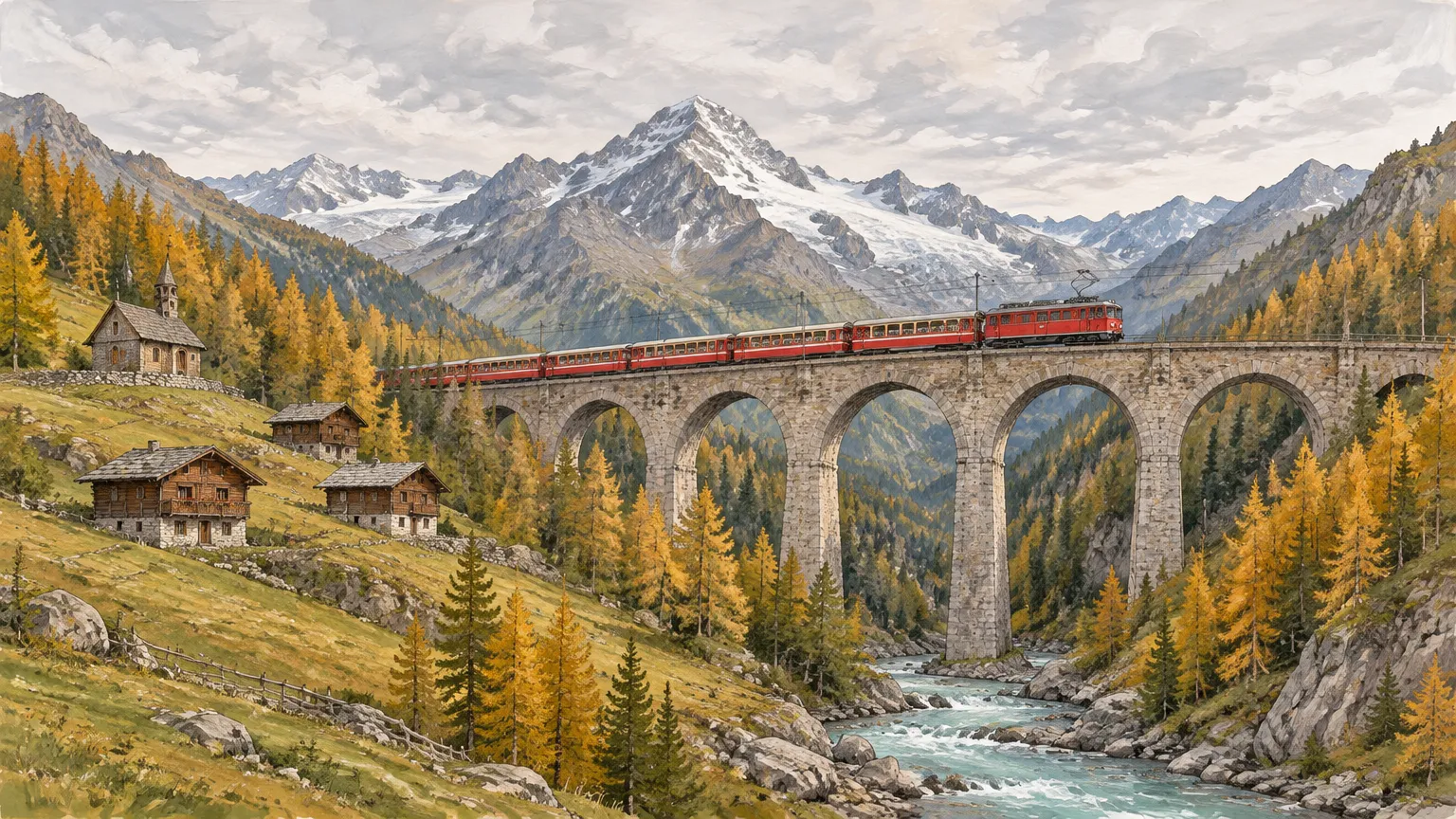
output-3c6814b29e5b.webp

A wide gouache-and-ink landscape illustration of a small red mountain train crossing a curved stone viaduct high above a green alpine valley. Snow-dusted granite peaks rise behind under a pale overcast sky that fills the top third of the frame. A turquoise glacial river winds along the valley floor between larch forests turning gold, with a tiny wooden chapel and three chalets on the left slope. Visible brush texture, crisp ink linework, gentle atmospheric perspective, calm late-afternoon light. Wide cinematic composition with the viaduct across the middle third. No people in close-up, no text, no logos, no watermark.

GPT Image 2.6 Flare Text to Image

GPT Image 2.6 Flare Text to Image uses the faster of the two models in OpenAI’s Images 2.6 release, launched on November 4, 2026. OpenAI reports about 50% faster generation on average than earlier models, roughly six-second results at low quality, and better layout for posters and product shots. Render at 1K, 2K or 4K with presets or custom sizes, and use the new compression, moderation and planning controls.

Why Choose GPT Image 2.6 Flare Text to Image?

  • Fast drafts at low qualityOpenAI positions Flare for quick iteration and cites about six seconds per image at low quality, so you can test compositions and copy before moving to higher tiers.

  • Layout and lettering for postersImproved layout for posters and product visuals keeps headlines, captions and subjects where the prompt places them. Quote the exact words you want rendered.

  • Planning control with complexityChoose low, medium or high complexity to set how much the model plans before rendering. It works independently of quality and costs the same at every level.

  • Lighter files with output_compressionExport jpeg or webp with output_compression from 0 to 100 and deliver web-ready assets straight from the API.

  • Any size at any resolutionUse 10 presets, auto or a custom WIDTHxHEIGHT at 1K, 2K or 4K. auto is billed at 1K, and custom sizes follow their pixel tier.

  • Token billing with a known ceilingYou pay for actual text and image tokens. The upfront hold is the most a task can cost, and the unused part returns to your balance when it finishes.

Parameters

ParameterRequirementDescription
promptRequired

Non-blank text, up to 32,000 characters.

sizeOptional

Default 1:1. Ratios: auto, 1:1, 2:3, 3:2, 4:3, 3:4, 4:5, 5:4, 16:9, 9:16, 21:9, or custom WIDTHxHEIGHT. auto works at any resolution and is billed at 1K. Custom WIDTHxHEIGHT works at any resolution: positive multiples of 16, maximum edge 3840, ratio at most 3:1 and 655360–8294400 pixels, billed at the higher of the selected resolution and its pixel tier (up to 1,572,864 px 1K, up to 4,194,304 px 2K, above that 4K).

Default1:1
resolutionOptional

1K, 2K or 4K. Default 1K.

Default1K2K4K
output_formatOptional

png, jpeg or webp. Default png.

Defaultpngjpegwebp
qualityOptional

low, medium, high, xhigh or max. Default high. Quality and the billing tier set the upfront cap; final billing uses actual tokens.

Defaulthighlowmediumxhighmax
backgroundOptional

auto, transparent or opaque. Default auto. transparent requires png or webp.

Defaultautotransparentopaque
output_compressionOptional

Integer from 0 to 100 for jpeg or webp output. Leave empty for the default compression.

moderationOptional

auto or low. Default auto; low applies less restrictive filtering. Does not change the price.

Defaultautolow
complexityOptional

low, medium or high. Default high. Sets how much the model plans before rendering and does not change the price.

Defaulthighlowmedium

How to Use

  1. Write the promptDescribe the subject, layout, lighting and style. Put any words that should appear in the image inside straight double quotes.

  2. Pick size and resolutionChoose a preset such as 2:3 for posters or 16:9 for banners, auto, or a custom WIDTHxHEIGHT, then 1K, 2K or 4K.

  3. Set quality and planningStart with low or medium quality for drafts. Keep complexity at high for scenes with many constrained elements.

  4. Choose the file formatUse png for transparency or lossless files, or jpeg and webp with output_compression for lighter files.

  5. Run and collect the imageSubmit the task and read the image URL from the result once its status is finished.

Usage and Pricing

Billed by actual text input, image input and image output tokens. 1 credit = $0.005.

An upfront cap is held at submission from quality and billing tier, from 5.50 credits at low 1K to 142.34 credits at max 4K. The cap is the most a task can cost: after completion, actual tokens are settled and the difference is refunded, and failed tasks are refunded in full.

Usage and Pricing
UsageCredits / 1M tokensUSD / 1M tokens
Text input800$4.00
Image input1,280$6.40
Image output4,800$24.00

Best Use Cases

  • Posters, banners and social graphicsDraft layouts with headlines and captions at low quality, then re-run the chosen prompt at high quality for delivery.

  • Product shots and ad conceptsExplore surfaces, lighting and props around a product in 4:5, 1:1 or 16:9 before committing to a final render.

  • Web-ready illustrationsGenerate webp or jpeg with output_compression for blog headers and landing pages without a separate compression step.

  • Transparent design assetsCreate stickers, icons and spot illustrations as transparent PNG or WebP for direct use in layouts.

Pro Tips

  • Quote exact text: wrap headlines and labels in straight double quotes and state that they are the only words, as in the Port Alder poster example.
  • Draft cheap, finish sharp: keep the prompt fixed and move from low to high quality once the composition works.
  • Use complexity deliberately: keep the high default for crowded scenes and try low for simple single-subject images.
  • Match formats to features: transparency needs png or webp, and output_compression applies to jpeg and webp.

Notes

  • Each request returns one image. prompt accepts up to 32,000 characters.
  • The upfront cap depends on quality and billing tier; complexity and moderation leave the price unchanged.
  • To edit existing images or combine up to 16 references, use GPT Image 2.6 Flare Image Edit.
  • Tasks run asynchronously: submission returns a task_id, and the finished status carries the image URL.

Related Models

GPT Image 2.6 Flare Text to Image API FAQ

What is the GPT Image 2.6 Flare Text to Image API?

GPT Image 2.6 Flare Text to Image is an OpenAI model for generating images from text prompts. It produces one 1K, 2K or 4K image per request with fast low-quality drafts, poster-ready typography, transparent backgrounds and five quality tiers from low to max. Built on OpenAI’s Images 2.6 release, it keeps the GPT Image 2.5 request fields and adds complexity, moderation and output_compression for planning, filtering and file-size control. You can call it programmatically or try it from the playground above.

How fast is GPT Image 2.6 Flare at low quality?

According to OpenAI, Flare can finish a low-quality image in about six seconds, and Images 2.6 generates about 50% faster on average than earlier models. Higher quality tiers, larger resolutions and higher complexity take longer, so draft at low quality and raise the tier once the composition is settled.

What changed from GPT Image 2.5 Flare to GPT Image 2.6 Flare?

GPT Image 2.6 Flare accepts every 2.5 Flare field and adds output_compression, moderation and complexity. Token rates stay the same, while the upfront cap at low and medium quality is higher on 2.6: 5.50 and 9.50 credits at 1K, compared with 1.31 and 2.95 on 2.5. Choose 2.5 Flare for the lowest caps, or 2.6 for the new controls and faster generation.

How does complexity affect GPT Image 2.6 Flare Text to Image?

complexity sets how much the model plans before rendering: low, medium or high, with high as the default. It is separate from quality, which controls visual fidelity, and it leaves the price unchanged. Lower values suit simple single-subject images; keep high for scenes with many elements or layout constraints.

Can GPT Image 2.6 Flare Text to Image render poster text?

Yes. Put the exact words in straight double quotes and say they are the only text. The Port Alder example on this page renders a headline, a subtitle and a date line from a single low-quality request, and OpenAI cites improved layout for posters and product visuals in Flare.

Does GPT Image 2.6 Flare Text to Image support output_compression?

Yes, for jpeg and webp output. Send an integer from 0 to 100, or leave it out for the default compression. The alpine railway example uses webp with output_compression 80. For lossless files or transparency, choose png.

Which sizes does GPT Image 2.6 Flare Text to Image support?

Ten presets from 1:1 to 21:9, auto, and custom WIDTHxHEIGHT, all at 1K, 2K or 4K. auto is billed at 1K. Custom sizes use multiples of 16, an edge of at most 3840 and a ratio up to 3:1, and are billed at the higher of the chosen resolution and their pixel tier.

How is GPT Image 2.6 Flare Text to Image billed?

By actual tokens: 800 credits ($4) per 1M text input tokens and 4,800 credits ($24) per 1M image output tokens, with 1 credit = $0.005. A cap from 5.50 credits (low, 1K) to 142.34 credits (max, 4K) is held at submission, and the unused amount is refunded when the task finishes.