GPT Image 2.6 Sunburst Text to Image API

openai/gpt-image-2.6-sunburst/text-to-image
1K · 2K · 4K

GPT Image 2.6 Sunburst Text to Image turns detailed text prompts into 1K–4K images with fine material texture, crowded multi-element layouts and quality up to max. It keeps long scene descriptions in order, placing subjects, props and light where the prompt puts them.

Get API Key
Input
Required1060/32000
Optional
Optional
Optional
Optional
Optional
Optional
Optional
OutputReady

Maximum upfront charge: 10.58 credits · $0.05290

Billed by actual tokens. Any difference is refunded after completion.

Continue using

Examples

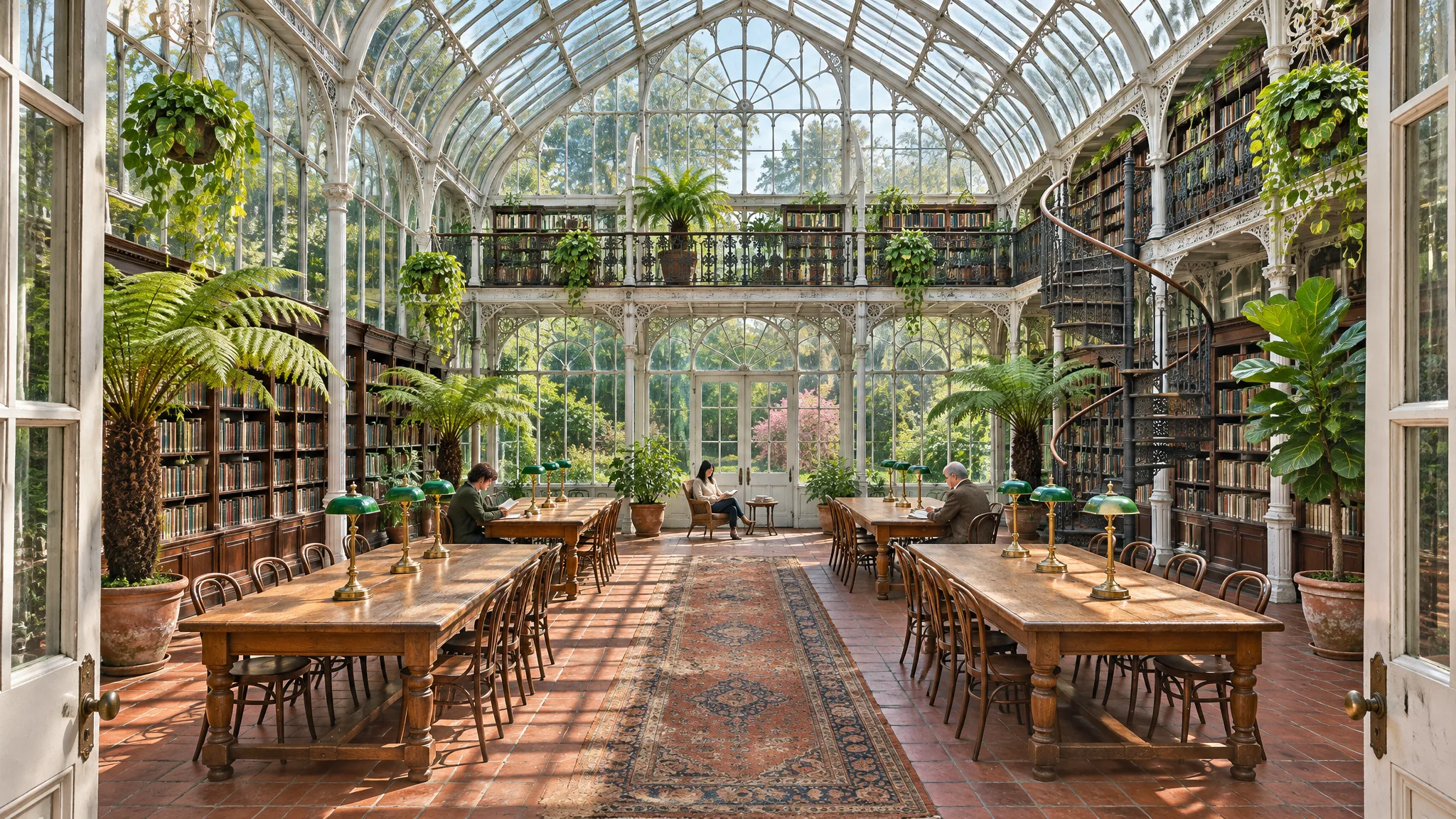
output-ff33e6b79305.png

Architectural interior photograph of a restored Victorian glasshouse converted into a public reading room. A tall white-painted cast-iron frame with curved glass roof panes; morning sun throws a grid of soft shadows across the floor. Two levels: on the ground floor, four long oak reading tables with green-shaded brass lamps run toward the back; along both sides, dark walnut bookshelves filled with books stand between potted tree ferns, a fiddle-leaf fig and hanging trailing pothos. A wrought-iron spiral staircase on the right leads to a narrow mezzanine balcony with more shelves. A terracotta tile floor with a worn runner rug in rust and indigo. Three readers seated far apart, small in the frame, faces not prominent. Central one-point perspective from the entrance, straight verticals, rich but natural color, fine detail in glass reflections, leaves and book spines without readable titles. No text, no signage, no logos, no watermark.
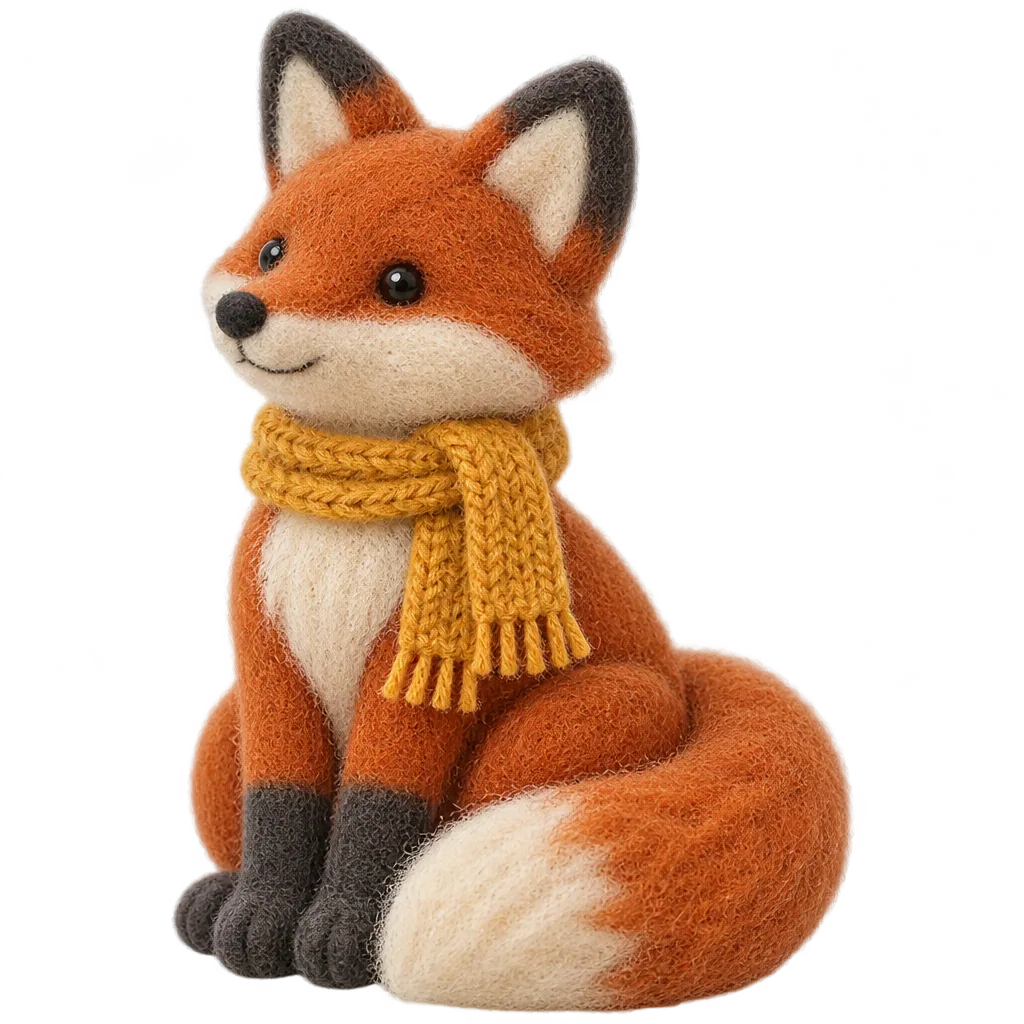
output-d2fe630b675d.png

A single handmade needle-felted wool fox toy sitting upright, facing three-quarters to the left, isolated on a fully transparent background. Rust-orange felt body with a cream chest and muzzle, charcoal felt paws and ear tips, a big fluffy tail curled around its front feet, small black glass bead eyes, a hand-knitted mustard-yellow scarf with tiny fringe. Visible wool fibers and soft fuzzy edges, gentle studio lighting from the upper left, a believable small contact shadow is not needed. The whole toy fully in frame with even margins. No background, no floor, no text, no logos, no watermark.
GPT Image 2.6 Sunburst Text to Image

GPT Image 2.6 Sunburst Text to Image uses the detail-focused model in OpenAI’s Images 2.6 release from November 2026. OpenAI positions Sunburst for work that needs more precision, with higher-quality results at medium and high quality. It reads prompts up to 32,000 characters, renders at 1K, 2K or 4K with presets or custom sizes, and adds complexity for planning control and output_compression for lighter jpeg or webp files.

Why Choose GPT Image 2.6 Sunburst Text to Image?

  • Detail at medium and high qualityOpenAI positions Sunburst for higher-quality generation at medium and high quality, suited to skin, wood grain, fabric and glass.

  • Complex scenes kept in orderWith complexity at its high default, the model plans crowded layouts before rendering, such as a two-level reading room with readers, lamps, shelves and a spiral staircase.

  • Long, structured promptsDescribe subject, spatial layout, materials and lighting in up to 32,000 characters.

  • Up to 4K and max qualityRender 2K or 4K at xhigh or max for print and large displays; custom sizes reach a 3840-pixel edge.

  • Transparent and compressed outputsExport transparent PNG or WebP assets, or jpeg and webp with output_compression for web delivery.

  • Same rates as FlareSunburst and Flare share token rates and upfront caps, so you choose between them by quality needs.

Parameters

ParameterRequirementDescription
promptRequired

Non-blank text, up to 32,000 characters.

sizeOptional

Default 1:1. Ratios: auto, 1:1, 2:3, 3:2, 4:3, 3:4, 4:5, 5:4, 16:9, 9:16, 21:9, or custom WIDTHxHEIGHT. auto works at any resolution and is billed at 1K. Custom WIDTHxHEIGHT works at any resolution: positive multiples of 16, maximum edge 3840, ratio at most 3:1 and 655360–8294400 pixels, billed at the higher of the selected resolution and its pixel tier (up to 1,572,864 px 1K, up to 4,194,304 px 2K, above that 4K).

Default1:1
resolutionOptional

1K, 2K or 4K. Default 1K.

Default1K2K4K
output_formatOptional

png, jpeg or webp. Default png.

Defaultpngjpegwebp
qualityOptional

low, medium, high, xhigh or max. Default high. Quality and the billing tier set the upfront cap; final billing uses actual tokens.

Defaulthighlowmediumxhighmax
backgroundOptional

auto, transparent or opaque. Default auto. transparent requires png or webp.

Defaultautotransparentopaque
output_compressionOptional

Integer from 0 to 100 for jpeg or webp output. Leave empty for the default compression.

moderationOptional

auto or low. Default auto; low applies less restrictive filtering. Does not change the price.

Defaultautolow
complexityOptional

low, medium or high. Default high. Sets how much the model plans before rendering and does not change the price.

Defaulthighlowmedium

How to Use

  1. Structure the promptWrite the subject, spatial layout, materials and lighting in that order. Long, specific prompts work well.

  2. Set resolution and sizePick 2K or 4K for detailed finals, with a preset, auto or a custom WIDTHxHEIGHT.

  3. Choose qualityUse medium for reviews and high, xhigh or max for final renders.

  4. Tune planningKeep complexity at high for scenes with many elements, and lower it for simple subjects.

  5. Run and retrieveSubmit the task and read the image URL once its status is finished.

Usage and Pricing

Billed by actual text input, image input and image output tokens. 1 credit = $0.005.

An upfront cap is held at submission from quality and billing tier, from 5.50 credits at low 1K to 142.34 credits at max 4K. The cap is the most a task can cost: after completion, actual tokens are settled and the difference is refunded, and failed tasks are refunded in full.

Usage and Pricing
UsageCredits / 1M tokensUSD / 1M tokens
Text input800$4.00
Image input1,280$6.40
Image output4,800$24.00

Best Use Cases

  • Editorial and documentary-style imageryPortraits at work, interiors and still lifes with believable texture and light, like the luthier example.

  • Architecture and interior conceptsMulti-level spaces with consistent perspective, furniture and planting.

  • Mascots and character assetsCharacters and toys on transparent backgrounds for packaging, stickers and campaigns.

  • Print and large-format finals4K output at xhigh or max for posters, signage and displays.

Pro Tips

  • Name materials and light directions explicitly, such as pale flamed maple or raking window light from the right.
  • Describe spatial order for crowded scenes: foreground to background and left to right.
  • Preview at medium and 1K, then re-run the same prompt at 2K or 4K with higher quality.
  • For transparent assets, describe the subject alone with even margins and choose png or webp.

Notes

  • Each request returns one image. prompt accepts up to 32,000 characters.
  • The upfront cap depends on quality and billing tier; complexity and moderation leave the price unchanged.
  • To edit or combine reference images, use GPT Image 2.6 Sunburst Image Edit.
  • Tasks run asynchronously: submission returns a task_id, and the finished status carries the image URL.

Related Models

GPT Image 2.6 Sunburst Text to Image API FAQ

What is the GPT Image 2.6 Sunburst Text to Image API?

GPT Image 2.6 Sunburst Text to Image is an OpenAI model for generating detailed images from text. It renders one 1K, 2K or 4K image per request from prompts up to 32,000 characters, with five quality tiers up to max, transparent backgrounds and custom sizes. As the precision model of OpenAI’s Images 2.6 release, it plans complex layouts before rendering and adds complexity, moderation and output_compression controls. You can call it programmatically or try it from the playground above.

When should I pick GPT Image 2.6 Sunburst over Flare?

Pick Sunburst when detail matters more than turnaround: material texture, crowded scenes and finals for print. OpenAI positions Flare for fast iteration, with about six-second results at low quality. Both share fields and prices, so you can draft on Flare and finish on Sunburst with the same prompt.

How does GPT Image 2.6 Sunburst Text to Image handle complex scenes?

Keep complexity at high, its default, so the model plans the layout before rendering, and describe the spatial order explicitly. The glasshouse reading room example places long tables, lamps, a spiral staircase and a mezzanine in one 2K frame at medium quality.

Which quality should I use with GPT Image 2.6 Sunburst Text to Image?

Medium for reviews and most web images, high for detailed finals, and xhigh or max for print or 4K displays. Quality also sets the upfront cap, from 9.50 credits at medium 1K to 142.34 credits at max 4K, while the final charge follows actual tokens.

What does GPT Image 2.6 Sunburst add over GPT Image 2.5 Sunburst?

It keeps every 2.5 Sunburst field and adds output_compression, moderation and complexity, on OpenAI’s newer Images 2.6 model. Token rates are the same; the upfront cap is higher at low and medium quality (5.50 and 9.50 credits at 1K, versus 1.31 and 2.95), and identical from high to max.

Can GPT Image 2.6 Sunburst Text to Image make transparent assets?

Yes. Set background to transparent with png or webp output and describe the subject alone, like the felt fox mascot example on this page.

What image sizes does GPT Image 2.6 Sunburst Text to Image support?

1K, 2K and 4K with ten presets, auto or a custom WIDTHxHEIGHT up to a 3840-pixel edge. auto is billed at 1K; a custom size is billed at the higher of the chosen resolution and its pixel tier.

How is GPT Image 2.6 Sunburst Text to Image billed?

By actual tokens: 800 credits ($4) per 1M text input tokens and 4,800 credits ($24) per 1M image output tokens, with 1 credit = $0.005. The quality-and-tier cap is held at submission, for example 10.58 credits at the default high quality and 1K, and the unused part is refunded.