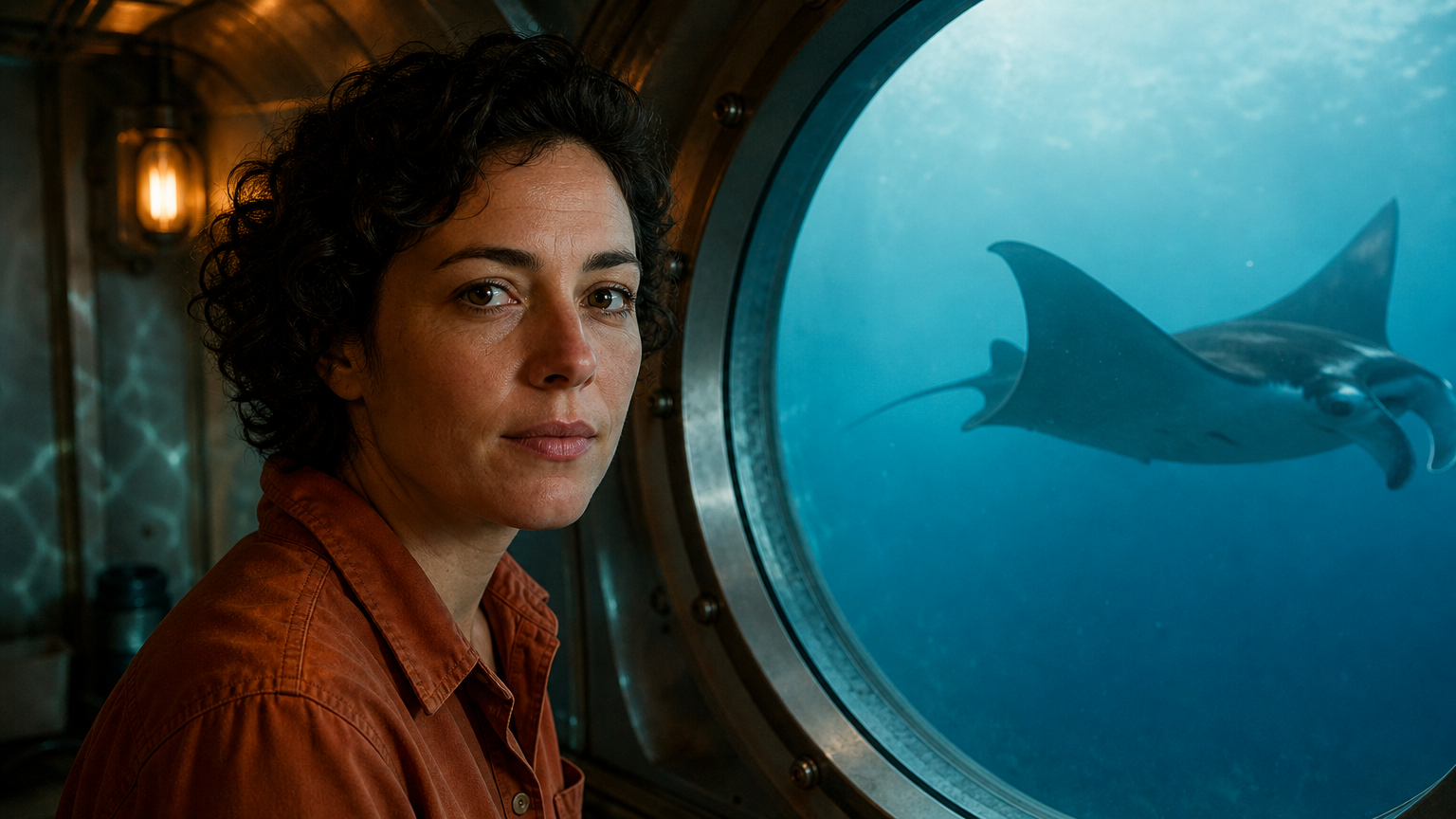
Animate this exact underwater observation cabin in one continuous five-second shot. Preserve the researcher's identity, orange shirt, cabin and round window. She turns her face slightly toward the camera, smiles with quiet surprise and says clearly in English, 'We have company.' Natural synchronized lips, eyes and subtle expression; finish the sentence by the fourth second. Outside the window, the single manta ray continues gliding forward toward the right edge of the window, gently moving its broad fins. Faint moving blue caustics play on the cabin wall. Fixed camera, believable human movement and stable facial features. Native audio: her warm close voice, low enclosed cabin ventilation and a distant muted watery rumble. No music, subtitles, text, added characters or cuts.
Kling 2.6 Pro Image to Video API
kwaivgi/kling-v2.6-pro/image-to-videoKling 2.6 Pro Image to Video animates still images into 1080p cinematic videos, supporting single start-frame generation, optional dual-keyframe control, and native synchronized audio. It injects natural kinetic motion into static visuals while faithfully preserving the original subject identity, clothing textures, and perspective framing.
784/1,000
Examples
REST API Reference
Quick Start
Submit a task and query its status. URLs using example.com or your-domain.com are placeholders; replace image and callback URLs with your own publicly accessible URLs. Output file URLs are illustrative.
Step 1: Set up authentication
Create an API key in the dashboard and attach Authorization: Bearer <API_KEY> when submitting a task.
- Submit Endpoint
- POST
https://api.vidgo.ai/api/generate/submit - Authorization Header
- Authorization: Bearer VIDGO_API_KEY
Step 2: Submit a task
POST /api/generate/submit: kwaivgi/kling-v2.6-pro/image-to-video
REQUEST_BODY=$(cat <<'JSON'
{
  "model": "kwaivgi/kling-v2.6-pro/image-to-video",
  "input": {
    "prompt": "A slow camera pan across a sunlit garden.",
    "duration": 5,
    "sound": false,
    "aspect_ratio": "16:9",
    "image_urls": [
      "https://example.com/start-frame.png"
    ]
  }
}
JSON
)

RESPONSE=$(curl --silent --show-error --fail-with-body \
  --request POST \
  --url "https://api.vidgo.ai/api/generate/submit" \
  --header "Authorization: Bearer $VIDGO_API_KEY" \
  --header "Content-Type: application/json" \
  --data "$REQUEST_BODY")

CODE=$(printf '%s' "$RESPONSE" | jq -r '.code // empty')
if [ "$CODE" != "0" ] && [ "$CODE" != "200" ]; then
  printf 'API error: %s
' "$RESPONSE" >&2
  exit 1
fi
printf '%s
' "$RESPONSE"Step 3: Poll for completion
Poll with task_id while status is not_started or running, and stop at finished or failed. On success, read data.files[].file_url; on failure, read data.error_message.
Status Endpoint
GET https://api.vidgo.ai/api/generate/status/{task_id}Poll with task_id while status is not_started or running, and stop at finished or failed. On success, read data.files[].file_url; on failure, read data.error_message.
not_startedrunningfinishedfailed{
"code": 200,
"data": {
"task_id": "task-example",
"status": "running",
"created_time": "2026-09-23T00:00:00Z"
}
}{
"code": 200,
"data": {
"task_id": "task-example",
"status": "finished",
"files": [
{
"file_type": "video",
"file_url": "https://example.com/output.mp4"
}
],
"created_time": "2026-09-23T00:00:00Z"
}
}Complete executable script
Expand to review an end-to-end script with automatic polling, error handling, and timeout safeguards.
set -euo pipefail
: "${VIDGO_API_KEY:?Set VIDGO_API_KEY in your environment}"

REQUEST_BODY=$(cat <<'JSON'
{
  "model": "kwaivgi/kling-v2.6-pro/image-to-video",
  "input": {
    "prompt": "A slow camera pan across a sunlit garden.",
    "duration": 5,
    "sound": false,
    "aspect_ratio": "16:9",
    "image_urls": [
      "https://example.com/start-frame.png"
    ]
  }
}
JSON
)

SUBMIT_RESPONSE=$(curl --silent --show-error --fail-with-body \
  --request POST \
  --url "https://api.vidgo.ai/api/generate/submit" \
  --header "Authorization: Bearer $VIDGO_API_KEY" \
  --header "Content-Type: application/json" \
  --data "$REQUEST_BODY")

TASK_ID=$(printf '%s' "$SUBMIT_RESPONSE" | jq -r '.data.task_id // .task_id // empty')
BUSINESS_CODE=$(printf '%s' "$SUBMIT_RESPONSE" | jq -r '.code // empty')
if [ "$BUSINESS_CODE" != "0" ] && [ "$BUSINESS_CODE" != "200" ]; then
  printf 'Submit failed:
%s
' "$SUBMIT_RESPONSE" >&2
  exit 1
fi
if [ -z "$TASK_ID" ]; then
  printf 'Submit response did not include task_id:
%s
' "$SUBMIT_RESPONSE" >&2
  exit 1
fi

START_TIME=$(date +%s)
POLL_DELAY=2
while true; do
  if [ $(( $(date +%s) - START_TIME )) -ge 600 ]; then
    printf 'Timed out after 600 seconds
' >&2
    exit 1
  fi
  STATUS_RESPONSE=$(curl --silent --show-error --fail-with-body \
    --url "https://api.vidgo.ai/api/generate/status/$TASK_ID" \
    --header "Authorization: Bearer $VIDGO_API_KEY")
  STATUS=$(printf '%s' "$STATUS_RESPONSE" | jq -r '.data.status // .status // empty')
  BUSINESS_CODE=$(printf '%s' "$STATUS_RESPONSE" | jq -r '.code // empty')
  if [ "$BUSINESS_CODE" != "0" ] && [ "$BUSINESS_CODE" != "200" ]; then
    printf 'Status request failed:
%s
' "$STATUS_RESPONSE" >&2
    exit 1
  fi

  case "$STATUS" in
    finished)
      printf '%s' "$STATUS_RESPONSE" | jq -r '(.data.files // .files // [])[]?.file_url'
      break
      ;;
    failed)
      printf '%s' "$STATUS_RESPONSE" | jq -r '.data.error_message // .error_message // "Generation failed"' >&2
      exit 1
      ;;
    not_started|running)
      sleep "$POLL_DELAY"
      if [ "$POLL_DELAY" -lt 10 ]; then POLL_DELAY=$((POLL_DELAY + 1)); fi
      ;;
    *)
      printf 'Unexpected task status: %s
' "$STATUS" >&2
      exit 1
      ;;
  esac
done
Request Parameters (input object)
Place generation parameters in input, with model and optional callback_url at the request root. Use standard JSON types; unsupported input fields are rejected.
| Field | Type | Required | Default | Description |
|---|---|---|---|---|
| prompt | string | Yes | - | Required nonblank string, 1 to 1,000 characters after trimming leading and trailing whitespace. |
| image_urls | array | Yes | - | Required array containing at least one publicly accessible HTTP(S) image URL. URLs must not contain embedded credentials or whitespace. |
| end_image_url | string | No | - | Optional publicly accessible HTTP(S) last-frame image URL, without embedded credentials or whitespace. Omit this field when not using a last frame; empty strings and null are not accepted. Requires sound=false. |
| duration | integer | Yes | - | Required integer: 5 or 10 seconds. Strings and fractional durations are rejected. |
| aspect_ratio | string | Yes | - | Required: 16:9, 9:16 or 1:1. This field must be submitted but does not control the output aspect ratio for image-to-video. |
| sound | boolean | Yes | - | Required boolean: true for audio, false for no audio. Must be false when end_image_url is provided. |
Response Fields (Status Query)
Details returned by GET /api/generate/status/{task_id}:
| Field | Type | Description |
|---|---|---|
| code | integer | HTTP/business response status code (200 indicates success). |
| data.task_id | string | Globally unique task identifier. |
| data.status | string | Task lifecycle state: not_started, running, finished, or failed. |
| data.files | array | Array of output assets containing file_url and file_type upon completion. |
| data.error_message | string | null | Error diagnostic details if the task status is failed. |
Task Lifecycle
Clients should poll status until reaching either the finished or failed terminal state:
not_startedQueued
runningGenerating
finishedReady
failedFailed
Polling & Error Handling
- Polling frequencyStart polling with a 2 to 3-second interval, gradually increasing to 5 seconds for extended takes.
- Network resiliencyTransient 5xx responses or timeouts do not signify task failure; retry status requests after a short backoff.
- Webhook callbacksProvide a top-level callback_url in your submission payload to receive completion notifications automatically.
Specifications
| Specification | Value | Description |
|---|---|---|
| Model | kwaivgi/kling-v2.6-pro/image-to-video | |
| Duration | 5 / 10 s | Required integer: 5 or 10 seconds. Strings and fractional durations are rejected. |
Kling 2.6 Pro Image to Video Overview
Kling 2.6 Pro Image to Video is an advanced image-to-video generation model developed by Kuaishou Technology. It transforms a single start image or optional start-and-end frame pairs alongside descriptive motion prompts into 1080p full HD dynamic videos across 5-second or 10-second durations, with integrated native audiovisual synthesis.
Why Choose Kling 2.6 Pro Image to Video
Precise Start & End KeyframingProvide an initial start frame and an optional end frame, enabling the model to interpolate natural kinetic paths between defined boundary states.
Robust Visual Identity RetentionAnchors facial landmarks, garment details, and compositional depth from the input image, eliminating identity drift during motion.
Native Audiovisual SynthesisSynthesizes motion-synchronized ambient audio and dynamic Foley effects directly during inference without external post-production.
1080p Cinematic ClarityRenders professional 1080p full high-definition video assets ideal for commercial marketing, entertainment animatics, and digital showcases.
Predictable Tiered PricingClearly differentiated rates across 5s and 10s lengths and audio toggles, backed by automatic refunds if any task terminates unexpectedly.
Parameters
| Parameter | Requirement | Description |
|---|---|---|
| prompt | Yes | Required nonblank string, 1 to 1,000 characters after trimming leading and trailing whitespace. Default - |
| image_urls | Yes | Required array containing at least one publicly accessible HTTP(S) image URL. URLs must not contain embedded credentials or whitespace. Default - |
| end_image_url | No | Optional publicly accessible HTTP(S) last-frame image URL, without embedded credentials or whitespace. Omit this field when not using a last frame; empty strings and null are not accepted. Requires sound=false. Default - |
| duration | Yes | Required integer: 5 or 10 seconds. Strings and fractional durations are rejected. Default - |
| aspect_ratio | Yes | Required: 16:9, 9:16 or 1:1. This field must be submitted but does not control the output aspect ratio for image-to-video. Default - |
| sound | Yes | Required boolean: true for audio, false for no audio. Must be false when end_image_url is provided. Default - |
How to Use
Upload source reference framesProvide at least one publicly accessible HTTP(S) image URL as the start frame; optionally include an end-frame image URL to steer the final composition.
Describe motion intentionsDraft descriptive motion prompts specifying kinetic movements, camera trajectories, and atmospheric changes within the scene.
Select duration and audio modeChoose between 5s or 10s durations; select silent mode when utilizing an end frame, or enable native sound for single-image animations.
Dispatch generation taskSubmit your API payload or click Run in the playground to begin physical spatiotemporal reasoning.
Preview and export videoPoll task status until finished to access and download the rendered 1080p MP4 file.
Pricing
Billed per generated video. 1 credit = $0.005.
| Usage | Rate | Details |
|---|---|---|
| 5 s · No audio | 65 credits/video | $0.325/video |
| 10 s · No audio | 130 credits/video | $0.650/video |
| 5 s · With audio | 120 credits/video | $0.600/video |
| 10 s · With audio | 240 credits/video | $1.20/video |
Best Use Cases
Static Photography AnimationTransform portrait or landscape still photographs into lively 1080p short videos featuring natural hair movement and dynamic lighting.
E-Commerce Dynamic DemonstrationsAnimate static product catalogs into professional promotional videos showcasing fabric flow and surface reflections.
Keyframe Camera TransitionsSupply establishing and close-up images as start and end frames to interpolate seamless optical camera zoom moves.
Concept Art & Illustration EnhancementAdd fluid kinetic life and environmental dynamics to 2D concept illustrations while preserving the original art style.
Pro Tips
- When using an end frame, ensure both images maintain plausible physical progression so the model can generate natural transitional mechanics.
- Focus prompt descriptions on the specific path from initial pose to final composition, such as character turning slowly toward camera with a gentle smile.
- When generating with an end frame, configure sound=false to guide visual transitions; remove the end frame whenever native synchronized audio is preferred.
- Use high-resolution source images with clear subject lighting to assist the model in extracting accurate spatial depth vectors.
Notes
- Image-to-video requires image_urls as a nonempty array of publicly accessible HTTP(S) image URLs.
- The optional end_image_url parameter requires sound=false; single-image mode permits enabling sound=true.
- Processing is asynchronous: task submissions immediately return a task_id, with final assets retrievable via polling or webhook callbacks.
Kling 2.6 Pro Image to Video API Frequently Asked Questions
What is the Kling 2.6 Pro Image to Video API?
Kling 2.6 Pro Image to Video is a Kuaishou Technology model for generating dynamic video from still images. It accepts a single start-frame image or optional start-and-end frame pairs to produce 1080p cinematic videos across 5-second or 10-second durations, supporting native synchronized audio synthesis. Built with deep spatiotemporal attention and identity-anchoring mechanisms, it animates static scenes while faithfully preserving character facial features, styling, and composition. You can call it programmatically or try it from the playground above.
How does Kling 2.6 Pro Image to Video use an end frame to control ending visuals?
Pass an optional image URL into the end_image_url parameter, and the engine interpolates a physically coherent motion path from the start frame to the designated final state. When using an end frame for boundary guidance, configure the task without audio.
How does Kling 2.6 Pro Image to Video preserve character facial consistency?
The model leverages integrated feature-retention mechanisms to continuously reference the start image facial geometry, hairstyle, and garments, maintaining identity fidelity across dynamic camera movements.
Which image formats are supported by Kling 2.6 Pro Image to Video?
It accepts publicly accessible HTTP(S) image URLs in standard web formats including JPEG and PNG. High-resolution images featuring prominent, well-lit subjects yield optimal dynamic stability.
What audio does Kling 2.6 Pro Image to Video generate when sound is enabled?
In single start-frame mode with sound enabled, the model synthesizes contextual soundscapes, kinetic Foley noise, and ambient background audio that synchronize directly with visual actions without separate post-processing.
What is the pricing for Kling 2.6 Pro Image to Video?
Billing is calculated by duration and audio selection: 65 credits ($0.325) for 5s without sound, 130 credits ($0.650) for 10s without sound, 120 credits ($0.600) for 5s with sound, and 240 credits ($1.200) for 10s with sound. If a task terminates due to a system error, consumed credits are automatically refunded in full.
Can camera motion be controlled with text prompts in Kling 2.6 Pro Image to Video?
Yes. By incorporating cinematic keywords such as slow push-in, lateral pan right, or gentle camera crane up into your prompt, you can steer camera movement trajectories precisely.