Kling Image 4.0 Edit API

kwaivgi/kling-image-v4.0/edit
image_urls · kling_elements

Kling Image 4.0 Edit turns 1–10 reference images and up to 7 multi-angle elements into new 2K, 4K or native 8K images. In the Kling Image 4.0 Edit API, point to each input as @Image1 or @Element1 in the prompt to restyle a scene, change its weather or season, or place a specific product or character into it while faces, layouts and materials stay recognizable.

Get API Key
Input
Required438/50000
Required
Image Urls

Drag and drop files, paste from clipboard, or provide a URL. 1–10 public HTTP(S) images, referred to as @Image1, @Image2 by order. Images plus elements total at most 10.

1/10 files added

Kling ElementsOptional
@Element1
@Element1

Drag and drop files, paste from clipboard, or provide a URL. Up to 7 elements. Each element is 2–4 views of one character or object, frontal view first, referred to as @Element1, @Element2.

2/4 files added

Optional
Optional
Optional
Optional
OutputReady

Estimated cost: 15.00 credits · $0.0750

Charged when the task is submitted. Images an image set does not return are refunded.

Continue using

Examples

output-c983f09dd47f.webp

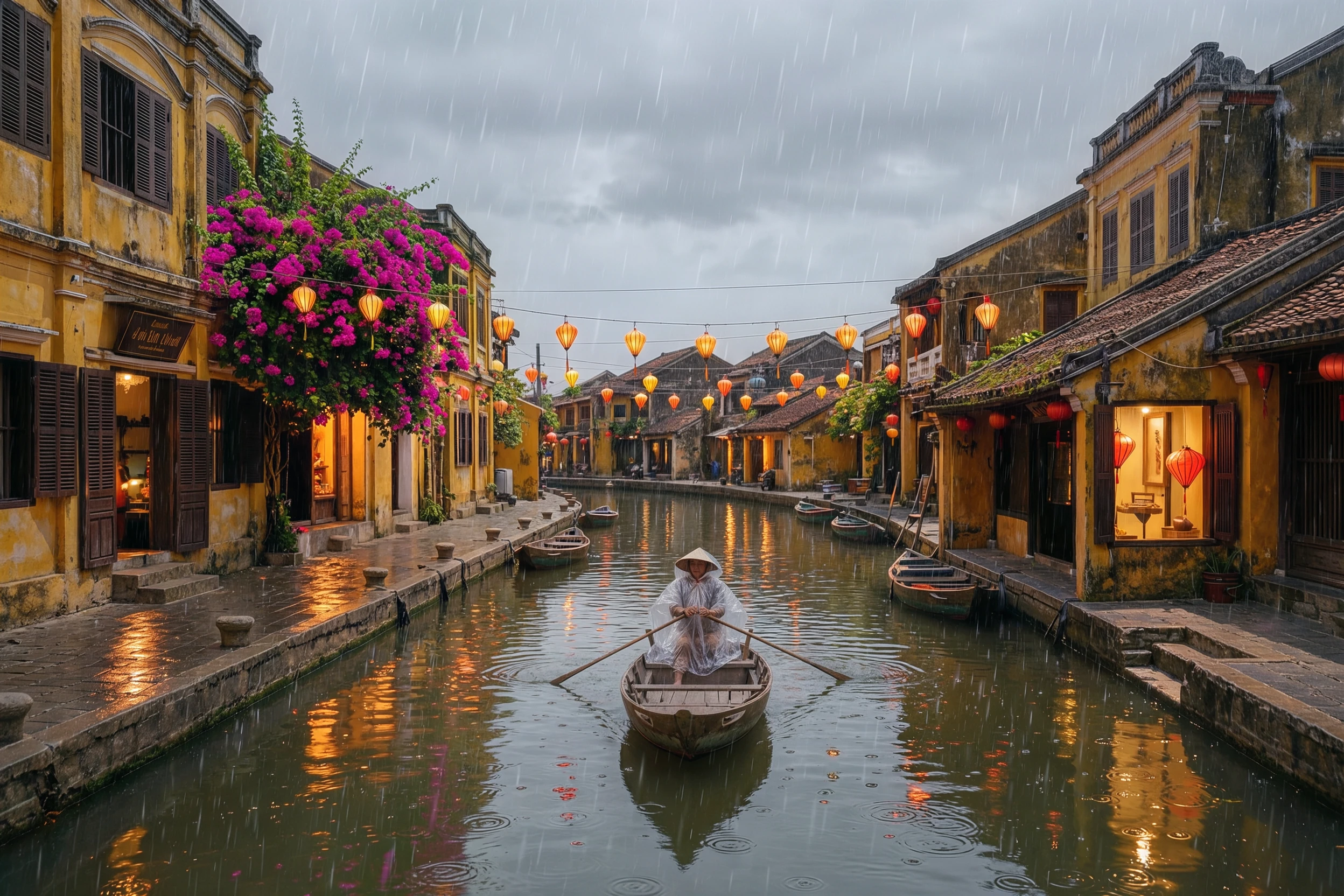
Turn @Image1 into a rainy monsoon evening in Hoi An. Light rain falls, the canal surface is dimpled by raindrops and reflects warm light, every silk lantern on the wire is lit in red, orange and yellow, and the shop windows glow. The woman in the boat now wears a clear plastic rain cape over her clothes and keeps rowing. Keep the shophouses, the bougainvillea balcony, the canal, the boat and her position exactly as in @Image1.
What is the Kling Image 4.0 Edit API?

Kling Image 4.0 Edit is the image-to-image side of Kling AI's November 2026 image model. The Kling Image 4.0 Edit API takes up to 10 ordered reference images and up to 7 elements, each showing one character or object from 2–4 angles, and follows prompt instructions that name them as @Image1 and @Element1. It outputs single images or coherent sets at 2K, 4K or native 8K.

Why choose the Kling Image 4.0 Edit API?

The Kling Image 4.0 Edit API combines up to 10 reference images and 7 multi-angle elements into new 2K, 4K or native 8K images.

  • Up to 10 referencesCombine scenes, products, outfits and style frames in one Kling Image 4.0 Edit API request, referred to by order as @Image1 to @Image10.

  • Multi-angle elementsGive 2–4 views of a product or character as an element so the Kling Image 4.0 Edit API keeps its shape, color and details from any angle.

  • Keep-and-change editsChange light, weather, season or style while buildings, people and positions hold, as in the Hoi An monsoon example.

  • Native 8K editsThe Kling Image 4.0 Edit API edits at 2K, 4K or 8K, so retouched product shots and scenes are ready for print.

  • References billed onceIn the Kling Image 4.0 Edit API, each reference or element adds 1 credit per task, however many images you request.

What parameters does the Kling Image 4.0 Edit API accept?

This API needs prompt and image_urls (1–10 images); kling_elements, size, resolution, enable_sequential and n are optional.

ParameterRequirementDescription
promptRequired

Text describing the image, up to 50,000 characters. Put exact on-image text in quotes; the model renders up to 2,000 characters of text in seven languages.

image_urlsRequired

1–10 public HTTP(S) image URLs, numbered @Image1, @Image2 and so on by their order. Each image is up to 30 MB, at least 300 px on each side, with an aspect ratio between 0.4 and 2.5. Each adds 1 credit once per task.

kling_elementsOptional

Up to 7 elements, each an object with element_input_urls: 2–4 views of one character or object, frontal view first. Refer to them as @Element1, @Element2. Images plus elements total at most 10; each element adds 1 credit once per task.

sizeOptional

Aspect ratio: auto, 16:9, 9:16, 1:1, 4:3, 3:4, 3:2, 2:3 or 21:9. auto picks the ratio from the prompt and references.

Defaultauto16:99:161:14:33:43:22:321:9
resolutionOptional

2K (2048×2048 at 1:1), 4K (5440×3072 at 16:9) or native 8K (8192×8192 at 1:1). 13, 19 or 32 credits per image.

Default2K4K8K
enable_sequentialOptional

true returns an image set: n related images with the same subjects and style, in story order. false returns n independent images.

Defaultfalsetrue
nOptional

Number of images: 1–9 for independent images (default 1), 2–10 for an image set (default 4). Each image is billed at the resolution price.

Default1 / 4

How do you use the Kling Image 4.0 Edit API?

Add references to the API, name them as @Image1 or @Element1 in the prompt, then poll until the edit is ready.

  1. Add reference imagesUpload 1–10 images or paste public URLs; the first becomes @Image1.

  2. Add elements when a subject must matchFor a product or character, add an element with a frontal view first and 1–3 more angles.

  3. Write the editSay what changes and list what stays, naming inputs as @Image1 and @Element1.

  4. Run the Kling Image 4.0 Edit APIPOST model kwaivgi/kling-image-v4.0/edit with image_urls and kling_elements, then read the PNG URLs from the finished status.

How much does the Kling Image 4.0 Edit API cost?

The Kling Image 4.0 Edit API costs 13, 19 or 32 credits per 2K, 4K or 8K image, plus 1 credit per reference image or element per task. 1 credit = $0.005.

A task costs n × the resolution price plus 1 credit for each reference image or element, counted once per task. When an image set returns fewer images than n, the unused images are refunded after completion; failed tasks are refunded in full.

How much does the Kling Image 4.0 Edit API cost?
UsageCreditsUSD
2K image13$0.065
4K image19$0.095
8K image32$0.16
Each reference image or element+1 per task+$0.005

What is the Kling Image 4.0 Edit API best for?

This API fits product placement, weather and season changes, consistent characters and composite moodboards.

  • Product placementPut an exact product into a lifestyle scene, like the turquoise watering can in the rooftop garden example.

  • Weather, season and time of dayTurn a midday street into a rainy evening while the architecture stays put.

  • Character consistencyKeep one character's face and outfit across new scenes with an element.

  • Composites and moodboardsMerge a scene, props and style references into one finished frame.

Pro Tips

  • Put the image you are editing first in the Kling Image 4.0 Edit API request, so it is @Image1 and anchors the scene.
  • Shoot element views on a plain background with the frontal view first.
  • List what must stay unchanged: faces, clothes, positions, buildings and light direction.
  • Leave size on auto to follow the source framing.

Notes

  • The Kling Image 4.0 Edit API takes 1–10 images in image_urls and up to 7 kling_elements; together they total at most 10.
  • Each image is up to 30 MB, at least 300 px on each side, with an aspect ratio between 0.4 and 2.5.
  • Output is PNG at 2K, 4K or 8K; enable_sequential returns a set of 2–10 related images.
  • For prompt-only generation, use Kling Image 4.0 Text to Image.

Sources

Model details on this page come from Kling AI's own publications:

“Generates up to 10 images from a single prompt, with cohesive styles and content.”

— Kling AI, Meet Kling Image 4.0 | Stunningly realistic. Sharp. Precise.,

“Native 8K image generation is now available, combining rich detail with refined textures and giving you more room for high-resolution displays and post-production cropping.”

— Kling AI, Meet Kling Image 4.0 | Stunningly realistic. Sharp. Precise.,

Kling Image 4.0 Edit API FAQ

What is the Kling Image 4.0 Edit API?

Kling Image 4.0 Edit is Kling AI's image model for editing and combining pictures with text instructions. The Kling Image 4.0 Edit API takes 1–10 reference images and up to 7 multi-angle elements and returns new images at 2K, 4K or native 8K, keeping named subjects recognizable while it changes light, setting, style or composition. Call it with kwaivgi/kling-image-v4.0/edit or try it in the playground above.

What are elements in the Kling Image 4.0 Edit API?

An element is one character or object shown from 2–4 angles, frontal view first, sent in kling_elements as element_input_urls. Refer to it as @Element1 in the prompt; the model uses all views to keep its shape and details when it places it in a scene.

How many images can the Kling Image 4.0 Edit API take?

Up to 10 reference images in image_urls and up to 7 elements, with images plus elements totaling at most 10. Each image is up to 30 MB and at least 300 px on each side.

Can the Kling Image 4.0 Edit API keep a scene unchanged?

Yes. Name the change and list what stays, such as the buildings, the boat and its position. The Hoi An example on this page turns midday into a rainy evening while the canal and shophouses hold their layout.