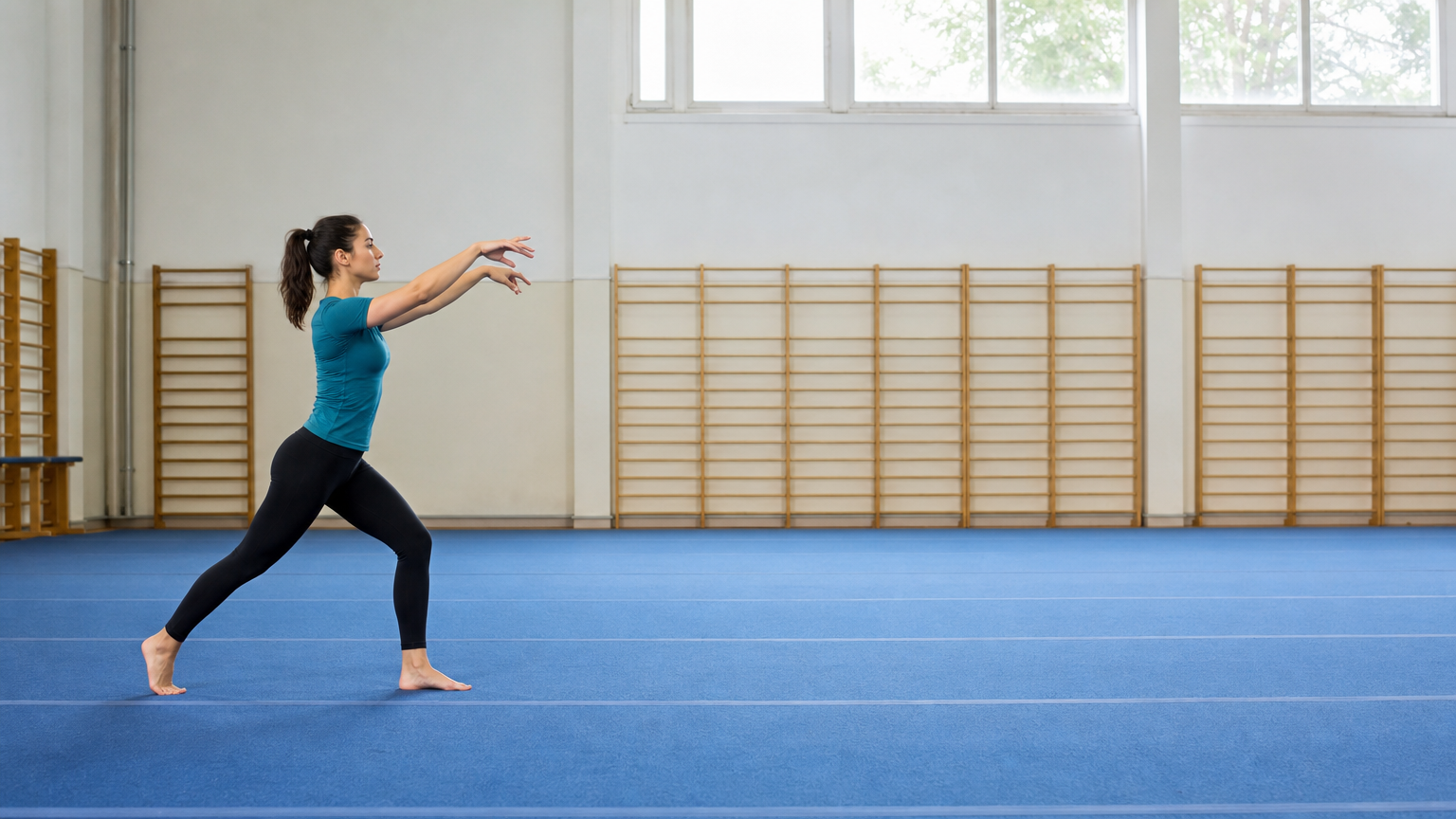
A single continuous five-second full-body sports shot of the same adult gymnast on the blue mat. She steps to the right, bends sideways, places her hands on the mat one after the other, sends her straight legs overhead in one smooth controlled cartwheel, then lands one foot followed by the other and stands upright. Exactly one cartwheel, no flips or repeated rotations. Preserve her face, fitted teal training clothes and all four limbs. Fixed wide side view with the entire body and landing area always visible, realistic weight transfer and natural timing. No cuts, no other people, no text.
Kling 2.1 Pro Image to Video API
kwaivgi/kling-video/v2.1/pro/image-to-videoKling 2.1 Pro Image to Video transforms still images into native 1080p full HD cinematic videos with optional start-and-end frame control across 5-second and 10-second durations. It preserves original subject identity, fine textures, and atmospheric lighting while synthesizing sophisticated physical trajectories and seamless camera transitions toward the target end frame.
Input
595/5,000
Start Image Url
End Image Url
Output
ReadyContinue with
Examples
REST API Reference
Quick Start
Submit a task and query its status. URLs using example.com or your-domain.com are placeholders; replace image and callback URLs with your own publicly accessible URLs. Output file URLs are illustrative.
01
Step 1: Set up authentication
Create an API key in the dashboard and attach Authorization: Bearer <API_KEY> when submitting a task.
- Submit Endpoint
- POST
https://api.vidgo.ai/api/generate/submit - Authorization Header
- Authorization: Bearer VIDGO_API_KEY
02
Step 2: Submit a task
POST /api/generate/submit: kwaivgi/kling-video/v2.1/pro/image-to-video
Submit Request
REQUEST_BODY=$(cat <<'JSON'
{
  "model": "kwaivgi/kling-video/v2.1/pro/image-to-video",
  "input": {
    "prompt": "A slow camera pan across a sunlit garden.",
    "start_image_url": "https://example.com/start-frame.png",
    "duration": 5,
    "end_image_url": "https://example.com/end-frame.png"
  }
}
JSON
)

RESPONSE=$(curl --silent --show-error --fail-with-body \
  --request POST \
  --url "https://api.vidgo.ai/api/generate/submit" \
  --header "Authorization: Bearer $VIDGO_API_KEY" \
  --header "Content-Type: application/json" \
  --data "$REQUEST_BODY")

CODE=$(printf '%s' "$RESPONSE" | jq -r '.code // empty')
if [ "$CODE" != "0" ] && [ "$CODE" != "200" ]; then
  printf 'API error: %s
' "$RESPONSE" >&2
  exit 1
fi
printf '%s
' "$RESPONSE"
03
Step 3: Poll for completion
Poll with task_id while status is not_started or running, and stop at finished or failed. On success, read data.files[].file_url; on failure, read data.error_message.
Status Endpoint
GET https://api.vidgo.ai/api/generate/status/{task_id}Poll with task_id while status is not_started or running, and stop at finished or failed. On success, read data.files[].file_url; on failure, read data.error_message.
not_startedrunningfinishedfailedSubmit Response
{
  "code": 200,
  "data": {
    "task_id": "task-example",
    "status": "not_started",
    "created_time": "2026-09-24T00:00:00Z"
  }
}
Completed Response
{
  "code": 200,
  "data": {
    "task_id": "task-example",
    "status": "finished",
    "files": [
      {
        "file_type": "video",
        "file_url": "https://example.com/output.mp4"
      }
    ],
    "created_time": "2026-09-23T00:00:00Z"
  }
}
Complete executable script
Expand to review an end-to-end script with automatic polling, error handling, and timeout safeguards.
Complete executable script
set -euo pipefail
: "${VIDGO_API_KEY:?Set VIDGO_API_KEY in your environment}"

REQUEST_BODY=$(cat <<'JSON'
{
  "model": "kwaivgi/kling-video/v2.1/pro/image-to-video",
  "input": {
    "prompt": "A slow camera pan across a sunlit garden.",
    "start_image_url": "https://example.com/start-frame.png",
    "duration": 5,
    "end_image_url": "https://example.com/end-frame.png"
  }
}
JSON
)

SUBMIT_RESPONSE=$(curl --silent --show-error --fail-with-body \
  --request POST \
  --url "https://api.vidgo.ai/api/generate/submit" \
  --header "Authorization: Bearer $VIDGO_API_KEY" \
  --header "Content-Type: application/json" \
  --data "$REQUEST_BODY")

TASK_ID=$(printf '%s' "$SUBMIT_RESPONSE" | jq -r '.data.task_id // .task_id // empty')
BUSINESS_CODE=$(printf '%s' "$SUBMIT_RESPONSE" | jq -r '.code // empty')
if [ "$BUSINESS_CODE" != "0" ] && [ "$BUSINESS_CODE" != "200" ]; then
  printf 'Submit failed:
%s
' "$SUBMIT_RESPONSE" >&2
  exit 1
fi
if [ -z "$TASK_ID" ]; then
  printf 'Submit response did not include task_id:
%s
' "$SUBMIT_RESPONSE" >&2
  exit 1
fi

START_TIME=$(date +%s)
POLL_DELAY=2
while true; do
  if [ $(( $(date +%s) - START_TIME )) -ge 600 ]; then
    printf 'Timed out after 600 seconds
' >&2
    exit 1
  fi
  STATUS_RESPONSE=$(curl --silent --show-error --fail-with-body \
    --url "https://api.vidgo.ai/api/generate/status/$TASK_ID" \
    --header "Authorization: Bearer $VIDGO_API_KEY")
  STATUS=$(printf '%s' "$STATUS_RESPONSE" | jq -r '.data.status // .status // empty')
  BUSINESS_CODE=$(printf '%s' "$STATUS_RESPONSE" | jq -r '.code // empty')
  if [ "$BUSINESS_CODE" != "0" ] && [ "$BUSINESS_CODE" != "200" ]; then
    printf 'Status request failed:
%s
' "$STATUS_RESPONSE" >&2
    exit 1
  fi

  case "$STATUS" in
    finished)
      printf '%s' "$STATUS_RESPONSE" | jq -r '(.data.files // .files // [])[]?.file_url'
      break
      ;;
    failed)
      printf '%s' "$STATUS_RESPONSE" | jq -r '.data.error_message // .error_message // "Generation failed"' >&2
      exit 1
      ;;
    not_started|running)
      sleep "$POLL_DELAY"
      if [ "$POLL_DELAY" -lt 10 ]; then POLL_DELAY=$((POLL_DELAY + 1)); fi
      ;;
    *)
      printf 'Unexpected task status: %s
' "$STATUS" >&2
      exit 1
      ;;
  esac
done
Request Parameters (input object)
Place generation parameters in input, with model and optional callback_url at the request root. Use standard JSON types; unsupported input fields are rejected.
| Field | Type | Required | Default | Description |
|---|---|---|---|---|
| prompt | string | Yes | - | Required nonblank string, maximum 5,000 Unicode characters after trimming. |
| start_image_url | string | Yes | - | Required first-frame public HTTP(S) URL with a hostname and no credentials or whitespace. |
| end_image_url | string | No | - | Optional last-frame public HTTP(S) URL with a hostname and no credentials or whitespace. Omit when unused; empty strings and null are rejected. |
| duration | integer | No | 5 | Integer 5 or 10 seconds; defaults to 5 when omitted. Strings, booleans, fractional durations and null are rejected. |
| negative_prompt | string | No | - | Optional string describing content to avoid. |
Response Fields (Status Query)
Details returned by GET /api/generate/status/{task_id}:
| Field | Type | Description |
|---|---|---|
| code | integer | HTTP/business response status code (200 indicates success). |
| data.task_id | string | Globally unique task identifier. |
| data.status | string | Task lifecycle state: not_started, running, finished, or failed. |
| data.files | array | Array of output assets containing file_url and file_type upon completion. |
| data.error_message | string | null | Error diagnostic details if the task status is failed. |
Task Lifecycle
Clients should poll status until reaching either the finished or failed terminal state:
not_startedQueued
runningGenerating
finishedReady
failedFailed
Polling & Error Handling
- Polling frequencyStart polling with a 2 to 3-second interval, gradually increasing to 5 seconds for extended takes.
- Network resiliencyTransient 5xx responses or timeouts do not signify task failure; retry status requests after a short backoff.
- Webhook callbacksProvide a top-level callback_url in your submission payload to receive completion notifications automatically.
Specifications
| Specification | Value | Description |
|---|---|---|
| Model | kwaivgi/kling-video/v2.1/pro/image-to-video | |
| Duration | 5 / 10 s | Integer 5 or 10 seconds; defaults to 5 when omitted. Strings, booleans, fractional durations and null are rejected. |
Kling 2.1 Pro Image to Video
Kling 2.1 Pro Image to Video is a flagship image-to-video generation model developed by Kwaivgi. Engineered for high-end cinematic production, commercial advertising, and visual effects pre-visualization, it renders native 1080p full HD video with intricate textural clarity and rich dynamic range. Its signature capability is optional start-and-end frame keyframe guidance using start_image_url and end_image_url, enabling creators to lock both the beginning composition and concluding destination pose while the model calculates fluid physical transitions. Offering 5-second and 10-second duration tiers at 55 credits ($0.275) per 5 seconds, it represents a state-of-the-art benchmark for deterministic camera and character motion control.
Why choose this model
Native 1080p Full HD ResolutionDelivers crisp full HD video rendering with sharp facial expressions, authentic skin micro-textures, and realistic material reflections.
Dual-Frame Keyframe GuidanceSupports setting both start_image_url and optional end_image_url, locking beginning and ending frames for precise storyboarding.
Cinematic Depth & Motion DynamicsSimulates sophisticated lighting shifts, depth-of-field variations, and multi-axis camera movements governed by accurate physics.
Flexible 5s and 10s Storytelling TiersConfigure 5-second high-impact visual spots or 10-second unfolding dramatic scenes through straightforward duration parameters.
Cost-Effective Pro Production TierPriced at 55 credits ($0.275) for 5s and 110 credits ($0.550) for 10s, offering premium studio-grade generation with automatic failure refunds.
Parameters
| Parameter | Requirement | Description |
|---|---|---|
| prompt | Yes | Required nonblank string, maximum 5,000 Unicode characters after trimming. Default - |
| start_image_url | Yes | Required first-frame public HTTP(S) URL with a hostname and no credentials or whitespace. Default - |
| end_image_url | No | Optional last-frame public HTTP(S) URL with a hostname and no credentials or whitespace. Omit when unused; empty strings and null are rejected. Default - |
| duration | No | Integer 5 or 10 seconds; defaults to 5 when omitted. Strings, booleans, fractional durations and null are rejected. Default 5 |
| negative_prompt | No | Optional string describing content to avoid. Default - |
How to Use
Upload Required Start FrameProvide a primary starting image via upload or public HTTP(S) URL in start_image_url to anchor initial character appearance and framing.
Attach Optional Destination End FrameOptionally specify an end_image_url destination frame to enforce a closed-loop movement trajectory and defined end pose.
Craft Motion & Directing PromptsDetail character actions, environmental interactions, and camera choreography, highlighting transitional elements between frames.
Configure Duration & Negative PromptsSelect 5 seconds or 10 seconds, and add negative_prompt terms to filter out visual artifacts or unwanted camera jitters.
Execute Task & Retrieve 1080p VideoSubmit the generation request to obtain a task_id, monitor progress via polling or webhooks, and download the full HD MP4 asset.
Pricing
Billed per video. 1 credit = $0.005.
| Usage | Rate | Details |
|---|---|---|
| Pro · 5 s | 55 credits/video | $0.275/video |
| Pro · 10 s | 110 credits/video | $0.550/video |
Best Use Cases
Commercial Advertising & Brand VisualsProduce studio-quality promotional clips, luxury product reels, and theatrical teasers with pristine 1080p visual fidelity.
Film & Television Pre-VisualizationSimulate complex director camera paths and blocking setups between storyboard keyframes prior to on-set production.
Deterministic Scene Keyframe TransitionsCreate seamless transitions between two distinct visual states, such as daytime to twilight or transformation sequences.
High-Fidelity Character AnimationAnimate digital actors, portraits, and expressive avatars with stable facial features and coherent physical gestures.
Pro Tips
- Align Composition Between Start and End Frames:When using end_image_url, ensure the subject perspective, scale, and lighting direction are logically compatible for smooth morphing.
- Detail the Transition Process in Prompts:Explicitly describe the intermediate action that connects the start image to the end image, such as 'turns around and walks away'.
- Select 10-Second Runtime for Large-Scale Movements:For broad camera pans or multi-step character actions, the 10-second tier gives the diffusion model sufficient temporal runway.
- Use High-Resolution Input Imagery:Providing source images at 1080p or higher allows Kling 2.1 Pro to maximize texture preservation and micro-detail rendering.
- Direct Camera Paths with Precise Terminology:Use terms like 'dolly in', 'truck right', 'pedestal up', or 'low-angle hero shot' to achieve intentional cinematography.
Notes
- Dual-Frame Prerequisite Constraint:The end_image_url parameter is optional but requires start_image_url; submitting an end frame alone without a start frame is invalid.
- Strict Integer Duration Validation:The duration field strictly accepts integer values 5 or 10; non-integer numbers, strings, or null values are rejected.
- Asynchronous Execution & Credit Protection:Credits are deducted upon task submission and automatically refunded if processing fails due to system or upstream errors.
Kling 2.1 Pro Image to Video API frequently asked questions
What is the Kling 2.1 Pro Image to Video API?
Kling 2.1 Pro Image to Video is a Kwaivgi model for cinematic image-to-video generation. It transforms static reference images into native 1080p full HD video clips across 5-second and 10-second runtimes with optional start-and-end dual-frame keyframe control. Powered by advanced spatial-temporal generative modeling, it preserves fine character details, clothing textures, and lighting coherence while synthesizing naturalistic motion trajectories. You can call it programmatically or try it from the playground above.
How does end_image_url work in Kling 2.1 Pro Image to Video?
When you supply both start_image_url and end_image_url, the model anchors the opening frame to the start image and the concluding frame to the end image. It calculates a realistic, physics-compliant motion transition and camera move between the two frames across your selected 5s or 10s duration.
What resolution does Kling 2.1 Pro Image to Video deliver?
Kling 2.1 Pro Image to Video renders native 1080p full HD resolution. It preserves the aspect ratio and fine compositional geometry of your input images, ensuring razor-sharp output quality for widescreen monitors and high-resolution mobile screens.
What durations can you configure in Kling 2.1 Pro Image to Video?
You can configure duration to integer 5 or 10 seconds. When omitted, the API defaults to 5 seconds. Values other than 5 or 10, such as fractional seconds or strings, are rejected by input validation.
How is Kling 2.1 Pro Image to Video billed?
Billing is charged per completed video: 55 credits ($0.275) for 5 seconds, and 110 credits ($0.550) for 10 seconds. Usage credits are deducted upon task submission and automatically refunded if a task terminates in a failed state.
When should creators choose Kling 2.1 Pro over Standard?
Choose Kling 2.1 Pro when your production requires native 1080p resolution, high textural fidelity, or deterministic closing pose constraints via end_image_url. For budget-conscious rapid prototyping and social media clips, Kling 2.1 Standard at 720p is the economical alternative.
Can Kling 2.1 Pro Image to Video run with only a start frame?
Yes. The end_image_url parameter is completely optional. If you omit end_image_url, Kling 2.1 Pro operates as a standard single-frame image-to-video generator, animating your start_image_url with full 1080p fidelity.
What image URL requirements apply to Kling 2.1 Pro Image to Video?
Both start_image_url and optional end_image_url must be publicly accessible HTTP(S) URLs pointing directly to an image asset (JPG, PNG, or WebP). URLs containing embedded basic auth credentials, localhost references, or whitespace are rejected.