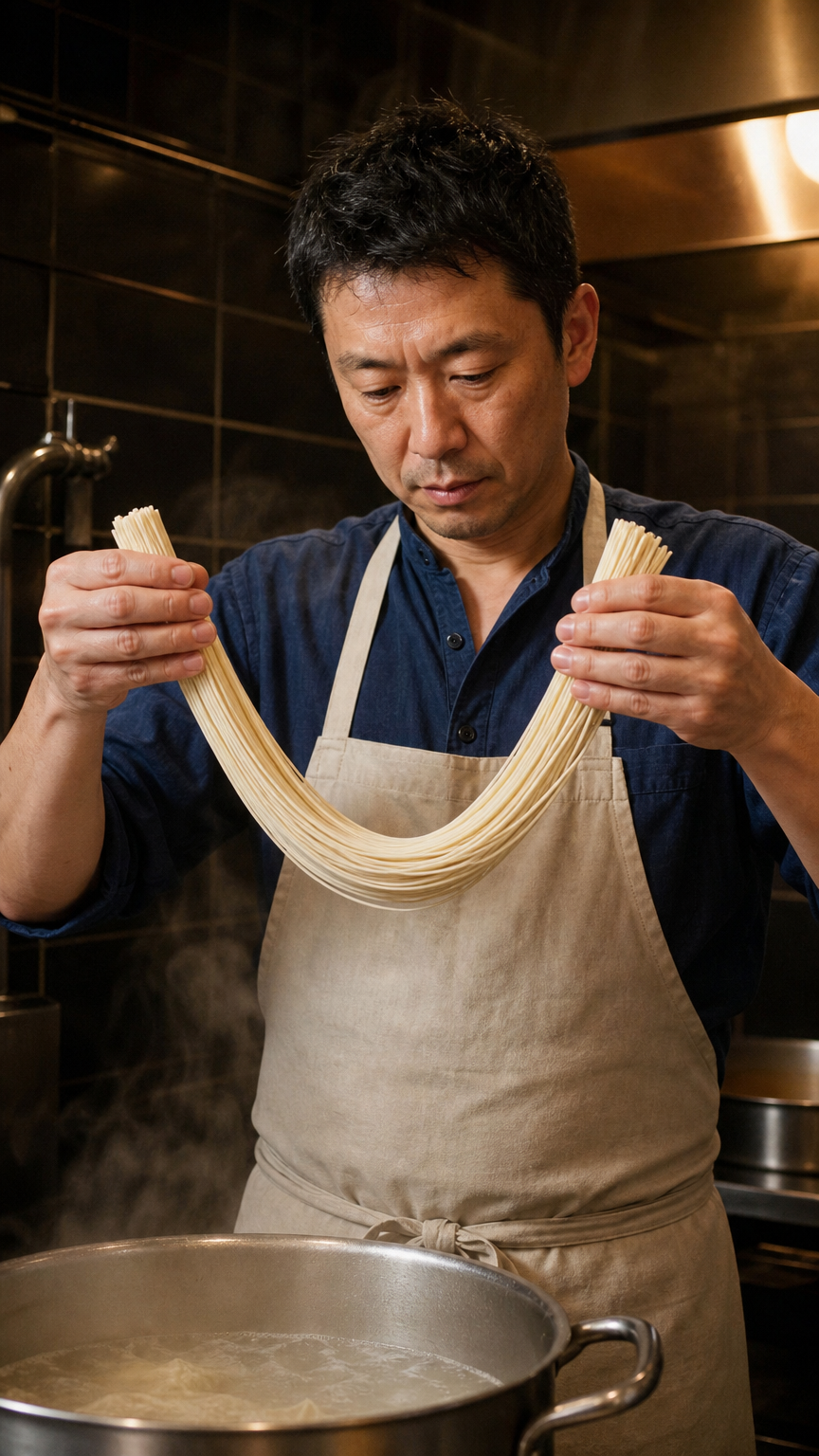
One continuous five-second documentary portrait of the same adult ramen cook in the small late-night kitchen. With one hand at each end of a short bundle of pale fresh noodle strands, he gently lifts and gives the suspended middle one small downward bounce, loosening the strands without releasing them. His hands stay apart, strands remain connected between the two grips. Steam curls upward from the pot below. Preserve his face, rolled sleeves, apron and kitchen. Fixed waist-up view, warm practical light, natural restrained motion. No cuts, no additional people, no lettering.
Kling 2.1 Standard Image to Video API
kwaivgi/kling-video/v2.1/standard/image-to-videoKling 2.1 Standard Image to Video transforms still images into fluid 720p dynamic video clips from text prompts and a starting frame across 5-second and 10-second durations. It preserves character facial likeness, textural fidelity, and scene lighting while introducing expressive physical movements and smooth cinematic camera pans.
Input
581/5,000
Start Image Url
Output
ReadyContinue with
Examples
REST API Reference
Quick Start
Submit a task and query its status. URLs using example.com or your-domain.com are placeholders; replace image and callback URLs with your own publicly accessible URLs. Output file URLs are illustrative.
01
Step 1: Set up authentication
Create an API key in the dashboard and attach Authorization: Bearer <API_KEY> when submitting a task.
- Submit Endpoint
- POST
https://api.vidgo.ai/api/generate/submit - Authorization Header
- Authorization: Bearer VIDGO_API_KEY
02
Step 2: Submit a task
POST /api/generate/submit: kwaivgi/kling-video/v2.1/standard/image-to-video
Submit Request
REQUEST_BODY=$(cat <<'JSON'
{
  "model": "kwaivgi/kling-video/v2.1/standard/image-to-video",
  "input": {
    "prompt": "A slow camera pan across a sunlit garden.",
    "start_image_url": "https://example.com/start-frame.png",
    "duration": 5
  }
}
JSON
)

RESPONSE=$(curl --silent --show-error --fail-with-body \
  --request POST \
  --url "https://api.vidgo.ai/api/generate/submit" \
  --header "Authorization: Bearer $VIDGO_API_KEY" \
  --header "Content-Type: application/json" \
  --data "$REQUEST_BODY")

CODE=$(printf '%s' "$RESPONSE" | jq -r '.code // empty')
if [ "$CODE" != "0" ] && [ "$CODE" != "200" ]; then
  printf 'API error: %s
' "$RESPONSE" >&2
  exit 1
fi
printf '%s
' "$RESPONSE"
03
Step 3: Poll for completion
Poll with task_id while status is not_started or running, and stop at finished or failed. On success, read data.files[].file_url; on failure, read data.error_message.
Status Endpoint
GET https://api.vidgo.ai/api/generate/status/{task_id}Poll with task_id while status is not_started or running, and stop at finished or failed. On success, read data.files[].file_url; on failure, read data.error_message.
not_startedrunningfinishedfailedSubmit Response
{
  "code": 200,
  "data": {
    "task_id": "task-example",
    "status": "not_started",
    "created_time": "2026-09-24T00:00:00Z"
  }
}
Completed Response
{
  "code": 200,
  "data": {
    "task_id": "task-example",
    "status": "finished",
    "files": [
      {
        "file_type": "video",
        "file_url": "https://example.com/output.mp4"
      }
    ],
    "created_time": "2026-09-23T00:00:00Z"
  }
}
Complete executable script
Expand to review an end-to-end script with automatic polling, error handling, and timeout safeguards.
Complete executable script
set -euo pipefail
: "${VIDGO_API_KEY:?Set VIDGO_API_KEY in your environment}"

REQUEST_BODY=$(cat <<'JSON'
{
  "model": "kwaivgi/kling-video/v2.1/standard/image-to-video",
  "input": {
    "prompt": "A slow camera pan across a sunlit garden.",
    "start_image_url": "https://example.com/start-frame.png",
    "duration": 5
  }
}
JSON
)

SUBMIT_RESPONSE=$(curl --silent --show-error --fail-with-body \
  --request POST \
  --url "https://api.vidgo.ai/api/generate/submit" \
  --header "Authorization: Bearer $VIDGO_API_KEY" \
  --header "Content-Type: application/json" \
  --data "$REQUEST_BODY")

TASK_ID=$(printf '%s' "$SUBMIT_RESPONSE" | jq -r '.data.task_id // .task_id // empty')
BUSINESS_CODE=$(printf '%s' "$SUBMIT_RESPONSE" | jq -r '.code // empty')
if [ "$BUSINESS_CODE" != "0" ] && [ "$BUSINESS_CODE" != "200" ]; then
  printf 'Submit failed:
%s
' "$SUBMIT_RESPONSE" >&2
  exit 1
fi
if [ -z "$TASK_ID" ]; then
  printf 'Submit response did not include task_id:
%s
' "$SUBMIT_RESPONSE" >&2
  exit 1
fi

START_TIME=$(date +%s)
POLL_DELAY=2
while true; do
  if [ $(( $(date +%s) - START_TIME )) -ge 600 ]; then
    printf 'Timed out after 600 seconds
' >&2
    exit 1
  fi
  STATUS_RESPONSE=$(curl --silent --show-error --fail-with-body \
    --url "https://api.vidgo.ai/api/generate/status/$TASK_ID" \
    --header "Authorization: Bearer $VIDGO_API_KEY")
  STATUS=$(printf '%s' "$STATUS_RESPONSE" | jq -r '.data.status // .status // empty')
  BUSINESS_CODE=$(printf '%s' "$STATUS_RESPONSE" | jq -r '.code // empty')
  if [ "$BUSINESS_CODE" != "0" ] && [ "$BUSINESS_CODE" != "200" ]; then
    printf 'Status request failed:
%s
' "$STATUS_RESPONSE" >&2
    exit 1
  fi

  case "$STATUS" in
    finished)
      printf '%s' "$STATUS_RESPONSE" | jq -r '(.data.files // .files // [])[]?.file_url'
      break
      ;;
    failed)
      printf '%s' "$STATUS_RESPONSE" | jq -r '.data.error_message // .error_message // "Generation failed"' >&2
      exit 1
      ;;
    not_started|running)
      sleep "$POLL_DELAY"
      if [ "$POLL_DELAY" -lt 10 ]; then POLL_DELAY=$((POLL_DELAY + 1)); fi
      ;;
    *)
      printf 'Unexpected task status: %s
' "$STATUS" >&2
      exit 1
      ;;
  esac
done
Request Parameters (input object)
Place generation parameters in input, with model and optional callback_url at the request root. Use standard JSON types; unsupported input fields are rejected.
| Field | Type | Required | Default | Description |
|---|---|---|---|---|
| prompt | string | Yes | - | Required nonblank string, maximum 5,000 Unicode characters after trimming. |
| start_image_url | string | Yes | - | Required first-frame public HTTP(S) URL with a hostname and no credentials or whitespace. |
| duration | integer | No | 5 | Integer 5 or 10 seconds; defaults to 5 when omitted. Strings, booleans, fractional durations and null are rejected. |
| negative_prompt | string | No | - | Optional string describing content to avoid. |
Response Fields (Status Query)
Details returned by GET /api/generate/status/{task_id}:
| Field | Type | Description |
|---|---|---|
| code | integer | HTTP/business response status code (200 indicates success). |
| data.task_id | string | Globally unique task identifier. |
| data.status | string | Task lifecycle state: not_started, running, finished, or failed. |
| data.files | array | Array of output assets containing file_url and file_type upon completion. |
| data.error_message | string | null | Error diagnostic details if the task status is failed. |
Task Lifecycle
Clients should poll status until reaching either the finished or failed terminal state:
not_startedQueued
runningGenerating
finishedReady
failedFailed
Polling & Error Handling
- Polling frequencyStart polling with a 2 to 3-second interval, gradually increasing to 5 seconds for extended takes.
- Network resiliencyTransient 5xx responses or timeouts do not signify task failure; retry status requests after a short backoff.
- Webhook callbacksProvide a top-level callback_url in your submission payload to receive completion notifications automatically.
Specifications
| Specification | Value | Description |
|---|---|---|
| Model | kwaivgi/kling-video/v2.1/standard/image-to-video | |
| Duration | 5 / 10 s | Integer 5 or 10 seconds; defaults to 5 when omitted. Strings, booleans, fractional durations and null are rejected. |
Kling 2.1 Standard Image to Video
Kling 2.1 Standard Image to Video is a high-efficiency image-to-video model developed by Kwaivgi. Built for automated creative pipelines, digital advertising, and social media production, it animates static starting images into smooth 720p video clips guided by natural language prompts. Operating with a required start_image_url input, it preserves original composition, character identity, and environmental lighting while synthesizing naturalistic motion dynamics. Offering 5-second and 10-second duration settings at an accessible rate of 30 credits ($0.150) per 5 seconds, it balances cinematic motion aesthetics with industry-leading generation economics.
Why choose this model
Smooth 720p Motion SynthesisProduces fluid, lifelike character actions, natural drapery physics, and organic scene dynamics at consistent 720p resolution without stutter.
Faithful Subject & Style RetentionPreserves facial features, costume details, lighting geometry, and visual textures from the input starting image throughout generation.
Flexible 5s and 10s DurationsSupports concise 5-second dynamic vignettes as well as extended 10-second narrative clips through simple integer duration configuration.
Prompt & Negative Prompt DirectingAllows up to 5,000 characters of scene direction, paired with negative_prompt support to suppress visual anomalies and unintended camera artifacts.
Industry-Leading Cost EfficiencyPriced at 30 credits ($0.150) for 5 seconds and 60 credits ($0.300) for 10 seconds, providing cost-effective scalability with automated credit refunds on failure.
Parameters
| Parameter | Requirement | Description |
|---|---|---|
| prompt | Yes | Required nonblank string, maximum 5,000 Unicode characters after trimming. Default - |
| start_image_url | Yes | Required first-frame public HTTP(S) URL with a hostname and no credentials or whitespace. Default - |
| duration | No | Integer 5 or 10 seconds; defaults to 5 when omitted. Strings, booleans, fractional durations and null are rejected. Default 5 |
| negative_prompt | No | Optional string describing content to avoid. Default - |
How to Use
Upload Starting FrameProvide a clear, high-resolution starting image via direct file upload or a publicly accessible HTTP(S) URL in start_image_url.
Describe Scene & MotionEnter detailed prompt instructions outlining character actions, environmental interactions, and desired cinematic camera pans or tilts.
Configure Negative PromptOptionally list unwanted artifacts, blurry textures, or erratic movements in negative_prompt to refine output visual cleanliness.
Select Generation DurationChoose between 5 seconds for focused social snippets or 10 seconds for longer narrative sequences.
Run and Retrieve VideoSubmit the task to receive a task_id, monitor status through polling or webhooks, and download the finished MP4 video asset.
Pricing
Billed per video. 1 credit = $0.005.
| Usage | Rate | Details |
|---|---|---|
| Standard · 5 s | 30 credits/video | $0.150/video |
| Standard · 10 s | 60 credits/video | $0.300/video |
Best Use Cases
Social Media Video MarketingConvert static graphics, photography, and banner designs into engaging, motion-rich vertical or landscape video assets.
E-Commerce Product ShowcaseAnimate catalog photos with gentle rotational views, fabric movement, and dynamic lighting to boost customer conversion.
Storyboard & Concept PrototypingRapidly test animatic camera trajectories and character actions from illustrated or generated concept art.
Character & Portrait AnimationBring digital humans, artistic avatars, and stylized character portraits to life while maintaining complete facial fidelity.
Pro Tips
- Focus Prompts on Motion Rather than Appearance:Because the source image already defines character appearance and setting, direct your prompt towards incremental actions and camera movements.
- Provide High-Quality Source Imagery:Input images with crisp subject boundaries, even illumination, and minimal noise yield significantly clearer 720p video outputs.
- Utilize Negative Prompts Effectively:Add terms such as 'distortion, abrupt cut, blur, flickering, low quality' to negative_prompt to preserve smooth motion coherence.
- Validate Concepts at 5 Seconds First:Test prompt variations and movement directions on the 5-second tier before committing to longer 10-second production takes.
- Direct Camera Trajectories with Film Verbs:Employ explicit camera instructions such as 'slow zoom in', 'pan left to right', or 'tracking shot' for predictable motion framing.
Notes
- Single Starting Frame Interface:Kling 2.1 Standard operates strictly from start_image_url; end_image_url is not supported on this endpoint (for start-and-end keyframes, select Pro).
- Strict Integer Duration Constraint:The duration parameter strictly requires integer values 5 or 10; fractional durations, string inputs, or null values are rejected.
- Asynchronous Execution & Credit Protection:Credits are deducted upon task submission and automatically refunded if processing fails due to system or server error.
Kling 2.1 Standard Image to Video API frequently asked questions
What is the Kling 2.1 Standard Image to Video API?
Kling 2.1 Standard Image to Video is a Kwaivgi model for image-to-video generation. It animates static starting frames into fluid 720p dynamic video clips across 5-second and 10-second durations with nuanced text prompt and camera movement control. Built on spatial-temporal generative diffusion architecture, it preserves the starting image's subject identity, costume textures, and scene lighting while synthesizing physically realistic actions. You can call it programmatically or try it from the playground above.
What output resolution does Kling 2.1 Standard Image to Video produce?
Kling 2.1 Standard Image to Video outputs high-definition 720p video. The generated video preserves the aspect ratio and compositional geometry of your input starting image, making it suitable for both 16:9 widescreen and 9:16 vertical displays.
Does Kling 2.1 Standard Image to Video support an end frame?
Kling 2.1 Standard Image to Video accepts only start_image_url and does not support end_image_url. If your workflow requires dual-frame interpolation between a starting image and a designated closing frame, switch to Kling 2.1 Pro Image to Video on this platform.
What video durations can you generate with Kling 2.1 Standard Image to Video?
You can generate either 5-second or 10-second videos by setting the duration parameter to integer 5 or 10. When omitted, duration defaults to 5 seconds. Fractional durations or other values are rejected before generation begins.
How is Kling 2.1 Standard Image to Video priced?
Pricing is charged per completed video: 30 credits ($0.150) for a 5-second video, and 60 credits ($0.300) for a 10-second video. Credits are deducted upon submission and refunded automatically if generation terminates in a failed state.
What image formats and URL requirements apply to Kling 2.1 Standard Image to Video?
The playground accepts JPG, PNG, and WebP image uploads up to 10 MiB. When submitting via REST API, supply a publicly accessible HTTP(S) URL in start_image_url that points directly to the image file without credentials or whitespace.
How does negative_prompt improve Kling 2.1 Standard Image to Video results?
The negative_prompt field allows you to specify visual artifacts, unnatural limb deformations, blurriness, or unwanted camera shakes to suppress during generation, helping ensure clean and stable physical motion.
What are the key differences between Kling 2.1 Standard and Kling 2.1 Pro?
Kling 2.1 Standard generates 720p video from a single starting frame at 30 credits for 5s and 60 credits for 10s. Kling 2.1 Pro upgrades output resolution to native 1080p full HD, adds optional end_image_url dual-frame interpolation, and costs 55 credits for 5s and 110 credits for 10s.