Grok Imagine Image 2.0 Edit API

xai/grok-imagine-image-v2.0/edit
1–3 input images · Low/Medium · 1K/2K

Grok Imagine Image 2.0 Edit transforms and refines images using natural language instructions and reference media, supporting multi-reference fusion across up to 3 input images, surgical region-based edits, and intelligent aspect ratio re-composition. It executes wardrobe adjustments, background replacements, and asset insertions while strictly preserving subject identity, facial geometry, and coherent lighting.

Get API Key
Input
987/8000
1/3
Reference image 1: Reference 1
OutputReady
1 × 12 + 1 × 2 = 14 credits · $0.070

Continue with

Examples

output.jpg

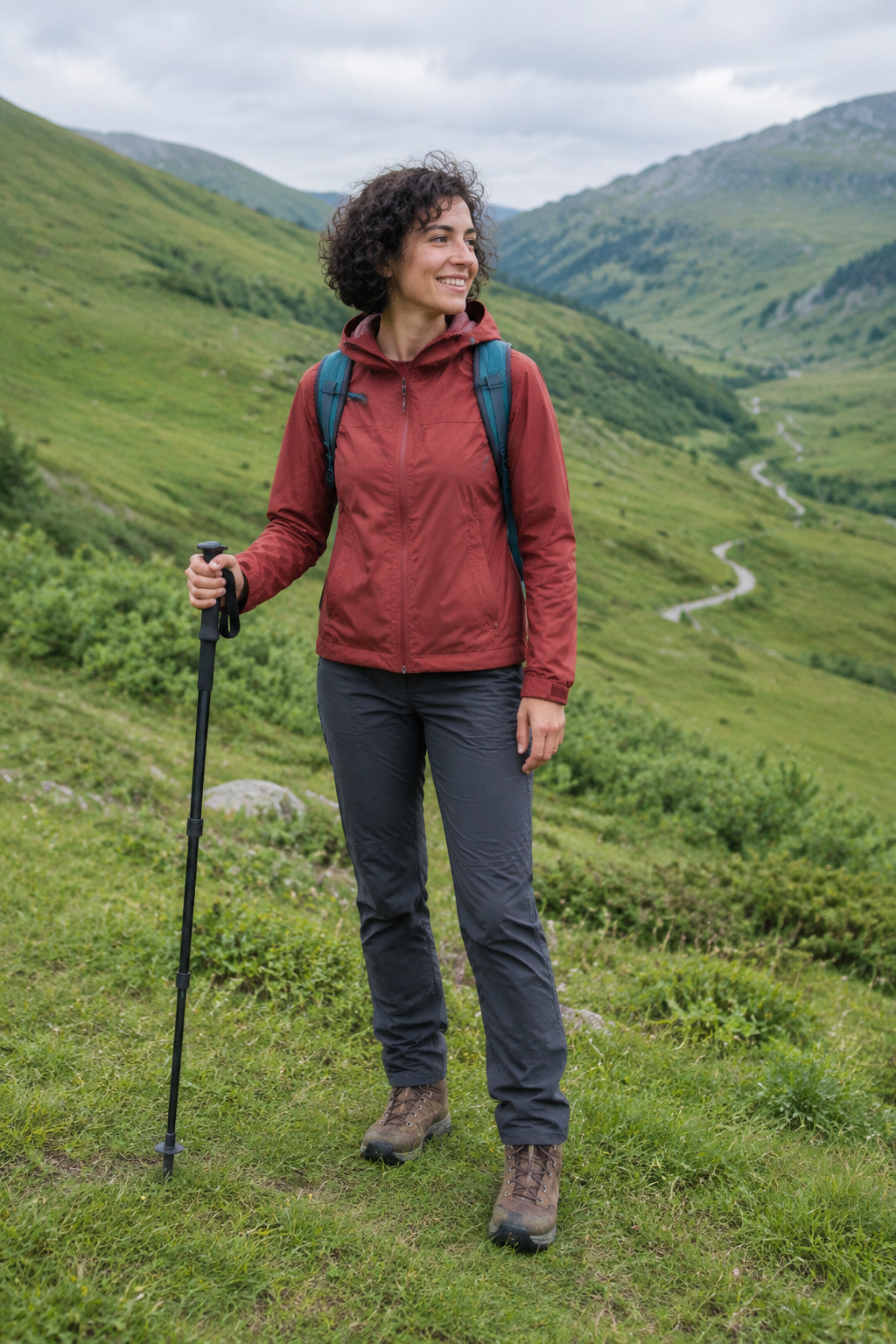
Edit this photograph by moving the same hiker from the green valley to a snow-covered alpine ridge at sunrise. Preserve her identity and recognizable facial features, short curly hair, expression, exact body pose and framing, rust-red jacket, charcoal trousers, brown boots, teal backpack, strap layout and single walking pole. Replace the grass and distant green hills with softly wind-sculpted snow and dramatic jagged snowy peaks under a pale peach dawn sky. Keep the full person and both boots visible at the same scale and position. Adapt the illumination naturally: warm sunrise rim light on the right side of her jacket and hair, soft cool blue fill from the snow, a believable contact shadow and slight boot impressions beneath her feet. Keep all clothing materials and equipment intact, no extra gear or extra people. The result must read as one convincing documentary outdoor photograph, not a cutout pasted onto a background. No advertising, text, logos, borders or watermark.

output.jpg

Transform the entire supplied home photograph into a lovingly handmade embroidery artwork on natural ivory linen, viewed straight on. Preserve the same cat's exact curled pose, gaze, silhouette, orange-black-white facial markings, white paws and wrapped tail. Preserve the relative placement of the blue cushion, wooden window and small fern so the original composition remains recognizable. Render the cat's fur using directional long-and-short stitches with subtle thread-color changes, its whiskers as fine individual strands, the cushion in soft satin stitches, the plant in delicate stem stitches, and the background in restrained running stitches with some exposed linen weave. Visible tactile thread relief and tiny handmade irregularities, softly lit physical textile, not a flat digital filter. Fill the square frame with the artwork without an embroidery hoop, decorative border, packaging, lettering, product presentation, advertising or watermark.

output.jpg

Combine these two reference photographs into one realistic wide landscape photograph. Image 1 supplies only the distinctive empty ochre-yellow canoe, its dark wooden gunwale, two bench seats, surface wear and single wooden paddle; preserve those features and its bow-pointing-right orientation. Image 2 supplies the sandstone canyon, river, camera viewpoint and late-afternoon lighting; retain its recognizable rock formations and river bend. Place exactly one canoe floating naturally on the calm water in the lower middle of image 2, occupying about one third of the frame width so the canyon remains vast. Match the boat's perspective, scale, color temperature and shadow to the canyon scene. Add a physically credible soft reflection beneath the hull and small contact ripples without changing the river's overall calmness. No shoreline from image 1, no duplicate boat, no people, no additional objects, no collage seams. Natural wilderness photograph, no text, advertising, logos, borders or watermark.

Grok Imagine Image 2.0 Edit Overview

Grok Imagine Image 2.0 Edit is xAI’s flagship image editing model designed to treat iterative modification as a first-class creative workflow. Ranking second globally on the Image Edit Arena benchmark, it empowers developers to direct 1 to 3 input images with text prompts, performing magic-wand region edits, multi-asset compositing, background changes, and non-destructive Smart Resize expansion.

Why Choose Grok Imagine Image 2.0 Edit?

  • Intelligent Multi-Reference FusionIngests 1 to 3 reference images simultaneously, intelligently blending garments, physical props, and facial characteristics across sources without manual clipping.

  • Surgical Region-Based ModificationApplies natural language prompts directly to isolated regions, updating specific items while locking surrounding pixels, perspectives, and background details in place.

  • Smart Resize Composition ExpansionRe-composes images across different aspect ratios (such as converting 1:1 into 16:9 or 9:16) by intelligently synthesizing realistic peripheral scene extension.

  • Flawless Subject and Identity ContinuityMaintains facial features, character proportions, and consistent rendering aesthetics across successive scene transfers and lighting shifts.

  • Granular Usage Billing & Automatic RefundsCombines transparent output tier rates with a predictable 2-credit surcharge per input image, backed by automatic credit refunds on task errors.

Parameters

ParameterRequirementDescription
promptRequired

Prompt must be a non-blank string of 1–8,000 characters.

image_urlsRequired

1–3 public HTTP(S) image URLs without embedded credentials.

nOptional

Integer from 1 to 4. Default: 1.

Default1234
aspect_ratioOptional

Supports 1:1, 2:3, 3:2, 9:16, 16:9. Default: 1:1.

Default1:12:33:29:1616:9
resolutionOptional

Choose 1K or 2K. Default: 1K.

Default1K2K
qualityOptional

Low or Medium. Default: Medium.

Defaultmediumlow

How to Use

  1. Supply reference imagesProvide 1 to 3 publicly accessible image URLs as your base canvas or feature references (such as model portraits, product photos, or styling boards).

  2. Draft explicit editing instructionsSpecify what to modify, swap, or introduce (for example, "Swap the model's denim jacket in image 1 with the leather coat in image 2").

  3. Choose output specs and framingSelect 1K or 2K resolution, configure Low or Medium quality, and define your target aspect ratio (1:1, 2:3, 3:2, 9:16, or 16:9).

  4. Submit asynchronous edit jobDispatch your API call to obtain a unique task ID, allowing background compute nodes to parse image references and diffuse edits.

  5. Retrieve edited imageryPoll the status endpoint until finished, then fetch the verified high-resolution PNG download URLs.

Pricing

Total credits = output count × tier rate + input image count × 2. The input surcharge is charged once per request. 1 credit = $0.005.

UsageRateDetails
Low / 1K8 credits / output image$0.040 / image
Medium / 1K12 credits / output image$0.060 / image
Low / 2K12 credits / output image$0.060 / image
Medium / 2K16 credits / output image$0.080 / image
Input image surcharge2 credits / input image$0.010 / image, once per request

Best Use Cases

  • E-commerce product re-contextualizationInsert packshots and merchandise photos into realistic lifestyle environments with accurate ambient reflections.

  • Fashion lookbook and model stylingRetain consistent model identities while swapping apparel, accessories, and color palettes across digital campaign lookbooks.

  • Key visual re-composition across formatsRe-compose square or landscape marketing assets into vertical 9:16 formats without cropping important visual subjects.

  • Object removal and background clean-upEliminate unwanted artifacts, replace busy settings with clean studio environments, or export clean transparent cutouts.

Pro Tips

  • When supplying multiple references, refer to each explicitly in the prompt (e.g., "Keep the pose and facial identity from image 1, but apply the vintage sunglasses shown in image 2").
  • Clarify both what changes and what stays untouched: "Replace the background behind the car with an alpine mountain highway; keep the car body, paint reflections, and road contact shadows identical."
  • When expanding aspect ratios with Smart Resize, describe additional environmental details to populate the newly framed peripheral canvas.
  • Ensure reference images have clean lighting and unobstructed subjects to facilitate accurate feature decoupling during multimodal fusion.

Notes

  • image_urls is required and must contain an array of 1 to 3 valid public HTTP(S) image URLs.
  • The prompt parameter is required and must contain 1 to 8,000 characters after removing leading and trailing whitespace.
  • Single requests support generating 1 to 4 output images (n), with total costs factoring in output count and input image fees.
  • Execution operates asynchronously; poll with task_id or set callback_url for immediate terminal state push notifications.

Related Models

Grok Imagine Image 2.0 Edit API frequently asked questions

What is the Grok Imagine Image 2.0 Edit API?

Grok Imagine Image 2.0 Edit is a high-fidelity image editing model developed by xAI. It pairs 1 to 3 reference images with natural language instructions to perform surgical region modifications, multi-asset feature fusion, and aspect ratio expansions. Built on advanced multimodal alignment architectures, it accomplishes complex wardrobe updates, scene changes, or element insertions while strictly preserving subject identity, fine textures, and realistic lighting harmony. You can call it programmatically or try it from the playground above.

How many reference images can I upload to Grok Imagine Image 2.0 Edit?

You can provide 1 to 3 publicly accessible HTTP(S) image URLs. The model parses visual elements from each asset, fusing distinct subjects, garments, or styling cues into a unified final render.

How does Grok Imagine Image 2.0 Edit preserve subject identity during edits?

The model generates precise internal segmentation boundaries guided by your prompt. Stating explicitly which elements to adjust and which to retain ensures that facial contours, product dimensions, and background textures remain intact.

Does Grok Imagine Image 2.0 Edit support Smart Resize aspect ratio changes?

Yes. Leveraging the Smart Resize capability, you can specify any supported ratio (1:1, 2:3, 3:2, 9:16, or 16:9). The model fills the expanded canvas while maintaining the natural scale and perspective of the original subject.

How is Grok Imagine Image 2.0 Edit billed?

Billing combines the base output tier rate with an input surcharge of 2 credits ($0.010) per provided image. For instance, generating one 1K Low image from 1 reference image costs 10 credits ($0.050), while one 2K Medium image from 3 references costs 22 credits ($0.110). Errored requests receive an immediate automatic refund.

Can Grok Imagine Image 2.0 Edit perform background replacement?

Yes. Instructing the model to swap the background or export an isolated cutout cleanly decouples the foreground subject, rendering realistic edge detail and ambient light integration.

What is the recommended prompt formula for Grok Imagine Image 2.0 Edit?

Structure your instructions using target localization, requested action, source reference binding, and preservation constraints (for example: "Select the jacket on the subject in image 1, swap it with the leather coat from image 2, and preserve the original facial expression, hair, and studio lighting").