Nano Banana Edit API

google/nano-banana/edit
10 ratios · 5 credits ($0.025) / generation

Nano Banana Edit refines images using natural language prompts and reference photos, supporting localized edits and background swaps. It strictly preserves facial identity, posture, and lighting harmony during modifications.

Get API Key
Input
464/5000
1
Reference image 1: Reference 1
OutputReady
5 credits / generation · $0.025

Continue with

Examples

edit-01-output.jpg

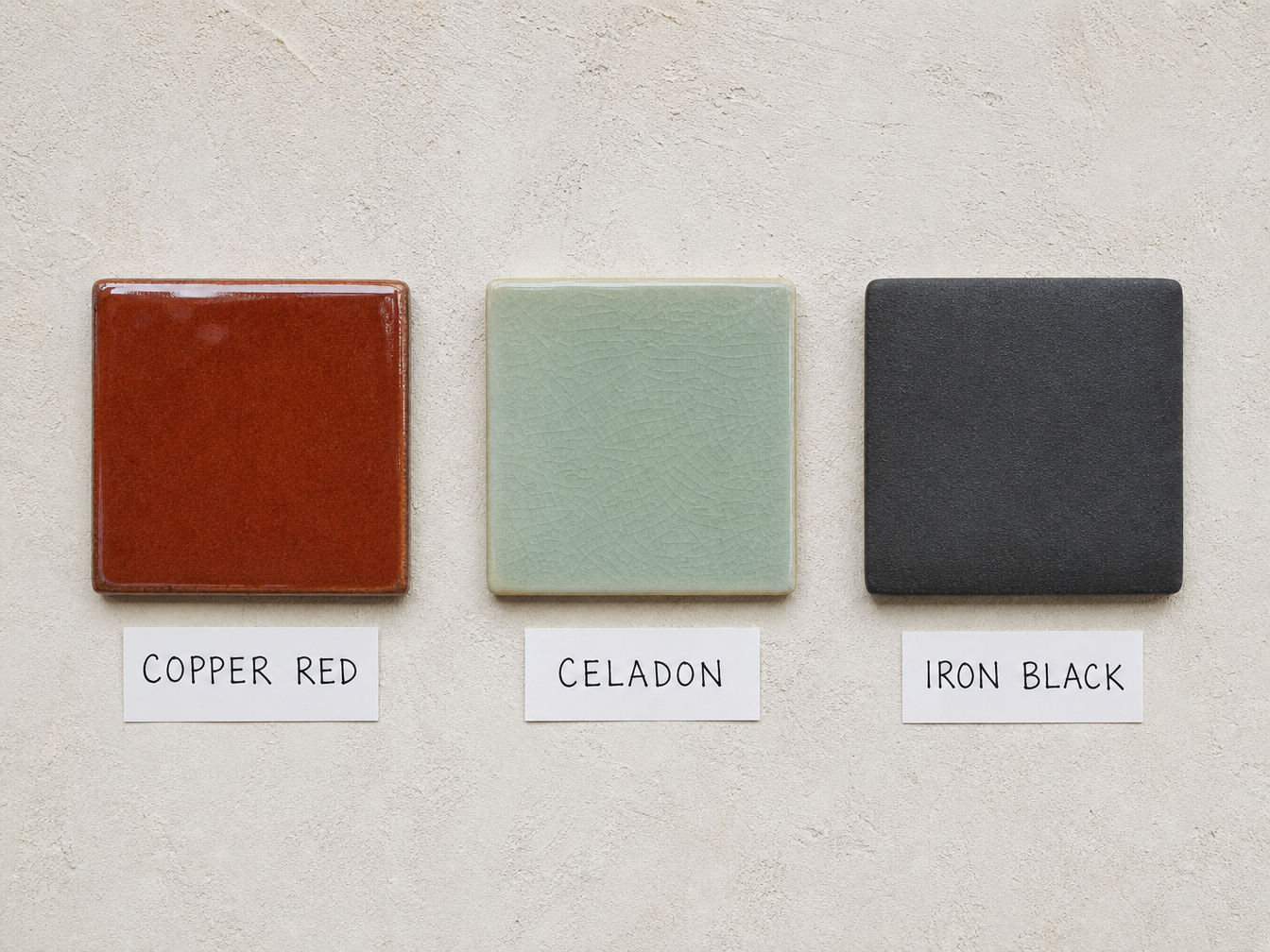
Use this photograph as the only source. Change only the middle tile: replace the celadon-green glaze with a deep glossy cobalt-blue glaze, and change its handwritten label from "CELADON" to "COBALT BLUE" in the same letter size, paper and handwriting. Keep the left copper-red tile and "COPPER RED" label, the right iron-black tile and "IRON BLACK" label, the plaster wall, lighting and camera angle exactly. No other tiles, no extra text, no logos, no watermarks.

edit-02-output.jpg

Add only a sleeping orange tabby cat curled on the center thwart of this same boat, and a folded grey wool blanket tucked beside it. Keep the boat, oars, mist, water and camera angle exactly. The cat must have realistic weight and a contact shadow on the wood. No people, no extra objects, no text, no logos, no watermarks.

edit-03-output.jpg

Use image 1 as the identity reference and image 2 as the destination. Place this same woman sitting cross-legged on the bamboo raft, cutting a sheet of red paper with small scissors, a few red scraps resting on the raft. Preserve her face, age, silver bun, indigo coat and ink-stained fingers from image 1. Preserve the river, limestone cliffs and raft from image 2. Natural overcast light, physically consistent contact with the raft, one woman only, no collage edges. No extra people, no text, no logos, no watermarks.

Nano Banana Edit

Nano Banana Edit is a premier multimodal image editing model engineered by Google DeepMind on the Gemini 2.5 Flash architecture. It enables mask-free, prompt-directed transformations with exceptional character facial consistency across iterations. Retaining original bodily poses and ambient lighting while applying targeted edits, it provides a fast, reliable solution for visual storytelling.

Why Choose Nano Banana Edit?

  • Breakthrough Facial and Identity ConsistencyAnchored by Gemini's deep multimodal representation, it locks in bone structure, facial landmarks, and expressions across successive edits to prevent character drift.

  • Mask-Free Prompt-Driven Local EditingEliminates the friction of manual lassoing or alpha mask painting; specify the change in plain English, and the model isolates the modification boundary automatically.

  • Faithful Pose, Perspective, and Lighting RetentionStrictly honors the original model posture, camera angles, and ambient bounce lighting, guaranteeing natural realism during full background or clothing replacements.

  • Multi-Reference Intelligent Feature FusionIngests multiple reference image URLs to decouple and synthesize character likeness from one photo with apparel textures or artistic styles from another.

  • Zero Surcharge on Multiple Reference ImagesPriced transparently at a fixed 5 credits ($0.025) per generation, regardless of whether you supply single or multiple reference URLs, cutting production costs.

Parameters

ParameterRequirementDescription
promptRequired

Describe the requested image changes using 1–5,000 characters, including at least one non-whitespace character.

image_urlsRequired

Reference images to edit. Provide at least one publicly accessible HTTP(S) image URL.

sizeOptional

Output image aspect ratio. Select auto to let the model choose the framing; the API request then omits size.

Defaultauto1:12:33:23:44:34:55:49:1616:921:9

How to Use

  1. Supply publicly accessible reference imagesProvide at least one public HTTP(S) image URL in the image_urls array, pointing to the base image to modify or supplementary style references.

  2. Formulate a targeted edit instructionDescribe the requested adjustment in the prompt parameter, using a clear structure such as "change [specific element] while preserving all other details".

  3. Specify the output aspect ratioSelect an output framing format among 10 options like 1:1, 9:16, or 16:9; select auto to preserve or adaptively match the base image composition.

  4. Submit the asynchronous editing requestSend your POST payload to receive an immediate task_id while backend inference clusters process feature extraction and guided diffusion.

  5. Retrieve and inspect edited visualsPoll the status endpoint until the task status becomes finished, or listen for your webhook callback, then download the rendered high-fidelity image.

Pricing

Each generation costs 5 credits ($0.025). 1 credit = $0.005.

UsageRateDetails
Image Edit5 credits / generation$0.025 / generation

Best Use Cases

  • Apparel Model Restyling and SwatchesSwap out clothing designs, textile textures, and accessories while strictly retaining the model's exact facial identity, skin tone, and body posture.

  • Product Scene Relocation and Background SwapsTransport studio packshots into sunny outdoor, home interior, or architectural settings while recalculating natural contact shadows and reflections.

  • Character Storyboards and Sequential ArtKeep characters instantly recognizable across multiple comic panels, concept sheets, and episodic narratives with dependable identity retention.

  • Photo Restoration and Distraction Clean-UpRemove unwanted background tourists, restore vintage photographs, or introduce contextually accurate period colorization.

Pro Tips

  • Use the "modify X, keep Y unchanged" pattern: Structure instructions explicitly (e.g., "change the background to a sunny cafe, keeping facial features, clothing, and posture identical") to tightly constrain diffusion boundaries.
  • Upload well-lit, high-resolution references: High-clarity inputs with balanced exposure allow the model to isolate facial features and material textures with superior accuracy.
  • Detail surface shaders and lighting physics: Explicitly specify finishes such as "matte brushed brass" or "translucent silk fabric" for realistic light integration.
  • Adopt an incremental multi-step editing workflow: When executing radical changes involving face, clothing, and background, execute separate calls for clothing and background in sequence for maximal fidelity.

Notes

  • The image_urls parameter is mandatory and requires at least one publicly accessible HTTP(S) image URL; web uploads accept JPEG, PNG, and WebP up to 30 MB each.
  • The prompt parameter is required and must contain 1 to 5,000 characters with at least one non-whitespace character after trimming.
  • Tasks are processed asynchronously, returning a unique task_id; any unexpected task failure automatically triggers a full refund of the deducted credits.

Related Models

Nano Banana Edit API frequently asked questions

What is the Nano Banana Edit API?

Nano Banana Edit is a Google DeepMind model for precise image editing driven by natural language and visual references. It delivers breakthrough character and facial consistency, mask-free localized inpainting, background replacement, and multi-reference feature blending. Built on the Gemini 2.5 Flash unified vision-language architecture, it strictly preserves original subject poses, perspective geometry, and natural ambient lighting while executing targeted transformations. You can call it programmatically or try it from the playground above.

How does Nano Banana Edit maintain facial consistency across edits?

Leveraging Gemini's multimodal latent memory, the model anchors cranial proportions, facial geometry, and expressions from the source image. Reinforcing your prompt with instructions such as "preserve exact facial identity" ensures characters remain coherent across changing outfits and environments.

Does Nano Banana Edit require manual mask uploads for local changes?

No. The model relies entirely on natural language semantic parsing to target modifications without manual masks or lasso selections. Simply state the desired change in your prompt (e.g., "change the red handbag to a brown leather backpack"), and the model automatically confines the edit to the designated item.

Does Nano Banana Edit preserve natural lighting during background replacements?

Yes. The model incorporates physical lighting re-estimation, recalculating contact shadows, rim reflections, and ambient color spill on the subject to match the light sources and color temperature of the new background.

Does Nano Banana Edit support multiple reference images?

Yes. You can supply multiple publicly accessible image URLs in the image_urls array to blend features across sources (e.g., transferring clothing style from a second image onto a character from the first), with no extra fee charged for additional reference pictures.

Can I adjust aspect ratios when editing images with Nano Banana Edit?

Yes. You can specify any of the 10 supported aspect ratios (1:1, 2:3, 3:2, 3:4, 4:3, 4:5, 5:4, 9:16, 16:9, or 21:9) via the size parameter. If omitted or set to auto, the model automatically selects an optimal framing aligned with the original composition.

How much does Nano Banana Edit cost?

Image editing calls cost a flat rate of 5 credits ($0.025, where 1 credit = $0.005) per generation, with zero surcharges for multiple reference images. If a generation request encounters a system error or fails validation, all debited credits are refunded immediately.