Kling O3 Image Edit API

kwaivgi/kling-image-o3/edit
1K / 2K / 4K · 1–9 images

Kling O3 Image Edit refines and blends imagery using up to 10 reference images alongside natural language instructions, supporting high-dimensional feature synthesis, mask-free surgical local edits, and native aspect ratio inheritance. It carries out complex wardrobe modifications, background transfers, and asset insertions while strictly preserving subject identity, facial contours, and realistic lighting textures.

Get API Key
Input
1036/2000
2/10
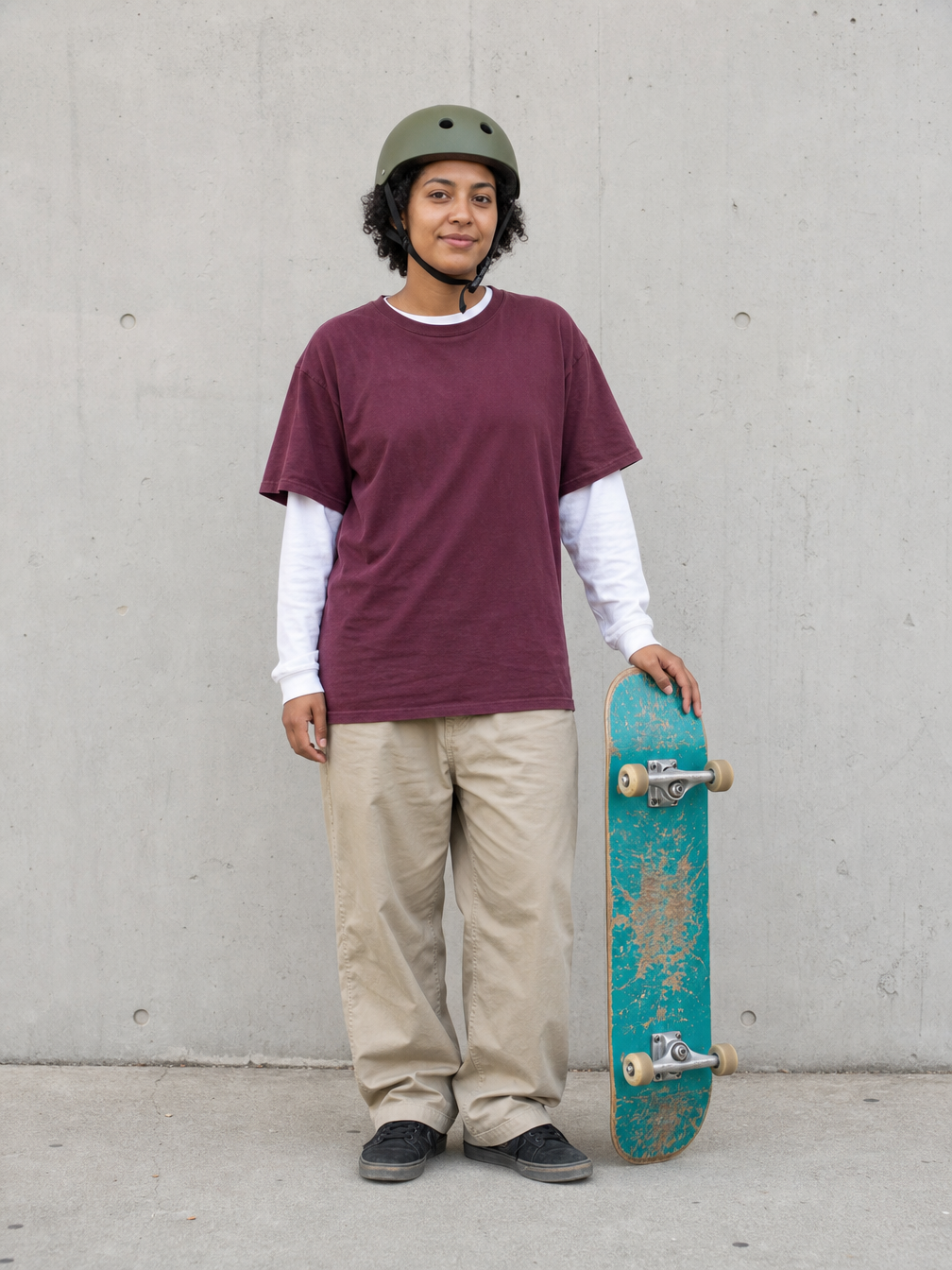
Reference image 1: Reference 1
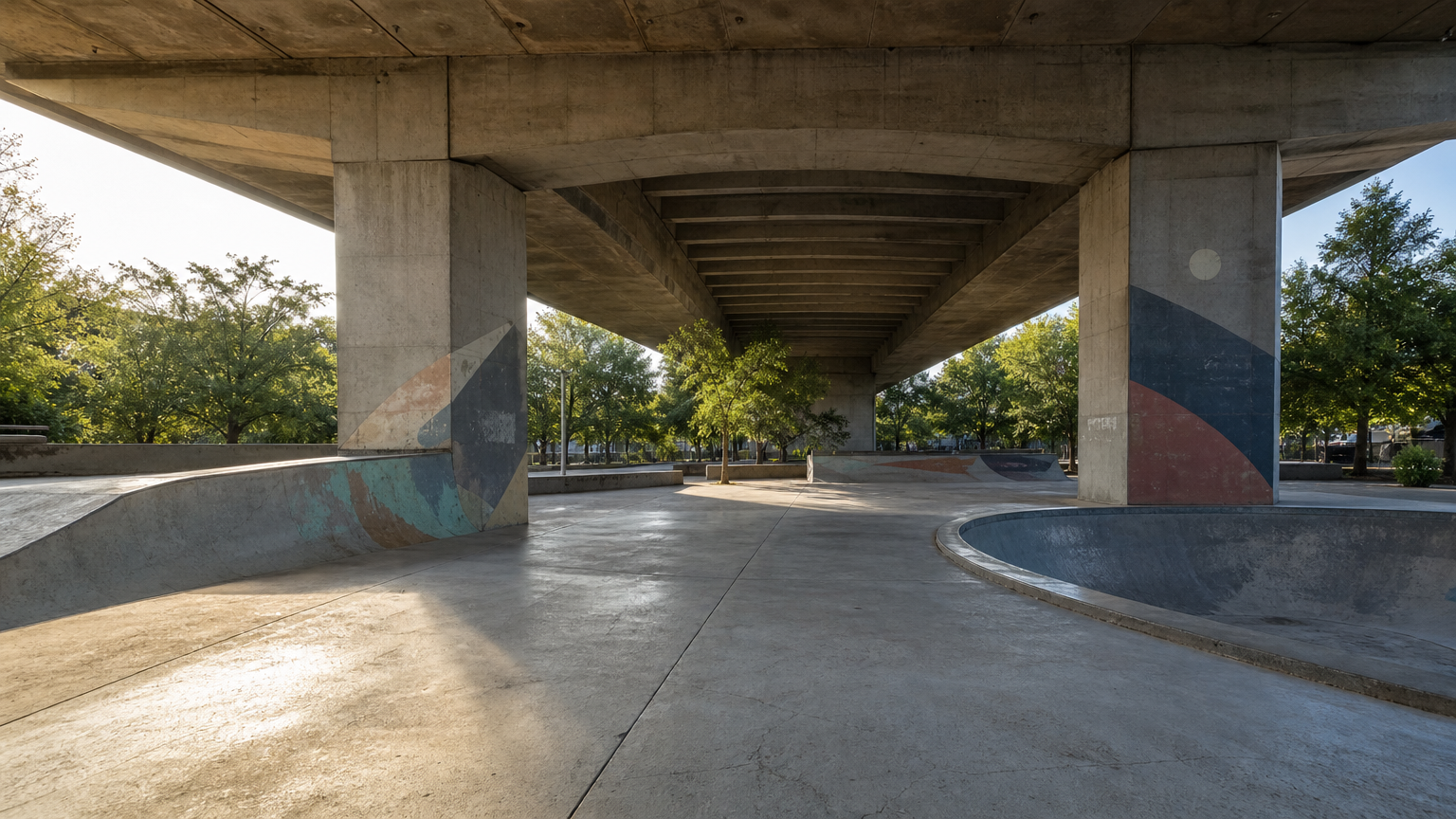
Reference image 2: Reference 2
Elements

Reference subjects in order with @Element1, @Element2. Provide a main view and additional views. Sign in to upload files.

OutputReady
1 × 3.5 = 3.5 credits · $0.018

Continue with

Examples

edit-01-output.png

Use image 1 as the exact reference for the woman and her skateboard, and image 2 as the environment and composition to preserve. Place the woman naturally on the flat central foreground apron of the skatepark in image 2, slightly left of center, full body visible. Keep her recognizable face, short curls, olive helmet, burgundy T-shirt over white sleeves, beige trousers, black shoes and the turquoise skateboard with cream wheels. She stands casually with both feet firmly on the ground, holding her skateboard vertically on the same side and with the same hand as in image 1; do not invent an action trick. Match the camera height, adult scale and late-afternoon light entering from the left in image 2; add realistic contact shadows beneath both shoes and the board. Preserve the bridge columns, right-hand bowl, left bank, distant trees and the overall park layout. Documentary sports photograph, natural skin and fabric. Exactly one person and one skateboard. No additional people, animals, text, brands, advertising or watermark.

edit-02-output.png

Edit this attic photograph with precisely localized changes. Remove every cardboard moving box on the left side of the window and restore the uninterrupted oak floor beneath them. In that cleared area place one comfortable moss-green fabric armchair angled slightly toward the center of the room, and one slender dark-bronze floor lamp with a small ivory shade immediately behind the chair. Fit both naturally under the sloping ceiling with believable proportions and floor contact shadows. Keep the exact original camera position and framing, roof slope, all exposed beams, square window and wooden frame, floorboard directions, foreground woven rug, right-hand built-in shelf and existing books. Preserve the original daylight direction and realistic photographic appearance; the new lamp is switched off. Do not renovate other surfaces or add decorations. No people, animals, boxes, typography, brands, advertising or watermark.

edit-03-output.png

Transform this mountain village photograph into a meticulous handmade layered-paper artwork while preserving the original scene layout and camera framing. Keep the same cluster of tiled-roof houses in the upper left, the S-shaped path from the bottom center to the village, the sweeping terraces on the right, and the distant hills along the top. Construct every terrace level from a distinct stacked sheet with crisp cut edges, visible paper thickness and soft cast shadows between layers. Render the houses as tiny folded-paper buildings and trees as simple carefully cut silhouettes. Use warm ivory, muted forest green, ochre and dusty blue cardstock with subtle fiber texture. Directional studio light from upper left reveals the relief without flattening the recognizable topography. No new buildings or roads, no people, animals, writing, labels, border, frame, logos or watermark.

Kling O3 Image Edit Overview

Kling O3 Image Edit is Kuaishou's (Kling AI) flagship multimodal image editing model engineered for complex visual compositing and multi-source asset modification. Ingesting 1 to 10 reference images simultaneously, it excels at multi-reference visual reasoning, prompt-driven maskless local inpainting, auto-ratio canvas inheritance, and native 4K resolution output. It delivers precise aesthetic control while preserving core subject continuity across commercial e-commerce, storyboards, and digital art.

Why Choose Kling O3 Image Edit?

  • Intelligent Multi-Reference Fusion up to 10 ImagesIngests 1 to 10 image assets in a single call, decoupling and harmonizing distinct subjects, styling palettes, physical props, and textures into an organic composite.

  • Mask-Free Natural Language InpaintingEliminates the friction of manual pixel masking; simply state modifications in plain language to execute pinpoint garment swaps, asset adjustments, and ambient relighting.

  • Dedicated auto Aspect Ratio SupportFeatures an auto ratio mode that preserves original canvas proportions faithfully, or maps cleanly to 8 standard ratios with realistic peripheral background synthesis.

  • Rigorous Subject & Illumination ConsistencyMaintains facial geometry, physique, material properties, and authentic ambient bounce light across successive scene transfers and object modifications.

  • Transparent Billing with Zero Input SurchargesAdopts the exact same predictable resolution rates as text-to-image with no surcharges per uploaded reference image, backed by automatic credit refunds on task errors.

Parameters

ParameterRequirementDescription
promptRequired

String, 1–2,000 characters after trimming.

image_urlsRequired

1–10 public HTTP(S) image URLs, passed in order.

resolutionOptional

Output resolution determines the per-image rate.

Default1K2K4K
sizeOptional

Aspect ratio; auto is supported only by Edit. auto, 16:9, 9:16, 1:1, 4:3, 3:4, 3:2, 2:3, 21:9

Default16:9auto9:161:14:33:43:22:321:9
output_formatOptional

Output image format.

Defaultpngjpegwebp
nOptional

Integer output count, 1–9. Total credits = the resolution rate × n.

Default1
elementsOptional

Array of subject-reference objects. Reference them as @Element1, @Element2, etc. No published count limit; extension fields are preserved.

elements[].frontal_image_urlOptional

Public HTTP(S) URL for the main subject view.

elements[].reference_image_urlsOptional

Array of public HTTP(S) image URLs for additional views of the same subject.

How to Use

  1. Gather reference image URLsAssemble 1 to 10 accessible public HTTP(S) image URLs representing subjects, garments, environments, or styling references.

  2. Formulate clear editing instructionsSpecify requested updates and boundary constraints in text (for example, 'Keep the facial identity from image 1, but dress the subject in the vintage leather jacket from image 2').

  3. Configure resolution and ratio framingSelect 1K, 2K, or 4K resolution, and configure auto to preserve the source image framing or choose standard ratios like 16:9 or 1:1.

  4. Choose format and output volumePick your target delivery format (PNG, JPEG, or WebP) and define output quantity n between 1 and 9.

  5. Dispatch job and download resultsSubmit the API request to obtain a unique task ID, poll until complete, and retrieve direct high-resolution PNG download URLs.

Pricing

1K/2K: 3.5 credits/image (approximately $0.018); 4K: 7 credits/image ($0.035). Total credits = resolution rate × n, without input-image or subject-reference surcharges. At $0.005 per credit, 3.5 credits equals $0.0175. USD is rounded to three decimals after calculating the total.

UsageRateDetails
1K / 2K3.5 credits/image · ≈ $0.018Multiply by the output count n.
4K7 credits/image · $0.035Multiply by the output count n.

Best Use Cases

  • E-commerce apparel styling and multi-asset fusionCombine model shots, apparel packshots, and studio environments to generate realistic lifestyle photography without reshoots.

  • Multi-reference character design and pose variationSynthesize facial traits and styling from multiple reference angles to produce consistent character portraits in fresh environments.

  • Format re-composition and intelligent background extensionUse auto to lock native aspect ratios, or extend horizontal banners into vertical 9:16 social assets with seamless environmental filling.

  • Surgical detail modification and object clean-upSwap accessories, adjust hairstyles, replace cluttered backgrounds with minimalist studio sets, and refine local highlights seamlessly.

Pro Tips

  • When supplying multiple images, identify references distinctly in your prompt (e.g., 'Retain the facial identity of image 1, dressed in the trench coat from image 2').
  • Clarify both updates and constraints: 'Replace the background with a sunlit modern interior; keep the subject's pose, facial expression, and studio lighting reflections completely unchanged.'
  • Use auto for the size parameter when you want the generated output to match the exact proportions and dimensions of your primary input image.
  • High-contrast reference images with clean backgrounds help the multimodal feature decoupling pipeline isolate subject contours with maximum precision.

Notes

  • The image_urls parameter is required and must contain 1 to 10 valid public HTTP(S) image URLs.
  • The prompt parameter is required and must contain 1 to 2,000 characters after removing leading and trailing whitespace.
  • Output count n must be an integer between 1 and 9; charges scale strictly with output count and resolution tier without reference surcharges.
  • Generation operates asynchronously; query status with task_id or configure a callback_url for immediate webhook notifications.

Related Models

Kling O3 Image Edit API frequently asked questions

What is the Kling O3 Image Edit API?

Kling O3 Image Edit is a state-of-the-art multimodal image editing model developed by Kuaishou (Kling AI). It pairs 1 to 10 reference images with natural language instructions to execute multi-asset feature fusion, mask-free surgical local edits, and aspect ratio adaptation. Built on advanced multimodal feature decoupling and diffusion architectures, it carries out wardrobe updates, scene changes, or element adjustments while preserving facial contours, fine textures, and lighting harmony. You can call it programmatically or try it from the playground above.

How many reference images can I upload to Kling O3 Image Edit?

You can provide between 1 and 10 publicly accessible HTTP(S) image URLs. The model parses visual elements from each asset, blending distinct subjects, styling cues, or props into a unified final output in a single job.

How does Kling O3 Image Edit preserve subject identity during edits?

The model utilizes semantic prompt localization rather than manual pixel masks. Stating clearly which attributes to modify and which to retain ensures that facial contours, product dimensions, and ambient light reflections remain stable.

Does Kling O3 Image Edit support original aspect ratio retention?

Yes. By setting the size parameter to auto, the model automatically respects the aspect ratio of the primary input image; it also supports expanding images into 8 standard aspect ratios with realistic peripheral background synthesis.

Are there extra fees for uploading reference images in Kling O3 Image Edit?

No. Kling O3 Image Edit shares the exact same pricing tiers as text-to-image with zero input image surcharges. Costs depend solely on output count and resolution tier, and failed tasks receive an immediate full refund.

What resolutions and output formats does Kling O3 Image Edit support?

It supports 1K, 2K, and native 4K resolutions with output choices of PNG, JPEG, and WebP (PNG by default). Even intricate multi-reference local edits produce sharp, high-fidelity commercial deliverables.

What is the recommended prompt formula for multi-reference fusion with Kling O3 Image Edit?

Structure your instructions using target localization, reference binding, requested action, and preservation constraints (for example: 'Select the model in image 1, dress them in the black jacket from image 2, place them in the street setting of image 3, and keep facial expressions and studio lighting identical').