Wan 2.7 Image Edit API

alibaba/wan-2.7/image-edit
6 preset sizes / custom size · 1–4 images

Wan 2.7 Image Edit transforms and blends 1–4 reference images with natural language instructions, enabling mask-free localized repainting, identity preservation, and stylistic transfer. It seamlessly updates targeted components while retaining original facial features, primary composition, and ambient lighting textures.

Get API Key
Input
880/5000
1/4
Reference image 1: Reference 1
OutputReady
1 × 4.2 = 4.2 credits · $0.021

Continue with

Examples

standard-edit-01-output

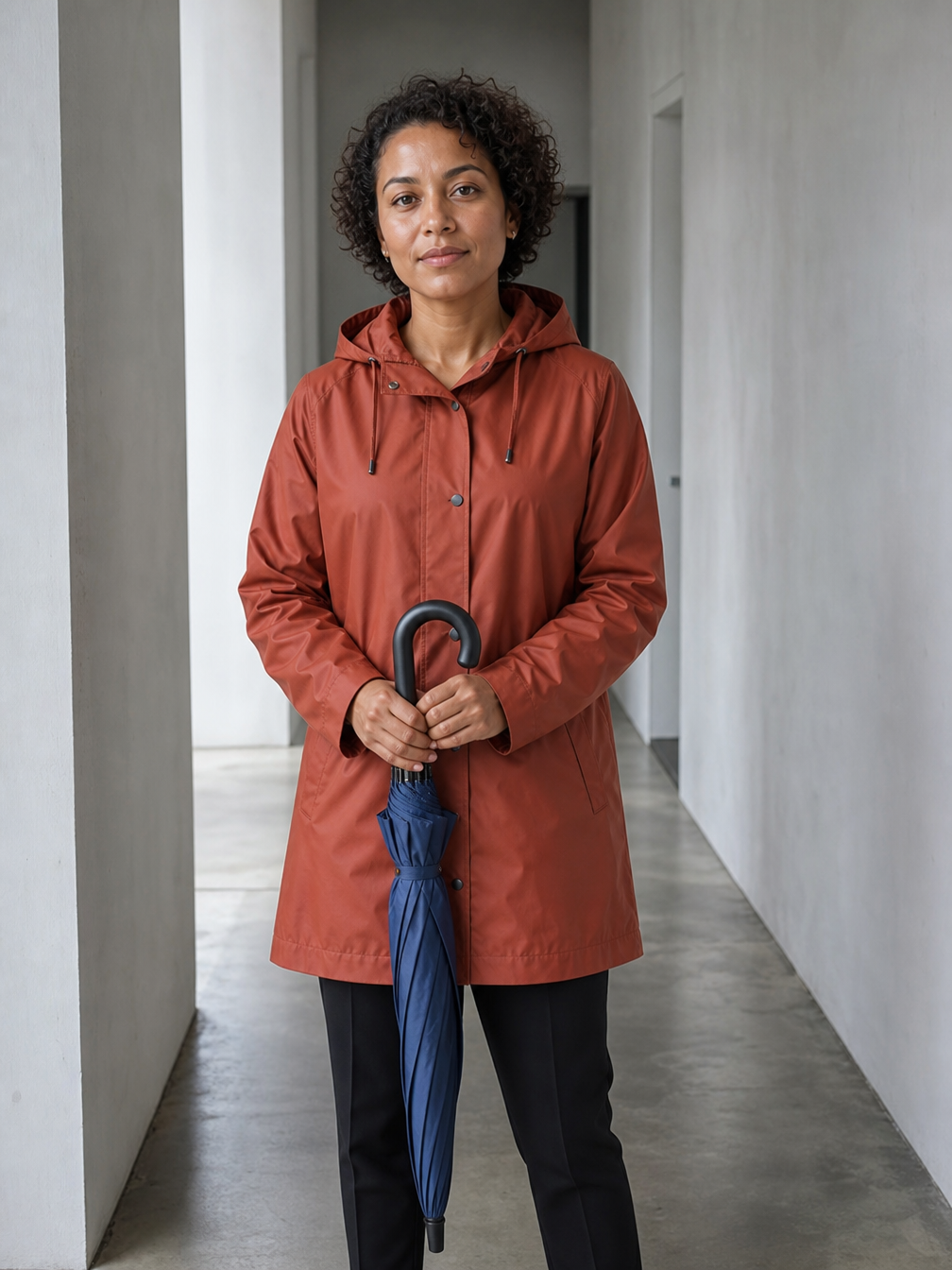
Edit the supplied photo in place. Treat the woman and her umbrella as a locked foreground cutout. Keep her EXACT image-space size, position, pose, face, short curly hair, rust raincoat, dark trousers, both hands and folded blue umbrella. Match the original close three-quarter portrait crop: her head stays near the top of the frame, her body fills most of the image height, and her feet remain OUTSIDE the bottom edge. Do not zoom out, move the camera, extend her legs or reveal shoes. Change only pixels of the plain corridor behind her into a rain-soaked bus shelter: glass wall with droplets at the right, a blurred wet residential street and trees behind her, subtle amber reflections. Preserve her face and body proportions with the same framing. Apply only a subtle cooler ambient tone to harmonize the light. No text, other people, advertising, logos, watermark, or foxes.

standard-edit-02-output

Transform image 1 into an elegant hand-printed color woodcut. Preserve the single beetle silhouette, its six legs, two antennae, orientation, size and exact location on the diagonal tree trunk. Replace photographic shading with bold carved black contour lines, restrained emerald, warm ivory and burnt-orange ink areas, visible wood grain and subtle print registration texture. Keep the original composition and recognizable bark grooves. No extra insects, no text, no border. No advertising, brands, logos, watermark, or foxes.
standard-edit-03-output

Edit image 1 only on the face of the wooden ferry sign. Replace all existing lettering with exactly two large centered lines: "渡口 / FERRY" and "09:30". Keep the sign wood grain, weathering, posts, exact perspective, framing, harbor water, mooring rope and background buildings unchanged. New lettering is off-white hand-painted clean sans serif, easily readable, follows the physical sign perspective. No additional words or objects. No advertising, brands, logos, watermark, or foxes.
Wan 2.7 Image Edit Overview

Wan 2.7 Image Edit is a unified multimodal image editing and reference-blending model developed by Alibaba Tongyi Lab. Creators can execute complex multi-image synthesis, localized inpainting, and stylistic transformations without manual masking by issuing intuitive natural language instructions (e.g., "place the person from image 1 into the scenic backdrop of image 2"). The model excels in facial identity retention across scenes and supports 6 preset aspect ratios as well as custom pixel dimensions, serving as an efficient engine for e-commerce scene staging, portrait retouching, and asset compositing.

Why Choose

  • Mask-Free Natural Language EditingEliminates tedious manual lassoing and brush selections; describe modifications and replacements in conversational text, and the model handles segmentation and edge transitions automatically.

  • 1–4 Multi-Reference SynthesisUpload up to 4 reference pictures and cross-reference them as "image 1", "image 2", etc. in your prompt to synthesize characters, merchandise, and backgrounds into a harmonious composition.

  • High-Fidelity Subject & Lighting RetentionModifies requested garments, objects, or scenery while preserving primary facial contours, character expressions, and authentic ambient reflections.

Parameters

ParameterRequirementDescription
promptRequired

String, 1–5,000 characters after trimming.

image_urlsRequired

1–4 public HTTP(S) image URLs, in order. Refer to image 1, image 2, etc. in the prompt. A single string or Base64 is not accepted.

sizeOptional

Six preset sizes, or an object such as {"width":1280,"height":720}. Width and height must be positive integers.

Default1024x1024512x512768x10241024x768576x10241024x576
nOptional

Output image count, integer 1–4. Credits = per-image rate × n.

Default1
seedOptional

Optional integer, omitted when unset. The upstream documentation specifies no numeric range.

How to Use

  1. Provide Reference ImagesPrepare 1 to 4 clean reference images via public HTTP(S) URLs (or upload directly in the playground).

  2. Write Edit InstructionsSpecify the exact transformation, such as "preserve the subject identity from image 1 and place them onto the beach setting of image 2".

  3. Submit Task and DownloadSubmit via the API or console, track the task asynchronously, and download the finished composite output.

Pricing

4.2 credits per output image ($0.021). Total credits = 4.2 × n. Size and reference images add no charges. 1 credit = $0.005.

UsageRateDetails
Standard4.2 credits/image · $0.021Multiply by output count n; credits are refunded for failed tasks.

Use Cases

  • E-Commerce Staging & Scene ReplacementRelocate studio-shot merchandise or models into authentic outdoor or lifestyle locations with photorealistic shadows.

  • Multi-Image Asset FusionExtract character faces from image 1, apparel from image 2, and aesthetics from image 3 into a cohesive hero asset.

  • Mask-Free Retouching & Wardrobe SwapsRapidly alter hairstyles, clothing colors, or handheld accessories while keeping facial structures strictly intact.

Tips

  • Reference Images by Index: Use explicit labels like "image 1" and "image 2" in your prompt to guide the multimodal planner in extracting targeted features accurately.
  • Use "Preserve... While Changing..." Structures: Clearly delineate preserved anchors (e.g., "preserve the facial structure of image 1") from modified areas to balance attention weights.
  • Match Image Quality and Lighting: Using reference photos with comparable resolutions and illumination angles delivers the most seamless color blending.

Notes

  • Reference Images Required: This endpoint mandates 1 to 4 reference image URLs; use Wan 2.7 Image Text to Image for prompt-only generation.
  • Public Accessibility: URLs passed via API must be directly reachable HTTP(S) links without authentication barriers.
  • Web Upload Limits: The web console accepts JPEG, PNG, and WebP formats up to 30 MB per file.

Related Models

Wan 2.7 Image Edit API FAQ

What is the Wan 2.7 Image Edit API?

Wan 2.7 Image Edit is an Alibaba Tongyi Lab model designed for high-fidelity image editing and multi-reference fusion. It combines 1–4 reference pictures with text prompts to perform mask-free inpainting, cross-scene subject transfers, and style migration. Built on a unified multimodal planner and DiT backbone, it executes desired modifications while preserving source identity and ambient lighting. You can call it programmatically or try it from the playground above.

How many reference images can I upload to Wan 2.7 Image Edit?

You can provide between 1 and 4 public image URLs. The images are ordered sequentially in an array and referenced as "image 1" through "image 4" in your prompt, with zero surcharge for multiple references.

Do I need to supply a mask when using Wan 2.7 Image Edit?

No. The model provides native mask-free editing. Simply describe the modifications in plain text, and the multimodal engine identifies the target boundaries automatically.

How does Wan 2.7 Image Edit preserve facial identity across edits?

The architecture decouples facial identity latents from background and apparel variables. Reinforcing instructions such as "keep the facial appearance of image 1 unchanged" ensures strict identity retention.

Can Wan 2.7 Image Edit output a different aspect ratio than the input?

Yes. You can specify any of the 6 preset dimensions or pass custom pixel measurements in the size parameter. The model intelligently extends the visual narrative to fill the target canvas.

Does using 4 reference images cost more than 1 in Wan 2.7 Image Edit?

No. Billing is determined solely by the number of output images generated (4.2 credits / $0.021 per image), with no additional fees for input images.

What happens to credits if an edit task fails?

Vidgo implements an automated refund guarantee. If a task fails due to unreachable image URLs, validation errors, or timeouts, all deducted credits are returned immediately.