MiniMax H3 Max and Turbo video generation with multimodal references

MiniMax H3 Max brings Max and Max Turbo into one family for 5–15-second videos at 480p, 768p or 1080p. Both variants create scenes from text or animate a starting image with an optional ending frame; Max also combines subject images, reference video and reference audio. Describe the action, camera and audible events to develop performances, transitions and scene concepts. Choose the task by its accepted sources, output settings and current rate, then review visual continuity and generated sound in the actual result.

MiniMax H3 Max is developed by MiniMax. Vidgo provides access to the model. Model names and trademarks belong to their respective owners.


Explore MiniMax H3 Max Models

For text-only scenes or frame animation, compare the Max and Max Turbo task rates at the same planned duration and resolution, then test your own brief. Choose Max Reference to Video for at least one subject image with optional movement and sound sources. All five cards open their existing tasks, where you can configure the exact inputs and inspect the complete estimate.

Text to VideoMiniMax

MiniMax H3 Max Turbo Text to Video

MiniMax H3 Max Turbo Text to Video turns text into coherent 5–15 second videos with synchronized native stereo audio and fast generation. It follows physical motion while rendering subtle changes in light and shadow.

Image to VideoMiniMax

MiniMax H3 Max Turbo Image to Video

MiniMax H3 Max Turbo Image to Video turns still images into 5–15 second videos with start and end frame control and synchronized native stereo audio. It preserves the source subject and textures while adding realistic physical motion.

Text to VideoMiniMax

MiniMax H3 Max Text to Video

MiniMax H3 Max Text to Video turns text prompts into cinematic video with native stereo audio, faster-than-real-time generation, and precise instruction following. It renders complex camera work and physical motion with fine detail across multiple resolutions and common aspect ratios.

Image to VideoMiniMax

MiniMax H3 Max Image to Video

MiniMax H3 Max Image to Video turns still images into video with native stereo audio, start and end frame control, and lip-synced dialogue. It preserves the source subject's identity and textures while adding fluid, natural motion and camera work.

Reference to VideoMiniMax

MiniMax H3 Max Reference to Video

MiniMax H3 Max Reference to Video creates cinematic video with combined image, video, and audio guidance. It preserves character appearance and motion rhythm while adapting the aspect ratio and delivering multiple HD quality levels.

MiniMax H3 Max Text, Frame and Multimodal Reference Tasks

Frame animation uses one starting image followed by an optional ending image. Max reference generation uses one to nine images and optional video or audio, with up to twelve assets combined; assign the sources appearance, scene, movement and sound roles in the prompt. Use each workflow’s own input fields so the chosen composition and source material match the intended shot.

Model / taskInput and workflow
MiniMax H3 Max Turbo Text to VideoMiniMax H3 Max Turbo Text to Video turns text into coherent 5–15 second videos with synchronized native stereo audio and fast generation. It follows physical motion while rendering subtle changes in light and shadow.
MiniMax H3 Max Turbo Image to VideoMiniMax H3 Max Turbo Image to Video turns still images into 5–15 second videos with start and end frame control and synchronized native stereo audio. It preserves the source subject and textures while adding realistic physical motion.
MiniMax H3 Max Text to VideoMiniMax H3 Max Text to Video turns text prompts into cinematic video with native stereo audio, faster-than-real-time generation, and precise instruction following. It renders complex camera work and physical motion with fine detail across multiple resolutions and common aspect ratios.
MiniMax H3 Max Image to VideoMiniMax H3 Max Image to Video turns still images into video with native stereo audio, start and end frame control, and lip-synced dialogue. It preserves the source subject's identity and textures while adding fluid, natural motion and camera work.
MiniMax H3 Max Reference to VideoMiniMax H3 Max Reference to Video creates cinematic video with combined image, video, and audio guidance. It preserves character appearance and motion rhythm while adapting the aspect ratio and delivering multiple HD quality levels.

MiniMax H3 Max Bicycle Motion Transition and Taiko Performance Examples

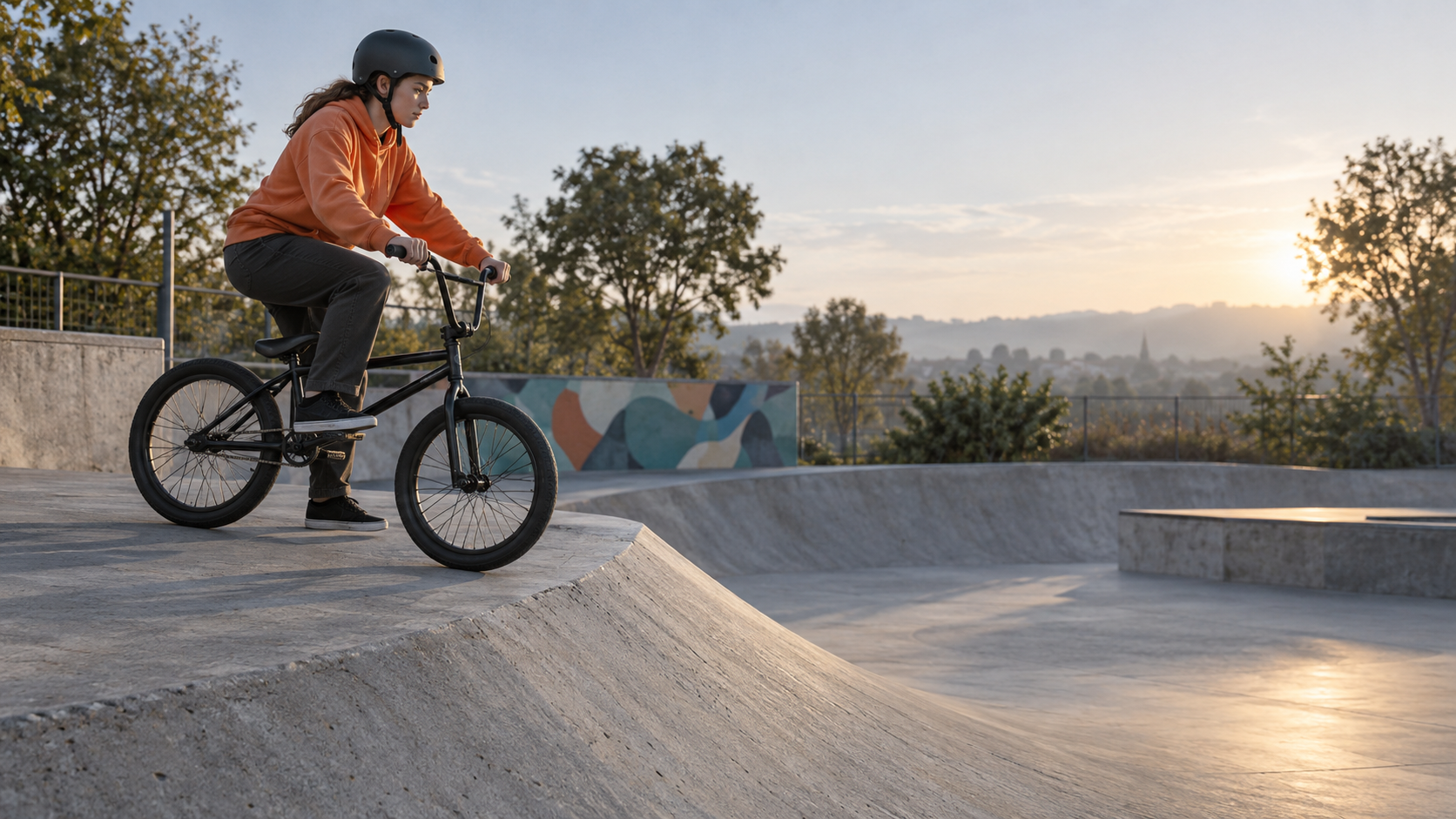
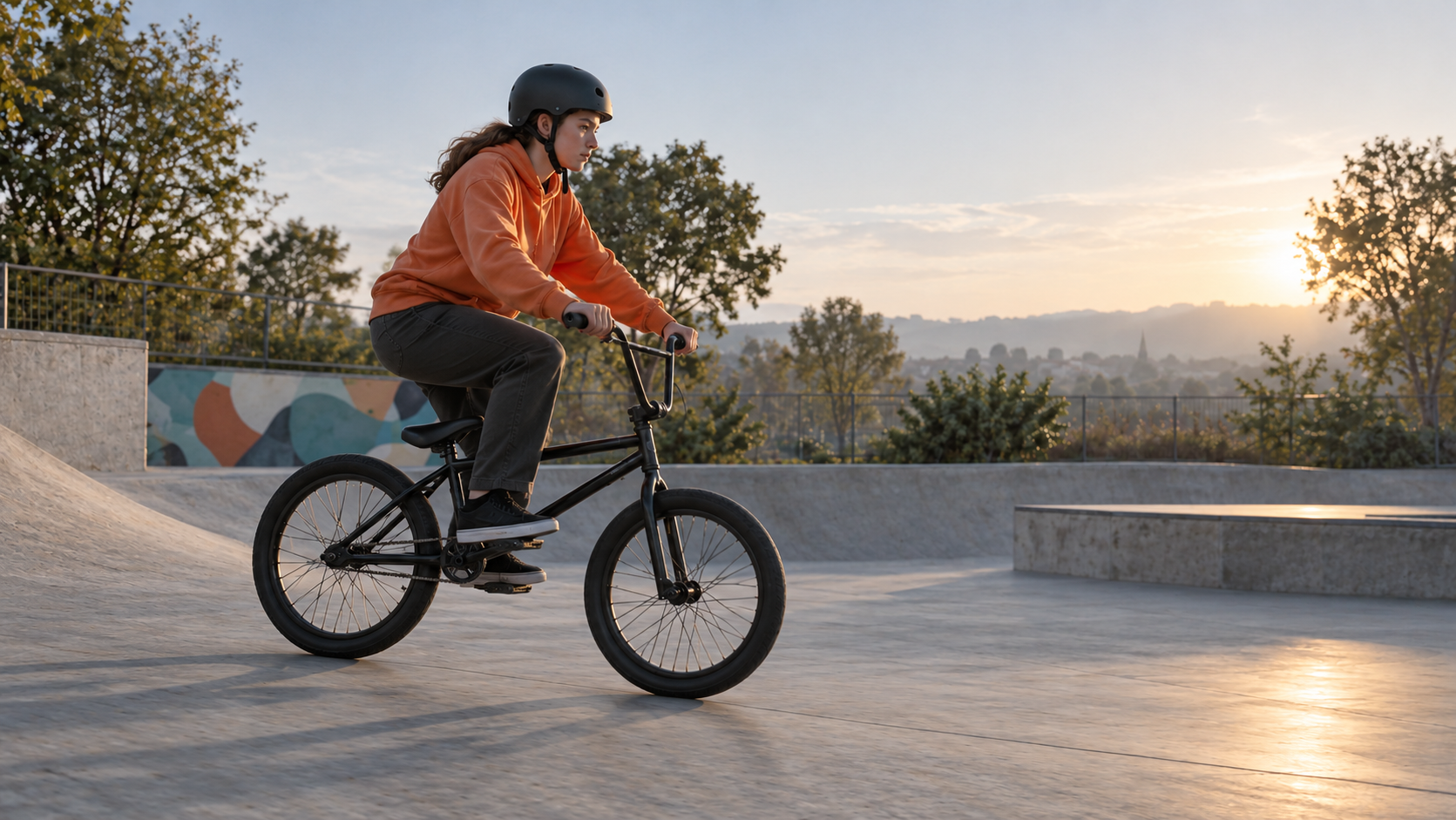
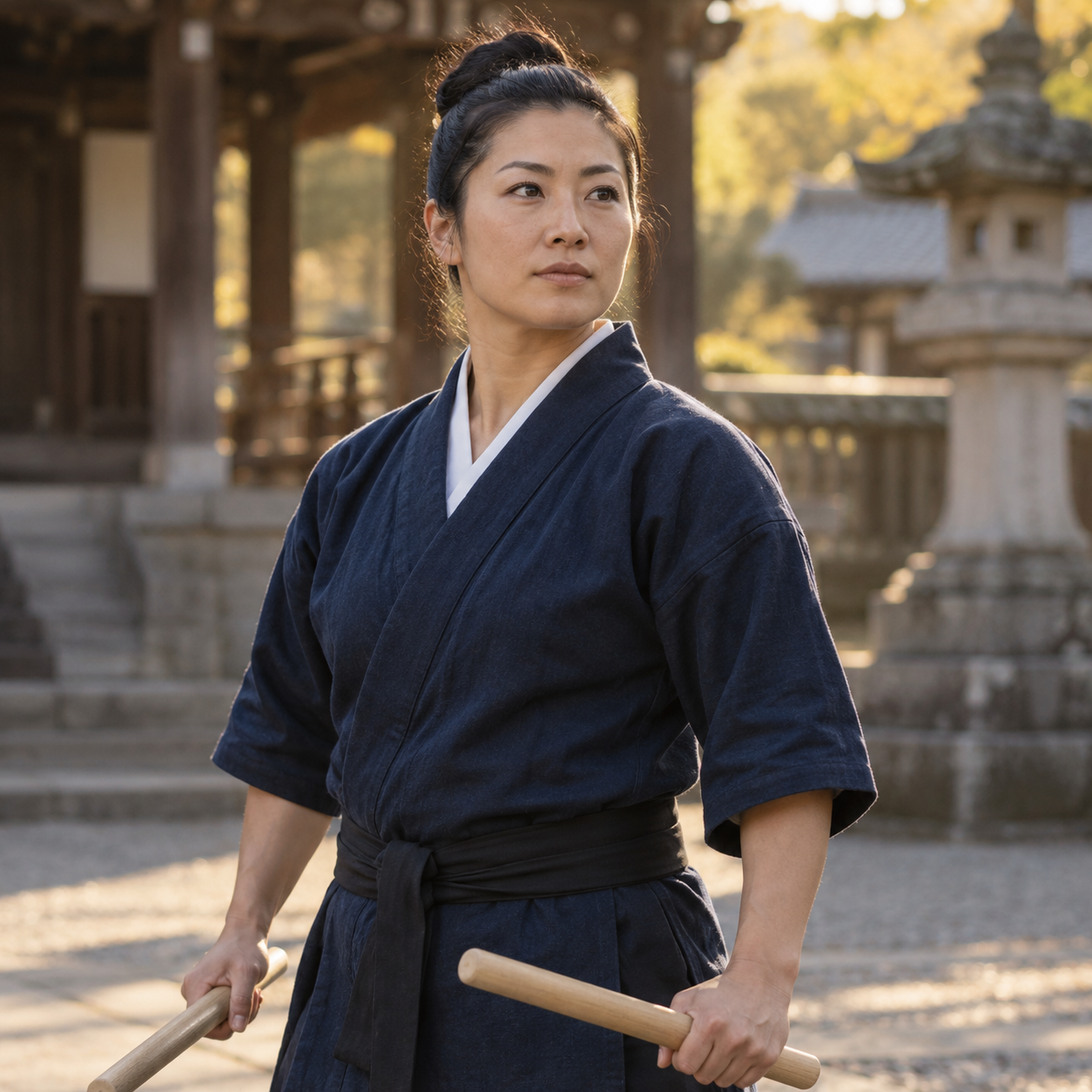
The Turbo BMX case provides an opening and landing frame, then asks for a single controlled hop with hands and feet held on the bicycle. The Max taiko case provides the performer’s image, a courtyard motion clip and a drum-audio source, then asks for one decisive strike and its resonance. Read the full prompts and inspect all inputs with their own results; each demonstrates a separate task and creative brief.

Prompt

Create a single continuous five-second live-action shot connecting these exact first and last frames. The same helmeted adult BMX rider in the plain orange hoodie makes a small controlled hop from the shallow bank lip, keeps both hands on the handlebars and both feet on the pedals, and lands both wheels smoothly on the flat. Preserve the bicycle frame, wheels, helmet, face and skatepark geometry. Follow the rider with a gentle low tracking camera, without cuts, flips or spins. End at the supplied final pose and composition. Realistic short flight arc, wheel rotation, tire compression on landing and settling cloth. Native rolling tires, one soft landing sound and a satisfied breath, no music. No brands, captions or on-screen text.

BMX starting frame
BMX landing frame

Prompt

Use Image 1 for the adult female taiko performer's exact face, tied-back hair and indigo happi costume. Use Video 1 for the temple courtyard, large drum and the restrained left-to-right camera movement. Use Audio 1 for the dry wooden attack and low resonant drum atmosphere. In one continuous five-second cinematic shot, she raises both sticks, makes one decisive strike on the large drum, and holds the finish as her sleeve settles. Preserve her identity and drum geometry throughout. Match the drum impact to the generated sound, with the resonance spreading through the quiet courtyard. Late golden sunlight, subtle determined expression, no crowd or dialogue, no text, subtitles, logos or advertisements.

Taiko performer appearance reference
Drum attack and resonance reference

Creative Use Cases for MiniMax H3 Max

Start with a written scene, approved frame images or references for identity, movement and sound. Describe a clear action and the scene details to preserve, then generate with Max or Turbo using the appropriate input method. Reviewed clips can support dialogue studies, artwork reveals, physical-action rehearsal, sports concepts, reference-led performances and atmosphere proposals.

Dialogue and reaction studies

Describe an adult character, a short spoken line and the gesture that accompanies it. Review expression, mouth movement and audible delivery in the generated clip for a narrative scene draft.

Artwork and scene reveals

Provide starting and ending images showing a covered and revealed object. Describe the physical action and lighting to retain, then inspect continuity for an exhibition, restoration or storyboard concept.

Physical-action rehearsal

Prepare an action brief or an athlete’s starting frame and describe one concise movement sequence. Inspect body mechanics, equipment shape and contact in the generated video before developing the scene further.

Sports transition concepts

Use compatible first and last frames for a small jump, turn or landing. Describe the path and final pose, then compare both endpoints and movement for a sports-storyboard transition.

Reference-led performances

Prepare a performer image, appropriate movement video and sound source that meet the reference requirements. Assign each role and review identity, setting and sound timing for a performance concept.

Lighting and atmosphere proposals

Describe a setting, subtle environmental movement and the sound that should accompany it. Generate at the intended resolution and inspect how light, material and ambience combine for a scene-development proposal.

MiniMax H3 Max Specifications and API Pricing

Text and frame tasks use the selected Max or Turbo resolution rate multiplied by output seconds. Max reference generation starts with the same duration-based video charge, then adds server-metered reference usage above the included 4,096 reference tokens at the configured rate per 1,000 tokens. The reference task displays a minimum video amount while actual media usage is measured by the server. Use the dynamic table for current starting rates and units, and review the complete request estimate or final usage with the selected task.

ModelProviderWorkflowInput materialOutput specificationStarting rate
MiniMax H3 Max Turbo Text to VideoMiniMaxText to VideoText prompt1080p$0.025 / second
MiniMax H3 Max Turbo Image to VideoMiniMaxImage to Video1–2 starting/ending frames1080p$0.025 / second
MiniMax H3 Max Text to VideoMiniMaxText to VideoText prompt1080p$0.05 / second
MiniMax H3 Max Image to VideoMiniMaxImage to Video1–2 starting/ending frames1080p$0.05 / second
MiniMax H3 Max Reference to VideoMiniMaxReference to Video1–9 images; optional video/audio1080p$0.05 / second

How to Use MiniMax H3 Max on Vidgo

Test your creative brief online, then bring the verified request into your application.

Test online

Generate a result with your intended settings

Open the selected task from the model list above. Describe the action, camera and audible events, provide the required frames or references, and set duration and resolution. Review the estimate, noting that reference usage is measured on the server, then compare the generated clip with every source for identity, physical motion, endpoint framing and sound.

Why Use MiniMax H3 Max on Vidgo

Choose a task, inspect its settings and cost, and follow the result from an online test to an authenticated API request.

Creative testing and task selection

Choose inputs around your creative goal

For text or first/end-frame animation, choose Max or Max Turbo and compare the current rate at your intended resolution. Choose Max Reference to Video when a subject image should combine with optional video and audio cues. Set a whole-number duration from 5 to 15 seconds and 480p, 768p or 1080p; prepare reference media according to that task’s technical requirements.

Test your own prompt and media

Open the selected task from the model list above. Describe the action, camera and audible events, provide the required frames or references, and set duration and resolution. Review the estimate, noting that reference usage is measured on the server, then compare the generated clip with every source for identity, physical motion, endpoint framing and sound.

Review the estimate before generation

Compare Max and Turbo using the planned resolution and output duration. For Max reference generation, budget for the video minimum plus reference tokens above the included allowance; the server measures the actual media usage. Use the full amount and intended number of tests when planning the project.

API integration and result management

Learn from complete recorded examples

Read the actual prompt and inspect every source image, video or audio alongside its generated result. Use the recorded examples to understand how to describe input roles, action progression and the details to preserve in your own request.

Track each generation with its task ID

Retain the task ID returned by the API to query status and retrieve completed file URLs. Use your online generation history to review earlier results and the creative direction you tested.

Follow the documentation for the selected task

Use the documentation linked from each task for its exact model identifier, accepted inputs, authentication and response format. Integrate the same task you tested online so its media and settings match the request.

MiniMax H3 Max API FAQ

MiniMax H3 Max is a Vidgo video family containing three Max tasks and two Max Turbo tasks. Both variants support text and first/end-frame generation at 480p/768p/1080p for 5–15 seconds. Max additionally supports image-led references with optional video and audio, technical media requirements and separately metered reference usage.

Browse all models