Wan 3.0 video generation up to 30 seconds with multimodal references

Wan 3.0 brings the regular and Prime text, image and reference workflows together in one family. Generate 2–30-second clips at 480p, 720p or 1080p from a written scene, one or two frame images, or a combination of visual, motion, sound and information references. Assign each source a role, describe the action and camera, and choose audio for synchronized sound. Both variants expose the same documented input methods with separate rates; video-reference requests include source-video time in the complete estimate.

Wan 3.0 is developed by Alibaba. Vidgo provides access to the model. Model names and trademarks belong to their respective owners.


Explore Wan 3.0 Models

Select regular Wan 3.0 or Prime, then choose Text to Video for a new written scene, Image to Video for a starting frame or two endpoints, or Reference to Video for combined source material. Explain which image establishes appearance, which video guides movement and which audio supplies a sound reference. Review the task’s current rate with the complete media and output duration.

Text to VideoAlibaba

Wan 3.0 Prime Text-to-Video

Alibaba Wan 3.0 Prime video model with text-to-video, image-to-video, and reference-to-video workflows at 480p, 720p, or 1080p for 2 to 30 seconds with optional synchronized audio.

Image to VideoAlibaba

Wan 3.0 Prime Image-to-Video

Alibaba Wan 3.0 Prime video model with text-to-video, image-to-video, and reference-to-video workflows at 480p, 720p, or 1080p for 2 to 30 seconds with optional synchronized audio.

Reference to VideoAlibaba

Wan 3.0 Prime Reference-to-Video

Alibaba Wan 3.0 Prime video model with text-to-video, image-to-video, and reference-to-video workflows at 480p, 720p, or 1080p for 2 to 30 seconds with optional synchronized audio.

Text to VideoAlibaba

Wan 3.0 Text-to-Video

Alibaba Tongyi Lab's Wan 3.0 multimodal video model with separate text-to-video, first/last-frame image-to-video, and reference-to-video workflows at 480p, 720p, or 1080p for 2 to 30 seconds.

Image to VideoAlibaba

Wan 3.0 Image-to-Video

Alibaba Tongyi Lab's Wan 3.0 multimodal video model with separate text-to-video, first/last-frame image-to-video, and reference-to-video workflows at 480p, 720p, or 1080p for 2 to 30 seconds.

Reference to VideoAlibaba

Wan 3.0 Reference-to-Video

Alibaba Tongyi Lab's Wan 3.0 multimodal video model with separate text-to-video, first/last-frame image-to-video, and reference-to-video workflows at 480p, 720p, or 1080p for 2 to 30 seconds.

Wan 3.0 Text, Frame and Multimodal Reference Tasks

Image generation accepts one or two image_urls in frame order. Reference generation accepts up to ten images, five videos and five audio references, plus one file reference or one link reference for supplementary information. Supply at least one reference category and choose either the file or link method when using those information sources. The prompt connects each contribution to the intended scene, motion and sound.

Model / taskInput and workflow
Wan 3.0 Prime Text-to-VideoAlibaba Wan 3.0 Prime video model with text-to-video, image-to-video, and reference-to-video workflows at 480p, 720p, or 1080p for 2 to 30 seconds with optional synchronized audio.
Wan 3.0 Prime Image-to-VideoAlibaba Wan 3.0 Prime video model with text-to-video, image-to-video, and reference-to-video workflows at 480p, 720p, or 1080p for 2 to 30 seconds with optional synchronized audio.
Wan 3.0 Prime Reference-to-VideoAlibaba Wan 3.0 Prime video model with text-to-video, image-to-video, and reference-to-video workflows at 480p, 720p, or 1080p for 2 to 30 seconds with optional synchronized audio.
Wan 3.0 Text-to-VideoAlibaba Tongyi Lab's Wan 3.0 multimodal video model with separate text-to-video, first/last-frame image-to-video, and reference-to-video workflows at 480p, 720p, or 1080p for 2 to 30 seconds.
Wan 3.0 Image-to-VideoAlibaba Tongyi Lab's Wan 3.0 multimodal video model with separate text-to-video, first/last-frame image-to-video, and reference-to-video workflows at 480p, 720p, or 1080p for 2 to 30 seconds.
Wan 3.0 Reference-to-VideoAlibaba Tongyi Lab's Wan 3.0 multimodal video model with separate text-to-video, first/last-frame image-to-video, and reference-to-video workflows at 480p, 720p, or 1080p for 2 to 30 seconds.

Wan 3.0 Frame Animation and Multimodal Reference Examples

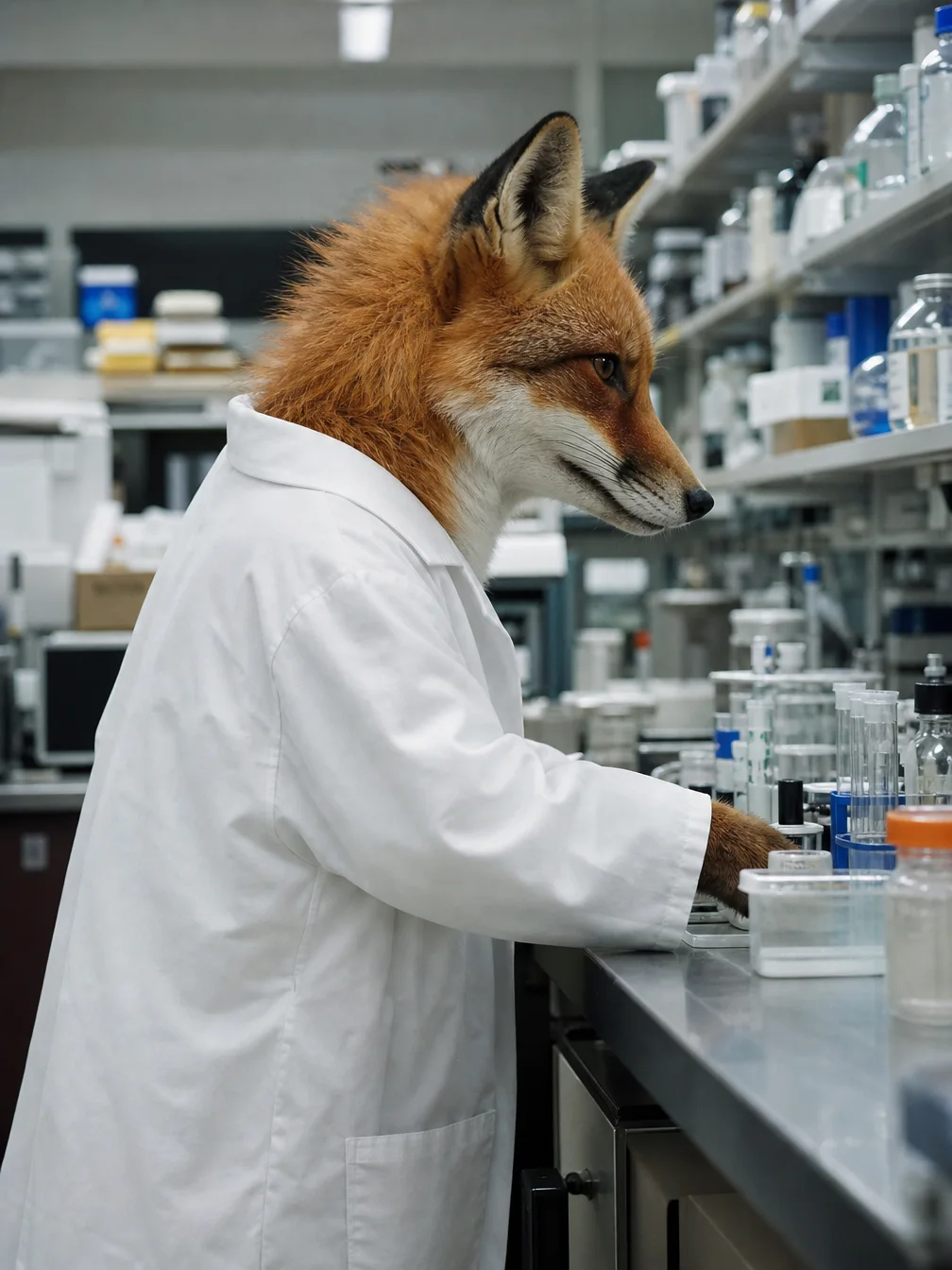
The regular case supplies two cat frames and asks for a five-second move into the keyboard-ending state. The Prime case supplies two visual references, a motion video and an audio recording; the prompt uses the first image for the fox’s appearance, the video for gait and the audio for laboratory ambience before placing the fox beside a bubbling beaker. Read each complete prompt and inspect every source with its generated result.

Prompt

Begin exactly from Image 1 and finish on Image 2. In one continuous five-second shot, the suited tabby cat leans forward with mock seriousness, then suddenly face-plants into the keyboard. Papers twitch. The coffee cup stays put. Camera: locked medium shot with a tiny downward tilt at the impact. No cuts. Preserve the cat's face markings, suit, tie, desk, and lighting. Synchronized audio: chair creak, rapid keyboard clacks, a muffled meow. No readable text, letters, numbers, captions, labels, logos, brands, watermarks, advertisements, posters, UI screens, or product packaging.

Starting cat frame
Ending cat frame

Prompt

Use image 1 for the fox's face, fur, and oversized white lab coat. Use video 1 only for the walking gait and tail sway. Use audio 1 for the laboratory room-tone: HVAC hum and distant glass. New 5-second 16:9 scene: the same fox walks along a lab bench, pauses, and sniffs a bubbling beaker. Medium tracking shot, eye level. Native audio: the supplied lab room-tone plus paw steps. No logos, no readable text, no products, no packaging, no prices, no CTA, no advertising, no watermark, no brand marks.

Prime visual reference 1
Prime visual reference 2
Laboratory sound reference

Creative Use Cases for Wan 3.0

Prepare a written scene, a pair of compatible frames or a set of references with clear roles. Describe the action, camera, materials and sound, then choose regular or Prime and the intended duration. Reviewed clips can support animated stories, character comedy, object-state transitions, motion studies and scenes with a specific acoustic setting.

Narrative video concepts

Write the subject, setting, gesture sequence and audible events. Generate a clip and review the scene and timing for an animated story or storyboard proposal.

Character comedy studies

Describe a readable setup, a physical action and its ending, including the camera and contact sounds. Inspect the actual progression for a short character performance or scene concept.

First-and-last-frame animation

Prepare compatible endpoint images and explain how the subject travels between them. Compare the clip with both states for an action, transition or material-motion proposal.

Reference-led motion

Provide images for appearance and videos for the intended motion, assigning each source a role. Inspect the combined character, proportions and movement for an animation or performance study.

Sound-specific environments

Provide an audio reference and describe the corresponding space and audible actions, then enable audio. Review the generated clip and requested acoustic relationship for a laboratory, workshop or atmosphere concept.

Information-guided video briefs

Prepare a file or link reference for supplementary context, alongside any visual or sound references. Explain how that information relates to the intended scene and inspect the returned clip for a visual explanation or story-development draft.

Wan 3.0 Specifications and API Pricing

Regular and Prime have separate rates for 480p, 720p and 1080p. Billing uses output duration plus the total duration of reference videos, multiplied by the selected variant and resolution rate. Requests with image, audio or information references use the output duration when they supply no reference video. The dynamic table shows current rates per billable second; let source-video durations load on the task page and review the full estimate for the intended 2–30-second output.

ModelProviderWorkflowInput materialOutput specificationStarting rate
Wan 3.0 Prime Text-to-VideoAlibabaText to VideoText prompt1080p$0.068 / billable second
Wan 3.0 Prime Image-to-VideoAlibabaImage to Video1–2 starting/ending frames1080p$0.068 / billable second
Wan 3.0 Prime Reference-to-VideoAlibabaReference to VideoImages / videos / audio / information1080p$0.068 / billable second
Wan 3.0 Text-to-VideoAlibabaText to VideoText prompt1080p$0.05 / billable second
Wan 3.0 Image-to-VideoAlibabaImage to Video1–2 starting/ending frames1080p$0.05 / billable second
Wan 3.0 Reference-to-VideoAlibabaReference to VideoImages / videos / audio / information1080p$0.05 / billable second

How to Use Wan 3.0 on Vidgo

Test your creative brief online, then bring the verified request into your application.

Test online

Generate a result with your intended settings

Open the selected task from the model list above. Enter the scene or motion instructions and supply the matching frames or references. Choose duration, resolution, framing and audio and review the complete estimate. Inspect the output against all source appearances, endpoints, motion and sound before preparing another request.

Why Use Wan 3.0 on Vidgo

Choose a task, inspect its settings and cost, and follow the result from an online test to an authenticated API request.

Creative testing and task selection

Choose inputs around your creative goal

Select regular or Prime in the model list, then choose text, one/two-frame animation or a reference request. Prepare the required sources, choose an integer duration from 2 to 30 seconds and 480p/720p/1080p, then select framing and audio. For reference videos, include their complete durations when reviewing the estimate.

Test your own prompt and media

Open the selected task from the model list above. Enter the scene or motion instructions and supply the matching frames or references. Choose duration, resolution, framing and audio and review the complete estimate. Inspect the output against all source appearances, endpoints, motion and sound before preparing another request.

Review the estimate before generation

Compare the regular or Prime rate for your resolution and the sum of output and reference-video seconds. Wait for the input durations to load and use that complete estimate with the planned test count to budget the project.

API integration and result management

Learn from complete recorded examples

Read the actual prompt and inspect every source image or video alongside its generated result. Use the recorded examples to understand how to describe input roles, action progression and the details to preserve in your own request.

Track each generation with its task ID

Retain the task ID returned by the API to query status and retrieve completed file URLs. Use your online generation history to review earlier results and the creative direction you tested.

Follow the documentation for the selected task

Use the documentation linked from each task for its exact model identifier, accepted inputs, authentication and response format. Integrate the same task you tested online so its media and settings match the request.

Wan 3.0 API FAQ

Wan 3.0 is an Alibaba video family with regular and Prime text, image and reference tasks on Vidgo. Both provide 2–30-second output at 480p/720p/1080p, one-to-two-frame input and multimodal reference fields. They use separate model identifiers and rates, with reference-video duration included in billing.

Browse all models