Animate the exact jumping spider in this first frame. In one uninterrupted macro shot it takes two short sideways steps on the observation surface, rotates its body to face the camera, lifts its front pair of legs and holds still. Preserve its eight legs, large forward-facing eyes, compact body and detailed hairs without adding appendages. Natural tiny foot contacts and deliberate pauses. Keep the camera, background and lighting fixed with enough depth of field to see the body. No cuts, no lettering, no logos, no advertising, no watermark.
Hailuo 2.3 Standard Image to Video API
minimax/hailuo-2.3/standard/image-to-videoHailuo 2.3 Standard Image to Video animates static starting images into expressive 768p video scenes, supporting 6-second or 10-second outputs, natural facial micro-expressions, and responsive motion prompt control. It preserves original character identity, compositional framing, and lighting atmosphere while introducing fluid physical movement and cinematic camera transitions.
545/5000
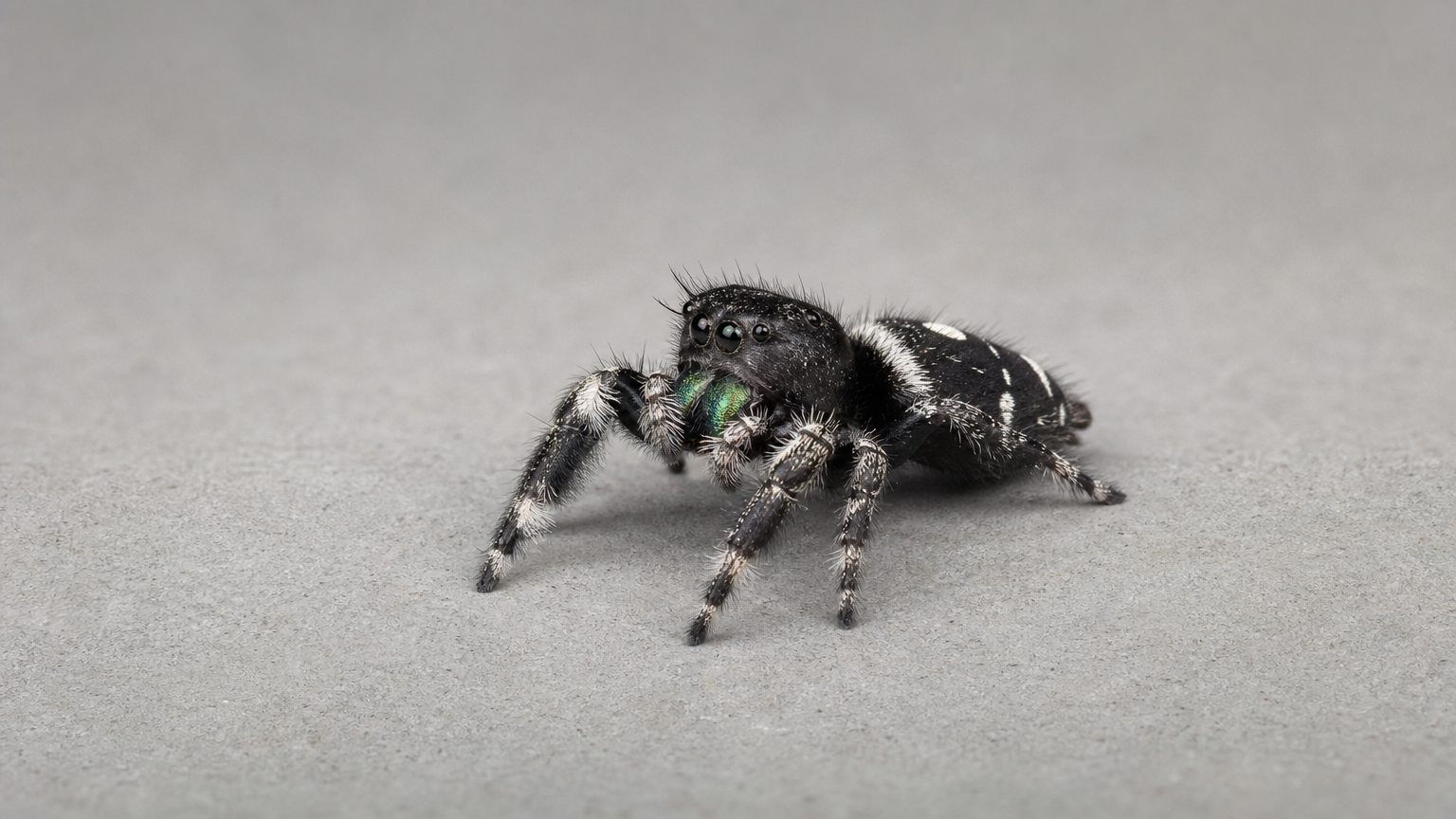
Required first frame. Playground uploads support JPG, PNG and WebP, up to 10 MiB. Use JSON mode to supply an HTTP(S) URL.
OutputReady
Continue with
Examples
REST API Spec
Quick Start
Submit an endpoint request and poll for status. Replace example URLs with your accessible files.
01
Step 1: Configure API authentication
Obtain an API key from the dashboard and include Authorization: Bearer <API_KEY> in every request header.
- Submission Endpoint
- POST
https://api.vidgo.ai/api/generate/submit - Auth Header
- Authorization: Bearer VIDGO_API_KEY
02
Step 2: Submit a generation task
POST /api/generate/submit. Pass model and optional callback_url at the root level, with generation parameters inside input.
Request Payload
REQUEST_BODY=$(cat <<'JSON'
{
  "model": "minimax/hailuo-2.3/standard/image-to-video",
  "input": {
    "prompt": "A quiet forest in morning light, with a slow camera pan.",
    "duration": 6,
    "resolution": "768p",
    "prompt_optimizer": false,
    "start_image_url": "https://example.com/start-image.png"
  }
}
JSON
)

RESPONSE=$(curl --silent --show-error --fail-with-body \
  --request POST \
  --url "https://api.vidgo.ai/api/generate/submit" \
  --header "Authorization: Bearer $VIDGO_API_KEY" \
  --header "Content-Type: application/json" \
  --data "$REQUEST_BODY")

CODE=$(printf '%s' "$RESPONSE" | jq -r '.code // empty')
if [ "$CODE" != "0" ] && [ "$CODE" != "200" ]; then
  printf 'API error: %s
' "$RESPONSE" >&2
  exit 1
fi
printf '%s
' "$RESPONSE"
03
Step 3: Poll for task completion
Poll status with task_id; continue while not_started or running, and stop on finished or failed. Read video URLs from data.files[].file_url on success, or data.error_message on failure.
Status Endpoint
GET https://api.vidgo.ai/api/generate/status/{task_id}Poll status using task_id; continue while not_started or running, stop when finished or failed. On success, read data.files[].file_url; on failure, read data.error_message.
not_startedrunningfinishedfailedSubmission Response
{
  "code": 200,
  "data": {
    "task_id": "task-example",
    "status": "not_started",
    "created_time": "2026-09-23T08:00:00"
  }
}
Completed Response Data
{
  "code": 200,
  "data": {
    "task_id": "task-unified-...",
    "status": "finished",
    "files": [
      {
        "file_url": "https://storage.vidgo.ai/generated/video.mp4",
        "file_type": "video"
      }
    ],
    "created_time": "2026-08-22T10:00:00Z",
    "progress": 100,
    "error_message": null
  }
}
Complete end-to-end script example
Expand to view a production-ready script with retry logic, error handling, and timeout safeguards.
Complete end-to-end script example
set -euo pipefail
: "${VIDGO_API_KEY:?Set VIDGO_API_KEY in your environment}"

REQUEST_BODY=$(cat <<'JSON'
{
  "model": "minimax/hailuo-2.3/standard/image-to-video",
  "input": {
    "prompt": "A quiet forest in morning light, with a slow camera pan.",
    "duration": 6,
    "resolution": "768p",
    "prompt_optimizer": false,
    "start_image_url": "https://example.com/start-image.png"
  }
}
JSON
)

SUBMIT_RESPONSE=$(curl --silent --show-error --fail-with-body \
  --request POST \
  --url "https://api.vidgo.ai/api/generate/submit" \
  --header "Authorization: Bearer $VIDGO_API_KEY" \
  --header "Content-Type: application/json" \
  --data "$REQUEST_BODY")

TASK_ID=$(printf '%s' "$SUBMIT_RESPONSE" | jq -r '.data.task_id // .task_id // empty')
BUSINESS_CODE=$(printf '%s' "$SUBMIT_RESPONSE" | jq -r '.code // empty')
if [ "$BUSINESS_CODE" != "0" ] && [ "$BUSINESS_CODE" != "200" ]; then
  printf 'Submit failed:
%s
' "$SUBMIT_RESPONSE" >&2
  exit 1
fi
if [ -z "$TASK_ID" ]; then
  printf 'Submit response did not include task_id:
%s
' "$SUBMIT_RESPONSE" >&2
  exit 1
fi

START_TIME=$(date +%s)
POLL_DELAY=2
while true; do
  if [ $(( $(date +%s) - START_TIME )) -ge 600 ]; then
    printf 'Timed out after 600 seconds
' >&2
    exit 1
  fi
  STATUS_RESPONSE=$(curl --silent --show-error --fail-with-body \
    --url "https://api.vidgo.ai/api/generate/status/$TASK_ID" \
    --header "Authorization: Bearer $VIDGO_API_KEY")
  STATUS=$(printf '%s' "$STATUS_RESPONSE" | jq -r '.data.status // .status // empty')
  BUSINESS_CODE=$(printf '%s' "$STATUS_RESPONSE" | jq -r '.code // empty')
  if [ "$BUSINESS_CODE" != "0" ] && [ "$BUSINESS_CODE" != "200" ]; then
    printf 'Status request failed:
%s
' "$STATUS_RESPONSE" >&2
    exit 1
  fi

  case "$STATUS" in
    finished)
      printf '%s' "$STATUS_RESPONSE" | jq -r '(.data.files // .files // [])[]?.file_url'
      break
      ;;
    failed)
      printf '%s' "$STATUS_RESPONSE" | jq -r '.data.error_message // .error_message // "Generation failed"' >&2
      exit 1
      ;;
    not_started|running)
      sleep "$POLL_DELAY"
      if [ "$POLL_DELAY" -lt 10 ]; then POLL_DELAY=$((POLL_DELAY + 1)); fi
      ;;
    *)
      printf 'Unexpected task status: %s
' "$STATUS" >&2
      exit 1
      ;;
  esac
done
Request Parameters (input object)
Supported generation parameters inside the input object when submitting a POST request to /api/generate/submit:
| Field | Type | Required | Default | Description |
|---|---|---|---|---|
| prompt | string | Yes | — | Required nonblank string, trimmed before validation. Maximum 5,000 Unicode characters. |
| duration | integer | No | 6 | 6 or 10 seconds; defaults to 6. |
| resolution | string | No | 768p | Fixed to 768p for this endpoint; used when omitted. |
| start_image_url | string | Yes | — | Required first-frame HTTP(S) image URL with a hostname and no embedded credentials. End frames, arrays and data URLs are not supported. |
| prompt_optimizer | boolean | No | — | Optional boolean; omit to leave unspecified upstream. No API default. The playground starts with false; no extra charge. |
Response Fields (query result)
Task details returned when polling GET /api/generate/status/{task_id}:
| Field | Type | Description |
|---|---|---|
| code | integer | Business response code, 200 on success. |
| data.task_id | string | Globally unique asynchronous task identifier. |
| data.status | string | Execution status: not_started, running, finished, or failed. |
| data.files | array | Generated video files upon completion, each with file_url and file_type. |
| data.error_message | string | null | Error description if task fails. |
Task Lifecycle
Clients should inspect the status field and stop polling when reaching finished or failed:
not_startedTask received and queued for execution.
runningGeneration is in progress.
finishedGeneration complete; retrieve video URL from data.files.
failedGeneration failed; inspect data.error_message; deducted credits are refunded per standard policy.
Polling & Error Handling
- Recommended Polling IntervalStart polling every 2–3 seconds, increasing to 5 seconds as the task continues, to avoid excessive requests.
- Network Fluctuations & RetriesIf status polling encounters 5xx or timeouts, the task is still running; retry querying after a brief pause.
- Asynchronous Webhook CallbackProvide callback_url at the root of the request payload to receive the completed task result automatically via POST.
Specifications
| Specification | Value | Description |
|---|---|---|
| Model ID | minimax/hailuo-2.3/standard/image-to-video | Root-level model field. |
| Resolution | 768p | Fixed to 768p for this endpoint; used when omitted. |
| Duration | 6 / 10s | 6 or 10 seconds; defaults to 6. |
Hailuo 2.3 Standard Image to Video
Hailuo 2.3 Standard Image to Video is developed by MiniMax to transform still images into fluid, lifelike video sequences. Creators provide a single high-quality starting image URL alongside natural language prompts to animate characters, environments, and objects. The model generates continuous 6-second or 10-second video clips at 768p resolution, reproducing nuanced facial micro-expressions and physically accurate motions while preserving input composition with transparent credit pricing.
Why Choose This?
High-Fidelity Subject Likeness PreservationMaintains facial contours, costume textures, and key visual attributes faithfully across the entire animation sequence.
Subtle Facial Micro-Expression ModelingAccurately conveys nuanced emotional shifts such as subtle smiles, thoughtful glances, and expressive character moments.
Flexible 6-Second and 10-Second DurationsSupports 6-second focused action clips or 10-second extended shots for comprehensive narrative development.
Responsive Motion Directive ExecutionFaithfully translates detailed textual instructions for body actions, environmental dynamics, and camera movement.
Economical and Transparent Credit PricingFixed pricing at 35 credits for 6s or 70 credits for 10s, with automatic credit refunds if task execution fails.
Parameters
| Parameter | Requirement | Description |
|---|---|---|
| prompt | Required | Required nonblank string, trimmed before validation. Maximum 5,000 Unicode characters. |
| duration | Optional | 6 or 10 seconds; defaults to 6. Default 6 |
| resolution | Optional | Fixed to 768p for this endpoint; used when omitted. Default 768p |
| start_image_url | Required | Required first-frame HTTP(S) image URL with a hostname and no embedded credentials. End frames, arrays and data URLs are not supported. |
| prompt_optimizer | Optional | Optional boolean; omit to leave unspecified upstream. No API default. The playground starts with false; no extra charge. |
How to Use
Host and Provide Starting ImageUpload or host a high-resolution JPG, PNG, or WebP image and provide its accessible HTTP(S) URL in start_image_url.
Direct Movement and Camera MotionWrite prompts specifying subject physical actions, environmental reactions, and camera moves such as pan or zoom.
Select Clip DurationPick 6 seconds for swift dynamic actions or 10 seconds for detailed narrative progression at fixed 768p resolution.
Configure Prompt OptimizerOptionally activate prompt_optimizer to enrich motion cues and cinematic lighting nuances without extra credits.
Submit Task and Retrieve VideoDispatch the asynchronous task and poll status using task_id to obtain the final MP4 video download URL.
Pricing
1 credit = $0.005. Billed per video; prompt optimization does not change the rate.
| Usage | Rate | Details |
|---|---|---|
| 768p / 6s | 35 credits ($0.175) | Per video |
| 768p / 10s | 70 credits ($0.350) | Per video |
Best Use Cases
Portrait and Character AnimationBreathe dynamic life into digital portraits, gaming characters, and avatars while maintaining character likeness.
E-Commerce Product DemonstrationsAnimate static product photography into engaging commercial videos showcasing materials, reflections, and motion.
Anime and Illustration DynamicsTurn 2D anime illustrations and hand-drawn concept art into fluid animated scenes with stylistic consistency.
Storyboard Frame-to-Scene RealizationTransform keyframe illustrations into full animated sequences to validate pacing, action timing, and blocking.
Pro Tips
- Anchor Prompts to the Starting Pose: Describe actions originating naturally from the subject's pose in the starting image for smoother transitions.
- Detail Micro-Expressions and Gaze: Explicitly describe subtle shifts in facial expressions and eye contact to produce compelling close-up performances.
- Use Active Direction Verbs: Employ precise action verbs like 'turns head toward camera', 'walks through falling leaves', or 'camera slowly tracks right'.
- Choose Duration to Match Action Scale: Use 6-second clips (35 credits) for single physical motions, and 10-second clips (70 credits) for multi-beat sequences.
- Ensure High-Quality Source Lighting: Clear, well-lit starting images allow the model to accurately deduce realistic shadows and reflective highlights during motion.
Notes
- Single Starting Frame Interface: This endpoint requires a single accessible HTTP(S) image URL in start_image_url; end frames and image arrays are not accepted.
- Fixed 768p Resolution Contract: Video generation outputs fixed 768p resolution, with integer duration options of 6 or 10 seconds.
- Asynchronous Execution and Credit Protection: Tasks process asynchronously via unique task_id; credits are deducted upon submission and refunded immediately if execution fails.
Hailuo 2.3 Standard Image to Video API frequently asked questions
What is the Hailuo 2.3 Standard Image to Video API?
Hailuo 2.3 Standard Image to Video is a MiniMax model for video generation from images. It animates static images into continuous 768p video scenes based on starting image inputs and text prompts, supporting 6-second or 10-second clips, subtle facial micro-expressions, and physical motion simulation. Built on MiniMax's enhanced multimodal video architecture, it preserves character identity, compositional framing, and lighting texture while generating natural body movements and cinematic camera transitions. You can call it programmatically or try it from the playground above.
What starting image formats are supported by Hailuo 2.3 Standard Image to Video?
The endpoint accepts publicly accessible HTTP(S) URLs pointing to JPG, PNG, or WebP images via the start_image_url parameter. In the interactive playground, images up to 10 MiB can be uploaded directly.
Does Hailuo 2.3 Standard Image to Video support an end frame?
This endpoint focuses strictly on start-frame guided generation through the start_image_url parameter. To steer the conclusion of your video, describe the closing action, subject placement, and final camera framing directly within the prompt.
How does Hailuo 2.3 Standard Image to Video preserve character facial likeness?
The model extracts identity and textural features from the starting frame to maintain facial anatomy, hair details, and costume consistency across the entire clip, allowing natural head turns and micro-expressions without facial warping.
Can Hailuo 2.3 Standard Image to Video generate 10-second animations?
Yes. The endpoint supports discrete duration options of 6 seconds (default, 35 credits) and 10 seconds (70 credits). Selecting 10 seconds provides ample temporal span for extended character dialogue gestures and multi-angle scene choreography.
How is Hailuo 2.3 Standard Image to Video billed?
Billing is calculated on a fixed per-video basis (1 credit = $0.005). A 6-second 768p video costs 35 credits ($0.175), while a 10-second 768p video costs 70 credits ($0.350). Enabling prompt optimization incurs no extra charges.
When should creators choose Hailuo 2.3 Standard Image to Video over Pro?
The Standard tier is recommended when you need flexible 6-second or 10-second durations, reliable 768p output, and economical per-video rates for rapid asset iteration. Choose Hailuo 2.3 Pro Image to Video when your production requires native 1080p Full HD fidelity for commercial showcase pieces.