Tripo3D P1 lightweight 3D objects from text or one image

Tripo3D P1 creates lightweight 3D objects from a written concept or one reference image. Describe a clear silhouette, connected parts and broad material regions, or supply an approved picture of the object. Set face_limit from 48 to 20,000 and choose geometry-only or textured generation through texture. An optional model_seed provides a generation seed to retain with the full request. Inspect the actual GLB and thumbnail from several angles before using the object in a game, miniature scene or visual study.

Tripo3D P1 is developed by Tripo AI. Vidgo provides access to the model. Model names and trademarks belong to their respective owners.


Explore Tripo3D P1 Models

Choose Text to 3D for an object prompt up to 1,024 characters, or Image to 3D for exactly one source image. Select the face limit and texture option around the intended object, then open the task to review the current tier and inspect the generated model. Both inputs use their existing task cards and routes.

Tripo3D P1 Text and Single-Image 3D Tasks

Text describes the shape, separated parts, proportions and surface regions to create. The image task uses one public image_urls entry for the visual source. Use face_limit and texture to express the intended mesh budget and appearance, and retain model_seed with the input when comparing object variations.

Model / taskInput and workflow
Tripo3D P1 Text to 3DCreate lightweight 3D objects from text or one image with adjustable face count and optional textures.
Tripo3D P1 Image to 3DCreate lightweight 3D objects from text or one image with adjustable face count and optional textures.

Tripo3D P1 Rover Text to 3D and Animal Image Modeling Examples

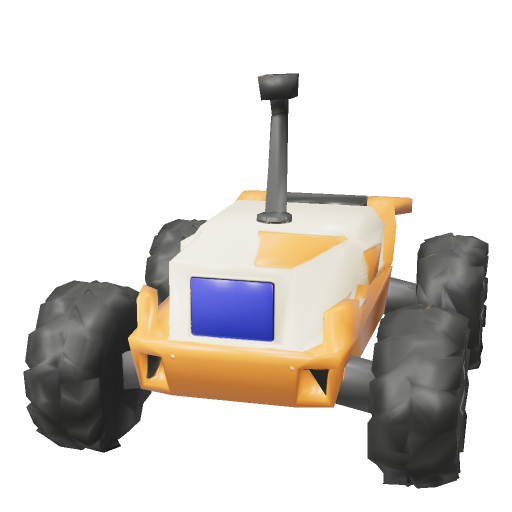
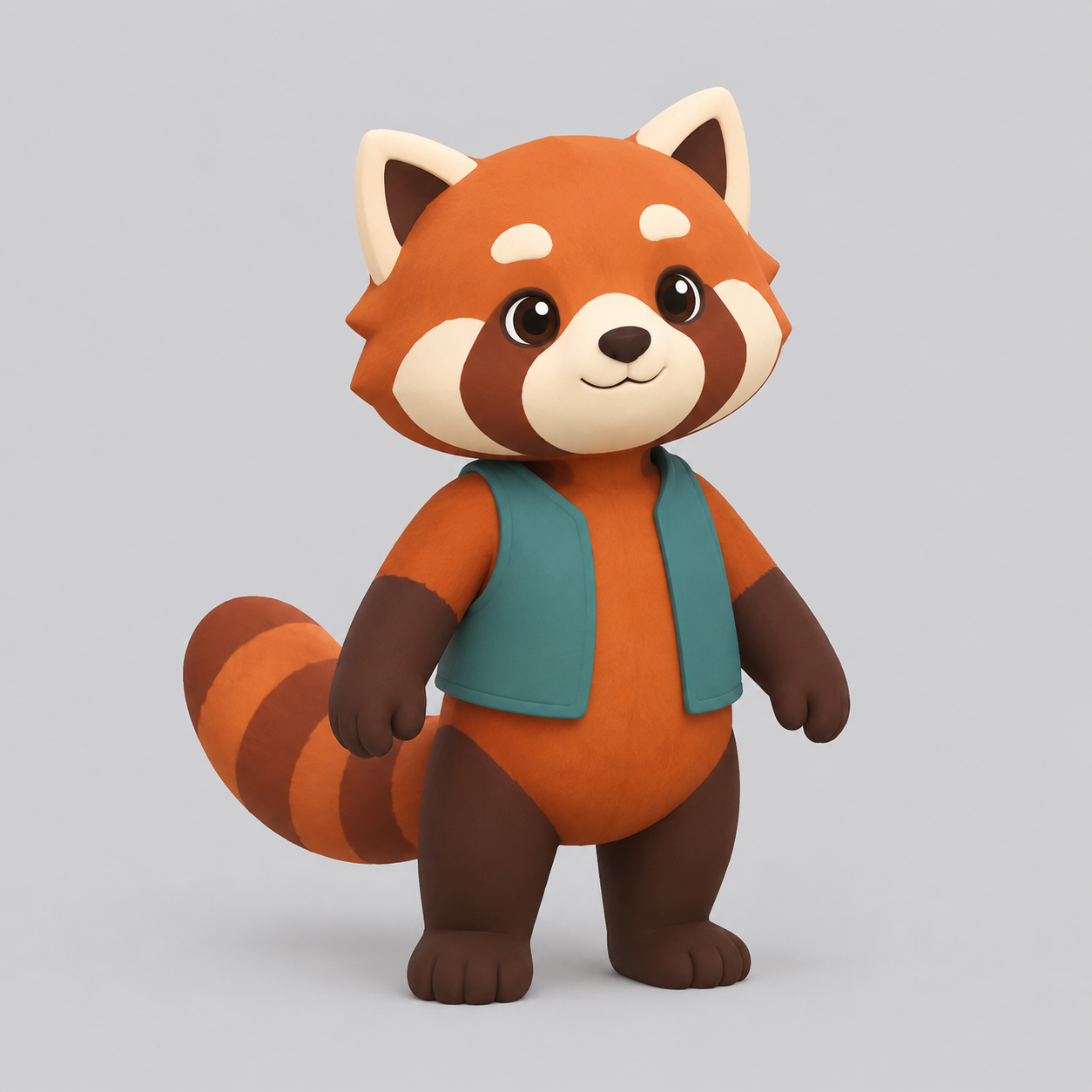
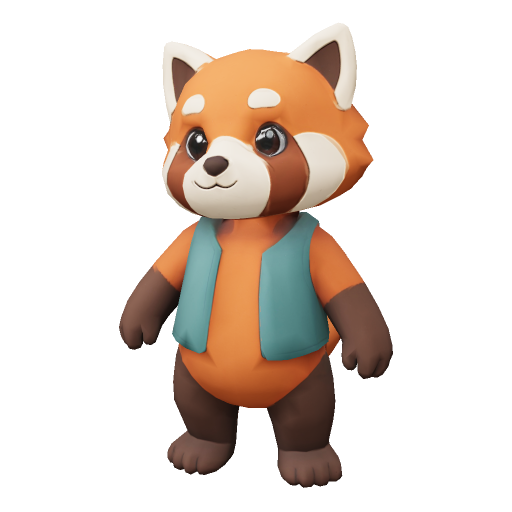
The rover case starts from a complete text brief with a 2,500 face limit, texture and recorded seed. The red-panda case supplies one actual image with a 3,000 limit, texture and its own seed. Read the original prompt or input object, compare the source with the thumbnail and rotate the returned GLB to inspect each object’s form, part separation and material regions.

Prompt

A compact stylized lunar survey rover, one standalone game asset. Four large chunky black treaded wheels, two on each side, a low orange and ivory rectangular chassis with beveled corners, a dark blue inset front window, a short thick camera mast centered on the roof, and a small flat rear equipment deck. Clearly separated wheels and wheel arches, sturdy simple geometry, clean readable silhouette, broad orange and white material regions, restrained surface detail. Native low-poly real-time game asset, no ground plane, no terrain, no text, no logos, no people, no extra vehicles.

Generated model preview image
Loading 3D model
Interactive generated 3D model

Recorded request input

{ "face_limit": 3000, "texture": true, "model_seed": 927201, "image_urls": [ "https://cdn.vidgo.ai/apis/models/tripo3d/p1/image-to-3d/v1/01/input.png" ] }

Original red-panda reference
Generated model preview image
Loading 3D model
Interactive generated 3D model

Creative Use Cases for Tripo3D P1

Prepare a written object or one clear picture, choose the mesh face limit and texture option, then generate and inspect the result. Reviewed models can support stylized game-prop concepts, low-poly environment pieces, character figures, planar-form studies, furniture concepts and interactive visual scenes.

Stylized game props

Describe a compact object with readable parts and material regions, then choose face limit and texture. Inspect the model in the intended 3D workflow before developing it for a game scene.

Low-poly environment pieces

Prepare a rock, arch or structural object with a clear silhouette and connected supports. Review the generated geometry and openings from several angles for an environment concept.

Character figures

Provide one approved character image and choose the mesh and texture settings. Compare posture, accessories and color regions with the reference while developing a stylized figure.

Planar-form studies

Describe the folds and major planes of a sculptural object and choose geometry-only generation. Inspect connected surfaces and silhouette before revising a shape study.

Furniture concepts

Provide a clear image showing the object’s supports, openings and curved parts. Choose the face limit and inspect the simplified volume for a furniture or miniature-scene proposal.

Interactive visual scenes

Generate an object with the intended mesh and surface settings, retrieve the actual GLB and inspect it in the target application. Use the reviewed object as the starting point for a scene or interactive prototype.

Tripo3D P1 Specifications and API Pricing

P1 uses a per-generation amount determined by texture. The geometry tier uses texture false, and a textured object uses the corresponding texture true tier. The dynamic table shows each task’s lowest current amount across those choices. Open the task with the intended texture setting to review the complete generation amount and plan object variations by request count.

ModelProviderWorkflowInput materialOutput contentsStarting rate
Tripo3D P1 Text to 3DTripo AIText to 3DObject promptGLB model / preview$0.28 / generation
Tripo3D P1 Image to 3DTripo AIImage to 3DExactly 1 reference imageGLB model / preview$0.28 / generation

How to Use Tripo3D P1 on Vidgo

Test your creative brief online, then bring the verified request into your application.

Test online

Generate a result with your intended settings

Open the chosen P1 task, enter the prompt or required image and set face limit, texture and optional seed. Review the generation amount, submit and compare the thumbnail and interactive model with the original brief or image. Inspect the silhouette, connected parts and surfaces before retrieving the files for your project.

Why Use Tripo3D P1 on Vidgo

Choose a task, inspect its settings and cost, and follow the result from an online test to an authenticated API request.

Creative testing and task selection

Choose inputs around your creative goal

Choose the text task for a written object or the image task for exactly one reference. Set face_limit from 48 to 20000, choose geometry-only or textured generation and optionally retain a model_seed. Review the matching texture tier before submitting.

Inspect your object with the intended settings

Open the chosen P1 task, enter the prompt or required image and set face limit, texture and optional seed. Review the generation amount, submit and compare the thumbnail and interactive model with the original brief or image. Inspect the silhouette, connected parts and surfaces before retrieving the files for your project.

Review the estimate before generation

Select the intended texture option and use its current per-generation amount when planning each variation. Keep the face-limit and seed settings with the result so the complete creative request remains available for comparison.

API integration and result management

Learn from complete recorded examples

Read the actual prompt or recorded input parameters and compare source images with the model preview and interactive result. Inspect silhouette, geometry and materials from several angles before adapting the workflow to your object.

Track each generation with its task ID

Retain the task ID returned by the API to query status and retrieve completed file URLs. Use your online generation history to review earlier results and the creative direction you tested.

Follow the documentation for the selected task

Use the documentation linked from each task for its exact model identifier, accepted inputs, authentication and response format. Integrate the same task you tested online so its media and settings match the request.

Tripo3D P1 API FAQ

Tripo3D P1 is a lightweight-object generation family on Vidgo with text and single-image tasks. It exposes a face limit from 48 to 20000, optional textures and a model seed. The recorded tasks return a GLB model and preview image that can be inspected with the original input.

Browse all models